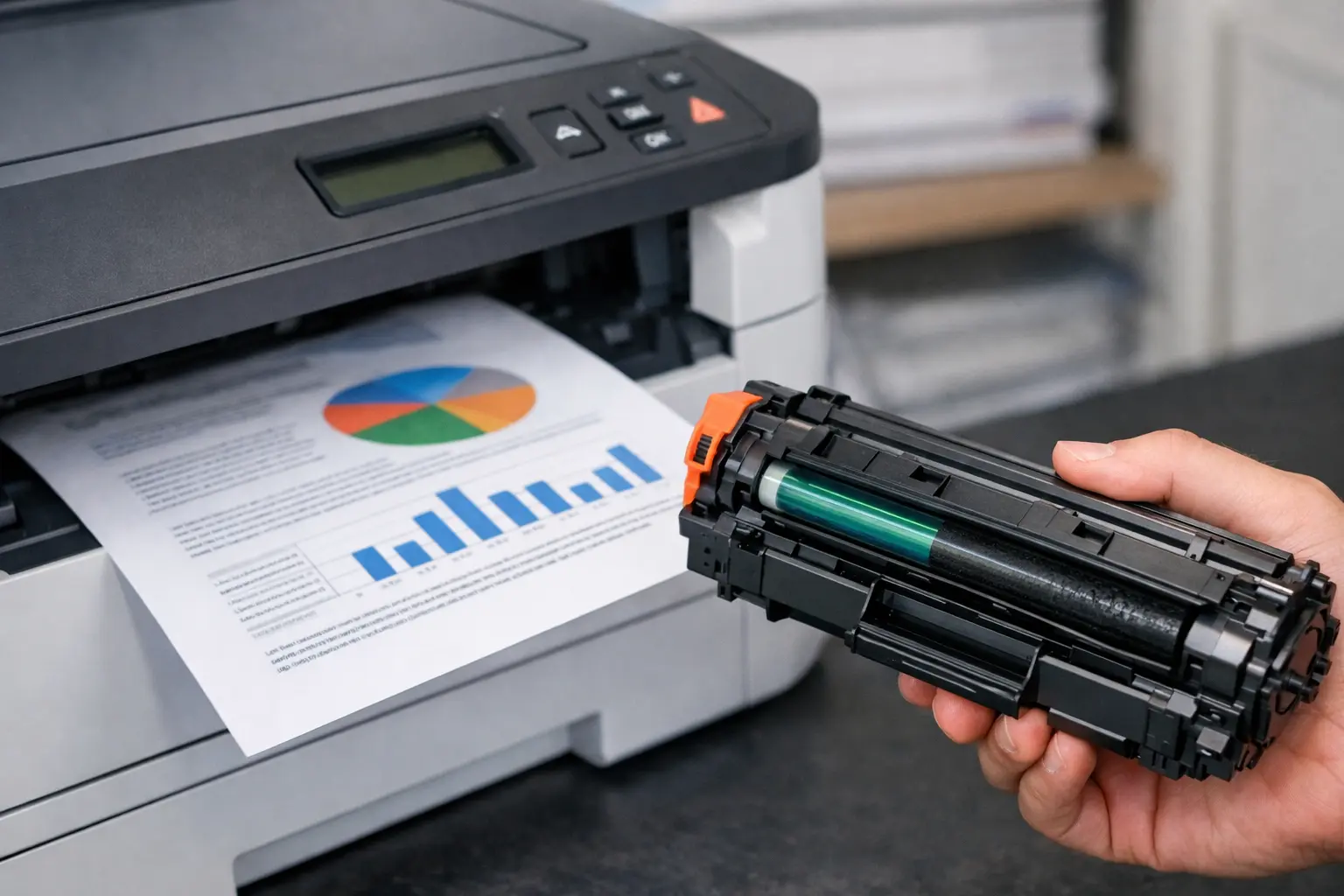
How Long Do Laser Printer Cartridges Last? A lot of people think a toner cartridge lasts for a fixed time, but that’s not really true. Many users get confused or even frustrated when their laser printer runs out of toner sooner than expected. One person may use a cartridge for months, while another has to replace it in just a few weeks. It can feel unfair, but there’s a simple reason behind it.
The truth is, toner life depends mostly on how you use your printer, not just the number written on the box. Manufacturers usually calculate page yield under standard conditions, typically with about 5% page coverage. But in real life, most people print documents that use more toner than that, which reduces how long the cartridge actually lasts.
On average, a toner cartridge can print between 1,500 and 6,000 pages. However, this number can change based on your print settings, document type, and printing habits. Even small changes in how you print can make a big difference in cost and toner usage, which is why two people using the same printer can get very different results.
If you ever feel like your printer is using toner too quickly, you’re not alone. It’s a very common issue. The good news is, once you understand how it works, you can easily improve toner life and get better value without spending extra money.
How Long Does a Laser Toner Cartridge Last?
A laser printer toner cartridge usually lasts 1,500 to 6,000+ pages, or about 1 to 12 months, depending on how you use your printer. In simple words, the more you print, the faster the toner runs out.
In real use, a home user may get a long toner life of 6–12 months, while office users may need a replacement in just 1–3 months. I often see people surprised by this, and honestly, it happens because real printing is very different from lab testing.
Manufacturers test toner under ideal conditions using light pages, but most users print heavier documents, which reduces the toner’s lifespan. This is why your toner cartridge may finish faster than expected.
| User Type | Usage | Cartridge Can Last |
| Home user | Low printing | 6–12 months |
| Student | Occasional use | 4–8 months |
| Office | Regular use | 1–3 months |
Compared to inkjet printers, laser printer toner lasts much longer and offers a lower cost per page, which is why many people prefer laser printers for daily work.
In short, toner life depends less on the printer and more on how you use it.
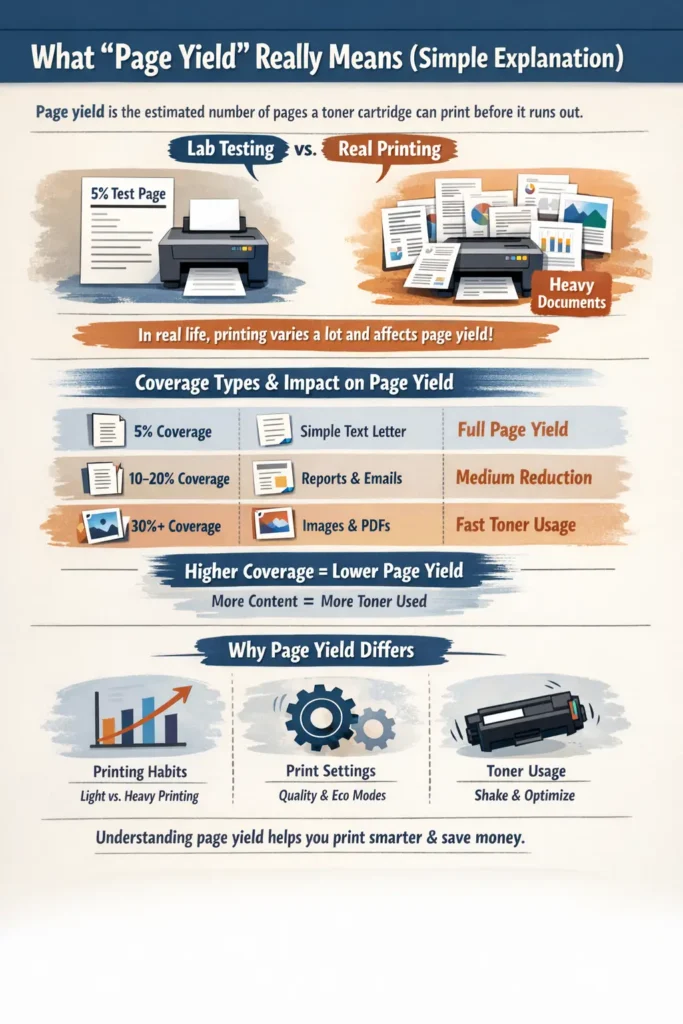
What “Page Yield” Really Means (Simple Explanation)
Page yield means the estimated number of pages a toner cartridge can print before it runs out. It sounds simple, but many people misunderstand it, and I’ve seen that cause a lot of frustration in real use.
Manufacturers calculate page yield in lab conditions using standard test pages. In real life, printing is different because documents are heavier and more varied. This is why your results may not always match the number on the box.
Higher page yield usually means a lower cost per page, helping businesses control printing costs and reduce waste. Some also choose remanufacture options to improve savings and recycling efforts.
One thing I’ve noticed (and honestly, it bothers me a bit) is that brands don’t clearly explain how printing habits affect page yield. So users think their toner is faulty when it’s actually normal usage.
Since toner is a dry powder, it stays stable and can be stored properly when unused, unlike ink. But real performance still depends on your daily printing habits.
What Is 5% Page Coverage
5% page coverage means only a small portion of the page is filled with text or graphics. Think of a simple letter with a few paragraphs and lots of blank space. That is the testing standard used to calculate page yield.
In reality, most people do not print like that. Many documents have heavy text, images, or design elements, which increase the number of pages used. So even if a cartridge can print a large number of pages in testing, your real cartridge can print fewer pages in daily life.
To make it easy:
| Coverage Type | Real Example | Impact on Page Yield |
| 5% coverage | Simple text letter | Full page yield |
| 10–20% coverage | Reports, emails | Medium reduction |
| 30%+ coverage | Images, PDFs | Fast toner usage |
Why Real-Life Printing Is Different
Real-life printing is never stable. One day you print light documents, and the next day you print heavy PDFs or images. To better understand how a laser printer handles this process internally, check the correct order of steps for laser printing.This change in printing habits directly affects how long a cartridge lasts.
Heavy printing reduces page yield quickly, while light printing can extend it. Even small settings like high-quality mode can use more toner than expected. I’ve seen many users shocked when their toner runs out early, but most of the time, it is just due to usage patterns, not product failure.
Also, simple things like shaking the cartridge or using eco mode can slightly help redistribute toner and improve usage. It is not magic, but it does help reduce waste and improve efficiency.
At the end of the day, understanding page yield helps you make smarter choices, save money, and improve the long-term reliability of your printing setup.
Real-Life Examples – How Long Toner Lasts for Different Users
Now this is the part where things finally feel real. Because honestly, talking about numbers is easy, but real usage is very different. Many users compare their results and feel confused because toner lifespan varies from person to person. That is normal. Printing habits change everything.
A toner cartridge behaves differently for each type of user, and yes, even the same printer can give very different results depending on usage and toner powder quality.
Home Users / Students
For home users or students, printing is usually light and occasional. You might print assignments, notes, or small documents once in a while. In this case, toner powder is used slowly, so the cartridge lasts much longer.
In my experience, people in this group often get the best value from OEM toner because they are not pushing the printer too hard. Even simple habits like proper storage and not overusing refill cycles can improve durability.
Still, I’ve seen students switch between ink cartridges and laser systems just because of cost confusion, but once they understand print quality differences, they usually prefer laser printers for consistency and longevity.
Small Offices
Small offices are a different story. Here, printing is regular but not extreme. Documents, reports, and invoices are printed daily, so toner powder runs out faster.
This is where cost control becomes important. Many businesses try refill options or remanufactured cartridges to reduce expense, but “Poor quality supplies can reduce print quality and affect printer performance. Using good-quality printing supplies and maintaining proper storage habits helps a lot. It also improves toner lifespan and keeps output stable, which businesses really depend on.
Heavy Office Use
Now this is where things get intense. Heavy office environments or organizations using color laser printers print large volumes every day. Reports, presentations, and bulk documents use toner powder very quickly.
In such cases, even OEM toner can finish fast simply because usage is high. Here, planning matters more than anything else. Businesses focus on supply management, cost per page control, and consistent print quality instead of just cartridge longevity.
I’ve personally seen offices struggle when they ignore usage planning — and it always leads to delays. That’s why proper system setup and monitoring matter so much.
Quick Comparison Table
| User Type | Printing Level | Average Toner Usage | Typical Longevity |
| Home Users / Students | Low | Light documents | 6–12 months |
| Small Offices | Medium | Daily reports | 2–4 months |
| Heavy Office Use | High | Bulk printing | 1–2 months |
In the end, toner powder usage depends fully on printing habits, not just the printer itself. Once you understand this, managing print quality and cost per page becomes much easier, and you stop blaming the printer for normal behavior.
How Long Do Laser Printer Cartridges Last Once Opened?
Once a laser printer cartridge is opened, many people start worrying if it will quickly lose its life. I get this question a lot, and honestly, I understand the concern. You don’t want to waste money on a new toner and then feel unsure about how long it will actually work.
The good news is simple: a laser printer cartridge does not “die” quickly after opening. It can still last for a long time if you handle it properly. But yes, usage and storage do matter a lot here.
Unlike ink cartridges, a laser system uses toner powder, which is dry and stable. That is why high-yield cartridges and even standard ones have a long shelf life compared to liquid ink systems. Still, once opened, small mistakes in handling can slowly reduce performance and print quality.
Does Toner Expire After Opening
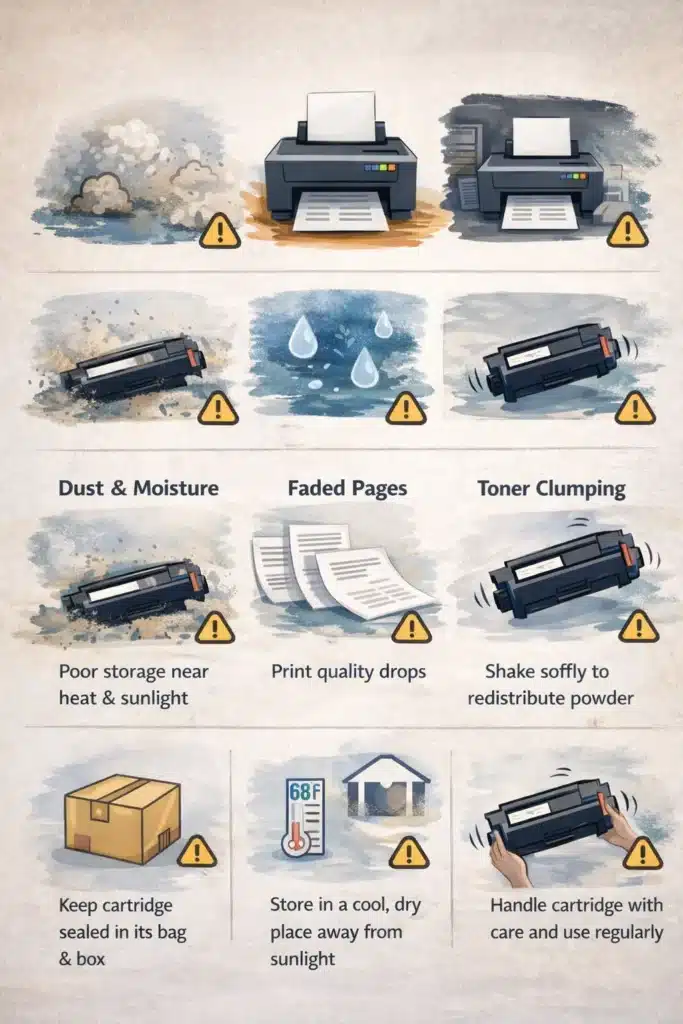
A toner cartridge does not expire immediately after opening, but over time, it can lose efficiency if not handled correctly. Technically, toner does not spoil like food, but it can be affected by air, dust, and moisture.
In my experience working with printing setups, I’ve seen people panic thinking their toner had expired, when in reality it was just stored poorly or not used for a long time. That misunderstanding is very common, and I wish manufacturers explained it better.
Most laser printers use toner that has a long shelf life, especially in high-yield cartridges. However, once opened, it is important to store toner properly to maintain performance. A new toner usually works best within normal usage cycles, and proper handling helps extend toner life.
What Happens If You Don’t Use It
If a toner cartridge stays unused for a long time after opening, a few things can happen. The toner powder inside may settle or clump slightly, which can affect print quality. You may start seeing faded prints or uneven areas.
In some cases, shaking the cartridge gently can help redistribute toner powder and restore output. But I should be honest here—this is not a permanent fix. It only helps in the short term.
Another issue is that dust or moisture can slowly affect internal parts, especially if storage conditions are poor. That is why proper storage is very important if you want to extend toner life.
I’ve also noticed a common mistake people make: they leave cartridges open near heat or sunlight. That is one of the fastest ways to reduce durability and shorten toner lifespan.
To keep things simple:
| Condition | Result |
| Proper storage | The cartridge lasts longer |
| Poor storage | Print quality drops |
| Long unused time | Possible toner clumping |
So yes, a toner cartridge can last a long time after opening, but only if you treat it with care. If you handle it properly, it will continue to deliver stable print quality without issues, and you won’t feel like you wasted your money.
Standard vs High-Yield vs Starter Toner (Key Differences)
When people buy a laser printer, they often don’t think much about the type of toner cartridge they are getting. Honestly, I find this a bit frustrating because this one decision directly affects your cartridge lifespan and long-term printing cost. And then users wonder why their toner runs out so fast.
The truth is simple: not all toner cartridges are the same. Starter, standard, and high-yield cartridges all behave differently once installed, even though they all contain toner and use the same basic printing process, where toner is transferred onto paper.
Starter vs Standard vs High-Yield
A starter cartridge usually comes with a new printer. It is designed for basic setup and testing, not heavy printing. It contains toner particles, but the amount is limited. So it runs out faster, sometimes much sooner than people expect. I’ve seen users get surprised and even annoyed here, thinking something is wrong with the printer.
A standard cartridge is the regular option most people buy. It offers a balanced performance between cost and usage. It does not last as long as high-yield versions, but it gives stable print quality for daily work. When the printer shows low toner, this is usually the type of toner people replace first.
A high-yield cartridge is built for heavy use. It holds more toner and allows toner to be used on every page at a lower cost per page over time. Yes, the upfront cost is higher, and I understand people hesitate here, but in real use, it often saves money and reduces frequent replacement.
To put it simply:
| Type | Usage | Lifespan | Cost Impact |
| Starter | Basic setup | Short | Low upfront cost |
| Standard | Daily use | Medium | Balanced |
| High-Yield | Heavy printing | Long | Better long-term savings |
Which One Lasts Longer
High-yield cartridges last the longest because they store more toner particles, which directly increases how many pages they can print before running out. Standard cartridges come next, and starter cartridges last the least.
In real use, inkjets still struggle to match this efficiency because they dry out like ink, while toner systems stay stable for longer periods. That’s why many users switch to laser printers when they want better control over cost and reliability.
One important thing I always tell users is this: don’t only look at upfront cost. Look at how often you will need to replace the cartridge. A high-yield option may feel expensive at first, but it reduces frequent replacement and often gives better long-term value.
At the end of the day, choosing the right cartridge depends on your printing habits, not just price.
Why Your Toner Runs Out Faster Than Expected
Many people feel confused when their toner finishes too quickly. I understand that frustration, and honestly, I’ve seen it happen so many times with printers and copiers in real work settings. The truth is, toner does not always fail early—most of the time, usage patterns are the real reason.
A toner cartridge can remain usable for a long time if used correctly and if you follow the manufacturer’s instructions. But small habits can quietly increase wastage without you even noticing. Let’s break it down in a simple way.
Images, PDFs & Heavy Printing
This is the biggest reason toner runs out faster. Printing simple text is light, but when you start printing images, PDFs, charts, or design-heavy files, the printer uses much more toner.
In real office environments, especially when handling large volumes, I’ve seen toner disappear faster than expected just because of the document type. It can feel a bit unfair, but it’s normal.
Even if you use an original OEM cartridge, heavy graphics will always reduce lifespan. Unlike inkjet systems, laser printers handle this better, but they still consume more toner when pages are dense.
Print Settings (High vs Draft Mode)
Print settings matter more than most people think. High-quality mode uses more toner to improve print quality and sharpness. Draft mode uses less toner and helps reduce the cost per page.
I often tell users this simple truth: if you don’t need perfect print quality, don’t force it. It only increases toner usage.
Some printers even adjust toner usage automatically based on settings, so choosing the right mode can make a big difference in print quality and reliability over time.
Background Printing
This is something many users never notice, and it honestly bothers me a little. Background printing jobs, updates, or accidental print commands can slowly consume toner without you realizing it.
Sometimes a cartridge is installed and ready, but small hidden print tasks keep running in the background. Over time, this leads to extra usage and wastage.
To avoid this, it is important to check what your printer is actually printing. It keeps your office supply usage under control and prevents unnecessary costs.
Cost Per Page – Is Toner Really Cheaper?
Cost per page means how much one printed page actually costs you. This is where toner usually performs better than ink systems, especially for regular office use.
Many people only look at the upfront cost and ignore long-term value. I’ve seen this mistake often, and it leads to frustration when cartridges finish too quickly.
Simple Cost Per Page Example
Cost per page is just how much one printed page costs you. You calculate it by dividing the cartridge price by the number of pages it typically produces.
Here is a simple example:
| Cartridge Type | Price | Pages It Typically Produces | Cost Per Page |
| Standard Toner | Medium cost | Moderate pages | Higher cost per page |
| High-Yield Toner | Higher upfront cost | More pages | Lower cost per page |
High-yield toner gives better value because it prints more pages before replacement, which reduces the overall cost per page.
Why High-Yield Saves More
High yield cartridges are designed for frequent printing. They produce more pages and help businesses reduce printing costs over time.
In busy printing environments, this makes a big difference. It helps users avoid constantly running low on toner and improves long-term efficiency.
Toner vs Ink – Which Lasts Longer?
This is a question I hear a lot, and I understand the confusion. People want something that lasts longer and saves money, especially when they only need to print important documents. Based on real-world use and experience, toner usually lasts much longer than ink systems, especially in office supply environments where printing happens daily.
The reason is simple: toner is a dry powder, while ink is a liquid. This small difference changes everything in terms of durability and how long supplies can be used before replacement.
Lifespan Difference
When we compare toner and ink, the difference is very clear in terms of longevity.
A toner cartridge can handle more printing needs before it runs low on toner every time. In many cases, it can print thousands of pages, depending on usage and printer type. Ink cartridges, on the other hand, often finish much faster, especially in frequent use.
Here is a simple comparison:
| Type | Average Use | Result |
| Toner | Long-term printing | Lasts longer, fewer replacements |
| Ink | Short-term printing | Needs frequent replacement |
I’ve noticed something frustrating in the industry—users are often not clearly told this difference at the start. Then they wonder why their ink runs out so fast compared to toner. It affects toner expectations when people switch between systems without proper guidance.
Even the fuser in laser printers helps control how toner is transferred to paper, making the process more efficient and stable. This is why toner systems are better for structured printing environments.
Why Toner Doesn’t Dry Out
Toner does not dry out because it is a dry powder, not liquid like ink. This is the main reason it stays stable even when the cartridge is installed for a long time or not used often.
Unlike ink, toner does not evaporate or harden inside the cartridge. So even if you print infrequently, it usually remains usable and does not lose quality quickly.
This makes toner more reliable for users who don’t need to print every day, especially in office or home setups where printing is occasional.
Signs Your Toner Is Running Out
When the toner starts getting low, it usually does not stop suddenly. It gives small signs first. Users should carefully watch these signs because ignoring them can lead to poor print output and unnecessary stress during important work. And honestly, I’ve seen many people panic just because they didn’t notice early warnings.
Even unopened cartridges or properly stored supplies behave the same once they are in use—remaining toner slowly decreases, and the printer starts showing changes in output.
Faded Prints
The most common sign is faded printing. Text starts looking light, uneven, or broken. You might notice missing lines in documents or weak black areas.
This happens because toner is running low inside the cartridge. Infrequent printing can also make this more noticeable because toner settles over time, affecting consistency.
Printer Warnings
Most modern printers show alerts when toner is low. You may see messages like “low toner” or “replace cartridge soon.”
These warnings are helpful, but I’ve noticed something frustrating—people often ignore them until the printer completely stops. That’s not a good habit, especially in businesses printing daily documents.
These alerts help users optimize their printing and avoid last-minute problems during work.
When to Replace
You should replace the toner when print quality becomes unclear, even after shaking the cartridge lightly or redistributing toner inside.
Remember, a cartridge is designed for a fixed lifespan. Once installed, it will gradually reach the end of its cycle. At that point, replacing it is the only proper solution.
For users with frequent printing, replacement happens sooner. For those with infrequent printing, it may last longer, but the signs remain the same.
In simple terms, don’t wait for complete failure. Replace it when print quality drops, not when the printer fully stops working.
Signs You’re Wasting Toner Without Realizing
This is one of those topics people don’t think about, but it really matters. Many users report that their toner finishes too fast, and honestly, most of the time it is not the cartridge—it is small printing habits that waste toner without anyone noticing. It can feel a bit frustrating because the problem is hidden. Let’s break it down simply.
Faded Prints, but Cartridge Still Full
Sometimes prints start looking light or patchy, even when the printer shows there is still toner inside. This makes people think something is wrong, but often it is just uneven toner usage inside the cartridge.
Instead of replacing it immediately, many users could improve results just by gently redistributing toner or checking print conditions. I’ve seen this happen often in real printer setups, and it always leads to confusion if not understood early.
Wrong Printer Settings
Printer settings play a big role in toner usage. If you are using high-quality mode all the time, the printer uses more toner than needed. Even for simple documents, it keeps pushing extra toner for sharper output.
This is one of my pet peeves, honestly. People don’t realize how much toner they waste just because of wrong settings. Changing to draft or eco mode when needed can make a big difference in daily usage.
Unnecessary Background Printing
This is the hidden problem most people never check. Sometimes printers run background jobs, repeated commands, or accidental print tasks. These small jobs slowly use toner without you even noticing.
I’ve seen cases where users thought their toner was faulty, but the real issue was unwanted printing running in the background. It wastes resources and affects overall efficiency.
Simply checking print queues regularly can help avoid this issue and save toner over time.
How to Check Toner Level (Easy Methods)
Knowing your toner level is very important, but I’ve noticed many users ignore it until the printer stops working. Honestly, this is one of those small habits that can save you from last-minute stress. If you check early, you can plan a replacement instead of rushing at the worst time.
Let’s keep it simple and practical.
From Printer Display
Most modern laser printers show toner levels directly on the screen. You may see a bar, percentage, or warning message like “low toner.”
This is the easiest method because you don’t need any extra tools. I personally prefer this method because it gives quick awareness while you are printing.
But here’s something I’ve observed in real use—people often see the warning but still ignore it. That leads to sudden printing problems later, which could easily be avoided.
If you check it regularly, you can avoid running out of toner during important work.
From the computer
You can also check toner levels from your computer through printer settings or software. Most printer brands provide a small utility that shows toner status.
This method is useful when the printer does not have a display or when you want more detailed information. It may also show warnings, estimated pages left, or cartridge status.
In real-world use, this helps users plan better and avoid situations where the printer stops suddenly. I always recommend checking it this way for offices or shared printers, where printing demand is higher.
To make it easier:
| Method | Ease of Use | Best For |
| Printer Display | Very Easy | Quick checks |
| Computer Software | Detailed | Office or frequent use |
In short, checking toner level regularly helps you stay prepared and avoid unexpected printing delays.
Simple Tips to Make Your Toner Last Longer
If you want your toner to last longer, you don’t need any hard tricks. Just small changes in your daily printing habits can make a big difference. I’ve seen many users waste toner without realizing it, and honestly, it’s usually because they never adjust simple settings. The good thing is, once you fix these habits, your toner starts lasting much longer without affecting normal work. It also helps you save money and reduce unnecessary printing stress.
Simple Tips
- Turn on Eco Mode for daily printing
- Print only when it is really needed
- Always check Print Preview before printing
- Avoid printing unnecessary documents
- Use draft mode for basic files
- Reduce heavy graphics when possible
Storage Tips to Avoid Early Damage
Storing toner properly is something many people ignore, and then they wonder why their prints look bad later. I’ve seen this issue many times in real printer setups, and honestly, it’s a bit frustrating because the solution is very simple. Good storage keeps your toner safe and helps maintain print quality for a longer time. If you handle it right, you avoid early damage and unnecessary replacement.
Keep in a cool, Dry Place
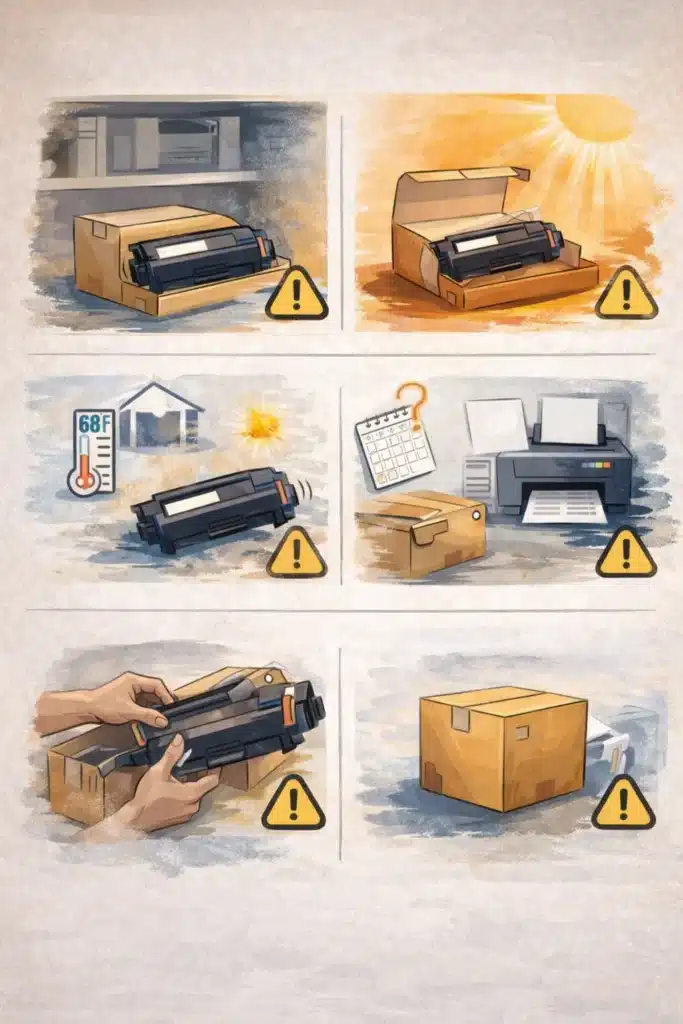
Toner works best when it is stored in a cool and dry environment. Heat, sunlight, or moisture can slowly affect the powder inside and reduce performance. I always recommend keeping it in a stable place, like a cupboard or storage shelf.
From my experience, this simple habit improves toner life more than people expect. It also helps maintain consistent print quality, especially for users who don’t print every day. A clean storage area also prevents dust from entering the cartridge packaging.
Avoid Opening Early
One common mistake is opening the cartridge before it is actually needed. I’ve seen users do this just to “check it,” but that often leads to unnecessary exposure.
Once opened, toner can slowly lose stability if not used properly. It is better to keep it sealed until you are ready to install it in the printer. This protects the toner powder and keeps the cartridge in good condition.
In simple words, the longer you keep it unopened, the safer it stays for future use.
Final Thoughts
So, after everything, the real answer is simple: a toner cartridge does not have one fixed life. It depends on how you print, what you print, and how carefully you use it. On average, it can last from a few months to a year, or even more in light use.
I’ve seen many users expect exact numbers, and I understand that frustration. But in real life, printing is never perfect or the same every day. Some days you print light documents, and some days heavy files, and that changes everything.
The good thing is this: if you understand page yield, use smart printing habits, and store your toner properly, you can easily make it last longer and get better value. It is not just about the printer—it is about how you use it.
In the end, a little care goes a long way. And honestly, once you get used to these simple habits, printing becomes cheaper, smoother, and much less stressful.
Frequently Asked Questions
1. How many months does toner last in a printer?
On average, a toner cartridge can last:
- Home use: 6–12 months
- Office use: 1–3 months
It depends on printing frequency.
2. Does toner expire if not used?
Yes, toner can expire or degrade over time. Usually, it lasts 2–3 years in storage if kept in a cool and dry place.
3. What is page yield in toner cartridges?
Page yield means the estimated number of pages a toner can print before running out. It is usually calculated at 5% page coverage.
4. Can toner dry out like ink?
No, toner does not dry out because it is a powder, not a liquid. That’s why it lasts longer than ink.
5. What affects toner cartridge lifespan?
Main factors include:
- Print volume
- Type of documents
- Printer settings
- Cartridge quality (standard or high-yield)
6. How often should I refill my laser printer?
You should refill it only when the toner is low or print quality becomes faded, usually after a few months to 1 year, depending on usage.

Willis C. Mathes
I’m Willis C. Mathes With hands-on experience and technical knowledge of printers, I dive deep into printer reviews, troubleshooting, and tips, ensuring you get the most out of your printing investment.