Heat sink problems are one of the most common reasons a 3D printer suddenly starts clogging or producing uneven extrusion. In this guide on how to fix heat sink on 3d printer nozzle, readers will learn how the hotend cooling system works, what causes heat buildup, and how to repair common issues before they damage print quality. The article also explains practical troubleshooting steps, proper nozzle tightening, airflow inspection, and maintenance tips that help keep the printer running smoothly during long prints.
What Does the Heat Sink Do in a 3D Printer Hotend?
A heat sink controls heat inside a 3d printer hot end. Its job is to keep the upper section cool while the lower part stays hot enough to melt filament properly. This separation matters because softened material inside the wrong area can quickly create a clog and stop a print midway.
The heat sink works with the cooling fan, heater block, and heat break to manage temperature flow. Most designs use thin metal fins that help remove unwanted heat through airflow. If dust builds up or the fan slows down, cooling performance drops, and heat creep may start developing inside the hotend.
One repair workshop tested two PLA machines using identical slicer settings and bed temperatures. Oddly enough, only one system kept jamming after long prints. The actual cause was a partially blocked fan wire that reduced airflow around the hot end. After a quick clean and fan replacement, extrusion became stable again. Situations like this show how small cooling issues can create frustrating failures.
Why Does Proper Cooling Matter in FDM 3D Printing?
Proper cooling helps the extruder move filament smoothly through the hotend path. When excess heat reaches the cold side, material softens too early and starts sticking before it reaches the nozzle. That problem often appears during long jobs or high temperatures.
Studies on FDM maintenance found that cooling-related failures are one of the biggest reasons for print interruptions. Even a weak fan or blocked airflow can reduce reliability over time.
How does heat move through the hotend assembly?
Inside the assembly, heat travels upward from the heater cartridge into the heater block and nozzle area. The lower section must stay extremely hot, while the upper side remains cooler so the material stays firm until printing begins.
The heat sink acts like a thermal barrier. It pulls extra warmth away before it can block extrusion or damage nearby parts.
What Happens When the Heat Sink Stops Working Properly
When cooling becomes weak, the nozzle may jam, extrusion may fail, and material can block the internal path. In severe cases, stuck plastic becomes difficult to remove and may even require pliers during maintenance.
Most of these problems are fixable. Stable airflow, proper assembly, and regular hotend cleaning usually solve the issue before serious damage happens.
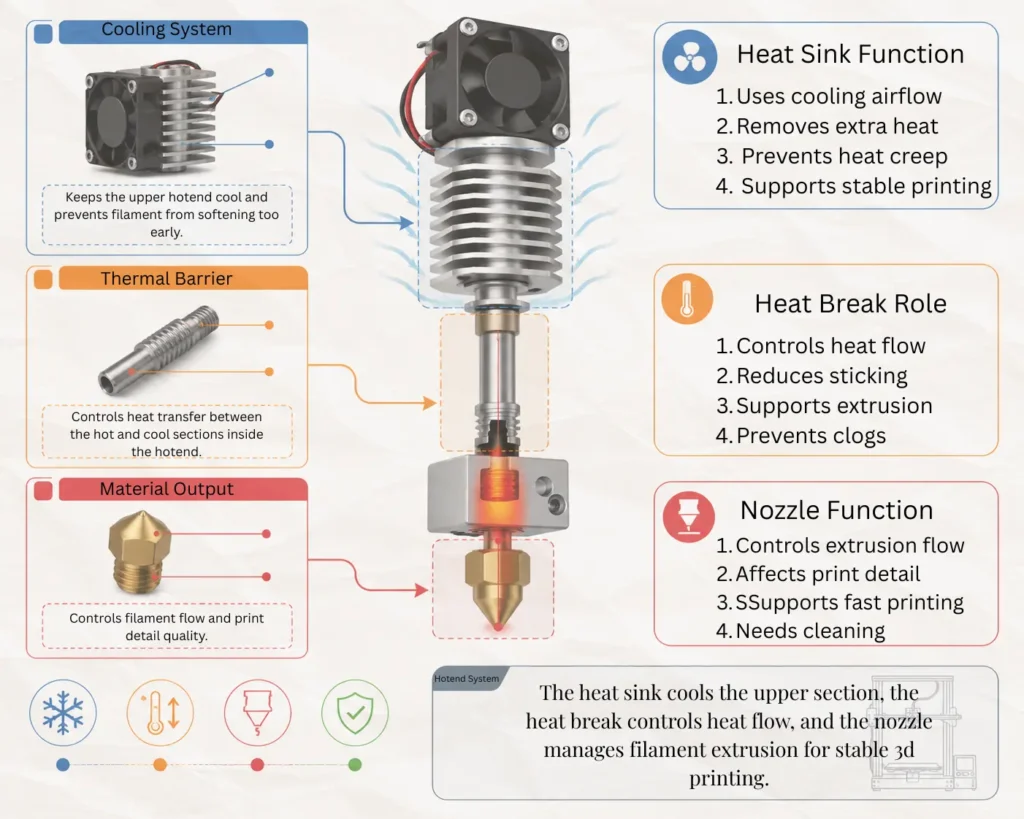
Difference Between the Heat Sink, Heat Break, and Nozzle
A lot of 3d printer owners confuse the heat sink, heat break, and nozzle because these parts sit close together inside the hotend. During troubleshooting, users often replace the wrong component and still face the same blockage problem afterward. That part gets frustrating pretty quickly, especially during longer PETG prints where stable thermal control matters more.
Each part inside the hotend has a different job. If one section stops working correctly, extrusion quality drops and printing results become inconsistent. Understanding how these components work together makes repairs much easier and helps prevent unnecessary hardware replacement.
What Is a Heat Sink?
The heat sink is the cooling section above the hot end. Its job is to pull excess warmth away from the upper filament path before the material softens too early. Most heat sinks use thin fins and a cooling fan to remove trapped heat through airflow.
A technician once shared a case on a repair forum where dust buildup reduced airflow enough to create repeated jams during overnight PETG jobs. The nozzle itself looked perfectly fine, but the cooling fins were partially blocked. After cleaning the fan area and restoring airflow, the machine returned to stable operation.
What is heartbreak?
The heat break is the thin tube between the heat sink and the heater block. It acts like a thermal separator that controls how heat moves through the hot end.
This small part is extremely important because it keeps the upper filament path cooler while allowing the lower section to stay hot enough for extrusion. If the heat break becomes dirty or damaged, softened material may stick inside and create a blockage. In some cases, users carefully remove residue using a thin needle or clean filament during maintenance.
What Does the Nozzle Do?
The nozzle is the final opening where melted material exits during printing. Its diameter controls layer detail and extrusion flow. Smaller nozzles improve detail, while larger ones allow faster material flow.
During maintenance, heating the nozzle properly before removal helps prevent thread damage inside the heater block. Skipping this step can create alignment problems later during reassembly.
Why These Parts Must Work Together Correctly
The heat sink, heat break, and nozzle work like one complete system. The heat sink cools, the heat break controls thermal transfer, and the nozzle handles extrusion. If one section fails, the entire hotend becomes unstable.
Stable airflow, proper print bed settings, and regular inspection all help keep the system reliable during long jobs.
Signs Your 3D Printer Heat Sink Is Failing
Heat sink problems rarely appear all at once. Most of the time, the printer starts showing small warning signs before a complete failure happens. Extrusion may look slightly inconsistent, long prints may stop midway, or strange smells may develop around the hotend area. Those little symptoms are easy to ignore at first. Then suddenly a print fails after six hours, and frustration kicks in.
A repair workshop that tested consumer FDM machines during extended PLA and nylon jobs noticed that cooling-related failures often developed slowly over time. In several cases, the actual solution was not replacing the nozzle at all. Weak airflow and trapped heat inside the hot end were creating unstable thermal conditions during long sessions.
Filament Jams Near the Heat Break
One of the earliest signs is material jamming near the heat break. This usually happens when excess heat moves upward and softens the filament before it reaches the melt zone.
Some operators first suspect slicer software or bad settings, but the real problem often comes from poor cooling around the hotend. If jams happen repeatedly, technicians sometimes use the cold pull method to remove softened residue from inside the path before testing airflow again.
Clicking or Skipping Extruder Motor
A clicking extruder motor usually means the drive gear is struggling to push material forward. Inside the hotend, softened plastic may create resistance that blocks smooth movement.
This issue becomes more common during long prints or when using materials like nylon that require a higher printing temperature. A partially restricted path can force the motor to skip repeatedly.
Under Extrusion During Long Prints
Under-extrusion is another common warning sign. Layers may suddenly become thin, weak, or incomplete even though the first part of the print looked normal.
One technician noticed this problem during a twelve-hour cosplay print using a larger nozzle diameter. The printer worked perfectly for several hours, then extrusion slowly became inconsistent because airflow around the cooling fins had weakened.
Burnt Filament Smell Around the Hotend
A burnt smell near the hot end often means the filament is staying exposed to heat longer than it should. That smell may appear before a full clog develops.
In some cases, operators even need to disassemble the hotend later and clean carbonized residue from internal parts.
Heat Traveling Into the Cold Side
The upper section of the hotend should stay relatively cool during operation. If the cold side feels unusually warm, unwanted thermal transfer is likely happening inside the system.
Sometimes a loose fan mount or blocked airflow path quietly causes this issue without obvious external signs.
Nozzle Leaks Around the Threads
Leaks near the nozzle threads usually appear when parts are not seated correctly. Melted plastic may ooze around the heater block instead of flowing only through the opening.
Incorrect tightening or worn threads can make the problem worse over time.
Uneven Extrusion and Stringing Problems
Stringing, blobs, and rough surface lines often appear when thermal control becomes unstable. Material flow stops feeling smooth, especially during detailed sections of a print.
Stable cooling, proper airflow, and correct hotend alignment usually restore consistent extrusion quality.
Common Causes of Heat Sink Problems in 3D Printers
Heat sink problems usually develop slowly instead of appearing overnight. A printer may work perfectly for small projects, then suddenly fail during a long session with jams, weak extrusion, or uneven layers. That pattern confuses a lot of users because the nozzle often gets blamed first, even when the real issue starts higher inside the hotend.
Several repair shops that tested entry-level FDM systems noticed the same trend during maintenance checks. Most cooling failures were linked to airflow restrictions, poor assembly, or unstable thermal control rather than broken hardware. Some cases were surprisingly simple, too. One machine failed repeatedly because a small dusty particle had blocked part of the fan intake. After cleaning the area, airflow returned to normal, and the printer completed overnight jobs without another clog.
Faulty Hotend Cooling Fan
The cooling fan removes excess heat from the heat sink fins. If the fan slows down, airflow becomes weak, and trapped warmth starts moving upward into the filament path.
Sometimes the fan still spins, which makes diagnosis tricky. A weak motor may no longer blow enough air to control the hotend temp during long prints. In one repair case, operators replaced the nozzle twice before realizing the fan speed had dropped because of worn bearings.
Dust Blocking Heat Sink Cooling Fins
Dust buildup is another major cause of thermal problems. Cooling fins need open airflow to release trapped warmth efficiently. When debris collects between the fins, cooling performance drops quickly.
Regular cleaning with compressed air or a small brush helps prevent this issue. Some users even wrap the printer during storage to reduce airborne dust around sensitive parts.
Incorrect Hotend Assembly
Improper assembly can create unstable thermal transfer inside the hotend. If parts are not seated correctly, gaps may form around the heater block or heat break.
One technician found a deep scratch near the threaded section of a heat break after improper installation with the wrong tool from a maintenance kit. That tiny surface defect later caused repeated extrusion issues during high-speed printing.
Loose Nozzle or Heat Break Alignment
A loose nozzle or misaligned heat break can create leaks and unstable heating conditions. Melted material may escape around the threads instead of flowing smoothly through the opening.
This issue becomes more noticeable at higher extrusion temperature settings, where pressure inside the hotend increases.
Excessive Retraction Settings
Aggressive retraction pulls softened material upward into cooler sections of the hotend. Over time, this creates partial jams that reduce stable material flow.
Flexible materials and some chemical-resistant filaments react even more sensitively to incorrect retraction values.
Heat Creep During Long Prints
Heat creep happens when unwanted warmth travels into the cold side during extended operation. Long prints increase thermal stress inside the hotend, especially in warm rooms with poor ventilation.
Research on FDM maintenance found that cooling-related failures become much more common during continuous operation because trapped warmth slowly builds up around the heat sink.
Poor Airflow Around the Printer
Restricted airflow around the machine can also affect cooling performance. Printers placed inside closed cabinets without ventilation often struggle to remove excess warmth efficiently.
Low-Quality Heat Break Materials
Cheap heat break materials transfer heat less efficiently and may wear out faster over time. Upgrading to a higher-quality metal or bi-metal design often improves thermal stability and reduces clog risks during demanding prints.
What Is Heat Creep in 3D Printing and Why Does It Happen?
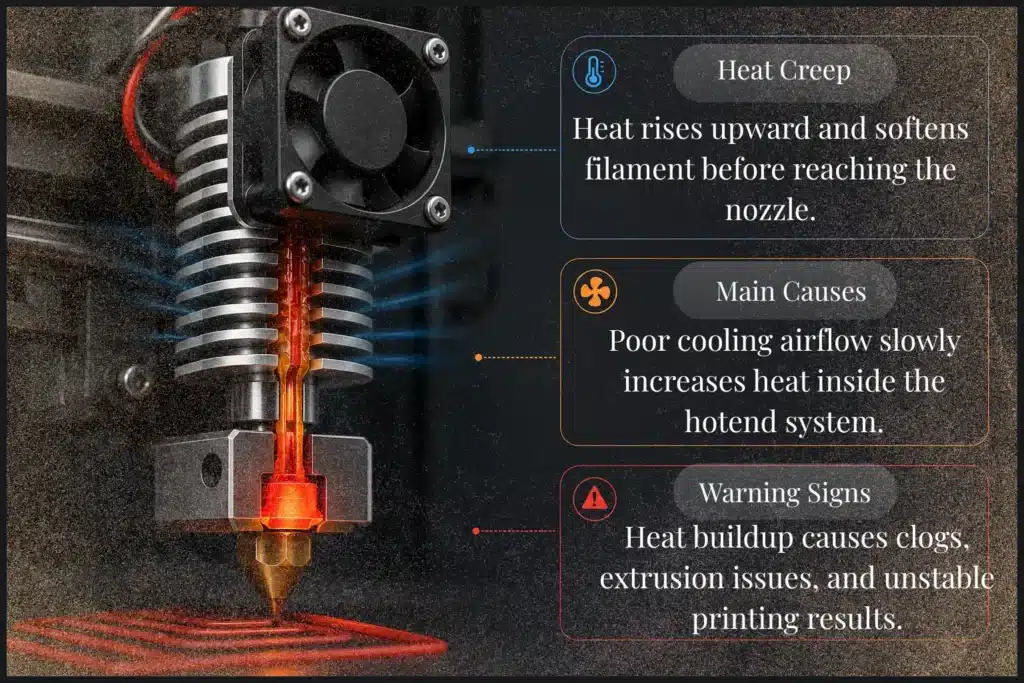
Heat creep happens when unwanted heat travels upward from the hot end into the cooler section of the filament path. Instead of melting only near the nozzle, the material starts softening too early inside the heat break. This creates resistance during extrusion and eventually leads to jams or failed prints.
The issue is very common in FDM systems, especially during long printing sessions. A machine may work perfectly for several hours, then suddenly stop pushing material smoothly. That part often confuses users because the nozzle may appear completely fine from the outside.
One repair technician tested several enclosed desktop printers during overnight PLA jobs. The printers completed short models without trouble, but larger prints failed repeatedly after six or seven hours. After inspection, the real problem turned out to be trapped heat around the cooling fins. Airflow inside the enclosure had become restricted, causing the upper section of the hotend to warm slowly over time.
How Heat Creep Affects Filament Flow
Inside the hotend, filament should remain solid until reaching the melt zone. Heat creep interrupts that process by warming the material too early.
As softened plastic expands inside the heat break, the extruder struggles to feed material properly. That pressure buildup can cause grinding, clicking noises, uneven layers, or complete clogs. Using the right method during maintenance, such as checking airflow and cleaning cooling fins regularly, helps reduce these failures significantly.
Difference Between Heat Creep and Overheating
Heat creep and overheating are not the same thing, even though they are often confused.
Overheating means the nozzle exceeds the intended printing temperature. Heat creep, however, happens when warmth spreads into sections that should remain cool. Lowering nozzle temperature alone may not solve the issue if airflow around the hotend is still weak.
Why PLA Is More Sensitive to Heat Creep
PLA softens at lower temperatures than many other materials. Because of that, it reacts faster to unstable cooling conditions.
A slight increase in thermal transfer inside the heat break can soften PLA early and create jams during long jobs. Other materials sometimes continue printing under the same conditions, while PLA struggles.
Common Heat Creep Symptoms Most Users Misdiagnose
Heat creep often looks like other hotend problems. Users may blame slicer settings, poor filament quality, or worn nozzles when cooling is actually causing the issue.
| Symptom | Possible Cause |
|---|---|
| Clicking extruder | Softened material inside the heat break |
| Random under extrusion | Weak airflow |
| Sudden jams during long prints | Heat buildup over time |
| Burnt smell near hotend | Trapped filament exposure |
In some cases, operators even suspect a chemical problem with the filament before discovering that unstable cooling was disrupting the entire extrusion process.
How to Inspect a 3D Printer Heat Sink for Damage
Inspecting the heat sink regularly helps prevent failed prints, extrusion problems, and repeated hotend clogs. In a lot of cases, users replace the nozzle or change slicer settings without checking the cooling system first. That can become frustrating because the actual issue may only be a weak fan, blocked airflow, or hidden residue inside the hotend.
A proper inspection does not take very long, but it can reveal problems before serious damage happens. Repair technicians who work on consumer FDM machines often check the heat sink first during troubleshooting because cooling-related issues are extremely common during long prints.
Checking for Bent or Damaged Cooling Fins
Cooling fins release unwanted heat from the hot end. If the fins become bent, dusty, or blocked, airflow cannot move properly through the heat sink.
One workshop operator noticed repeated jams on a printer that had been working perfectly for months. After inspection, a few crushed fins near the fan area were restricting airflow enough to create unstable cooling during longer jobs.
Inspecting the Hotend Fan and Airflow Direction
The cooling fan should spin smoothly and direct air straight across the fins. Weak airflow is one of the biggest causes of heat buildup inside desktop printers.
A fan may still spin even when airflow becomes too weak for proper cooling. Rattling sounds, vibration, or uneven speed often signal internal wear. Some users also install replacement fans backward after maintenance, which quietly causes thermal problems later.
Looking for Filament Residue Inside the Heat Break
Softened filament sometimes sticks inside the heat break after repeated jams. Over time, that residue narrows the internal path and affects extrusion stability.
A close inspection under bright lighting usually reveals dark buildup or rough material inside the tube.
Checking Loose Mounting Screws and Brackets
Loose screws or unstable brackets can shift hotend alignment during printing. Even slight movement may create leaks, vibration, or uneven heating around the nozzle area.
Identifying Cracked Threads or Warped Parts
Damaged threads or warped surfaces often appear after overtightening or repeated overheating. If metal parts no longer sit evenly together, replacing the damaged section is usually safer than attempting temporary repairs.
Tools You Need to Fix a Heat Sink on a 3D Printer Nozzle
Using the correct tools makes heat sink repairs safer and far easier. A lot of hotend damage happens because users try to remove parts with the wrong screwdriver or oversized wrench. What starts as a simple clog can quickly turn into stripped threads or bent cooling fins. That part gets frustrating fast, especially during an important print project.
Most heat sink repairs only require a few basic tools. Repair technicians who regularly maintain desktop FDM systems often keep a small toolkit nearby because cooling-related problems are extremely common during long printing sessions.
Hex Keys and Small Wrenches
Hex keys help remove fan covers, mounting brackets, and hotend screws safely. Small wrenches are useful for tightening or removing the nozzle during maintenance.
Using the correct size matters a lot. One workshop operator once used a slightly oversized wrench during nozzle removal and accidentally rounded the nozzle edges. After that, the hotend developed small leaks during printing.
Brass Brush and Cleaning Needle
A brass brush helps clean burnt residue and dust from the nozzle and cooling fins without damaging softer surfaces. Cleaning needles work well for clearing small partial clogs before they become severe.
These tools are most effective during routine maintenance rather than emergency repairs after a complete blockage.
Thermal Paste for Heat Break Installation
Thermal paste improves heat transfer between the heat break and the heat sink. A thin layer helps remove excess heat from the upper section of the hotend more efficiently.
Too much paste can create problems during reassembly, so experienced technicians usually apply only a very small amount.
Replacement Cooling Fan
Weak airflow is one of the biggest causes of heat creep. Cooling fans slowly wear out over time, especially in dusty environments or enclosed printer setups.
A replacement fan with proper airflow and matching voltage often restores stable extrusion immediately.
Heat-Resistant Gloves and Safety Tips
Hotend parts remain extremely hot after printing stops. Heat-resistant gloves help prevent burns during inspection or disassembly.
Before starting repairs, users should always power off the printer and allow the hot end to cool completely. Rushing this step sometimes damages wires or causes accidental injuries during maintenance.
Step-by-Step Guide to Fix a Heat Sink on a 3D Printer Nozzle
Repairing a heat sink problem is usually easier than most users expect. A lot of failed prints come from weak cooling, trapped residue, or incorrect hotend assembly rather than a completely broken component. The important part is working carefully and checking each section in the correct order.
Several repair technicians who service desktop FDM systems noticed that rushed maintenance often creates bigger problems than the original clog itself. Small mistakes during reassembly, especially around the hotend threads and cooling system, can lead to repeated jams later. Taking a few extra minutes during inspection makes a huge difference.
Step 1 – Turn Off and Cool the Printer Completely
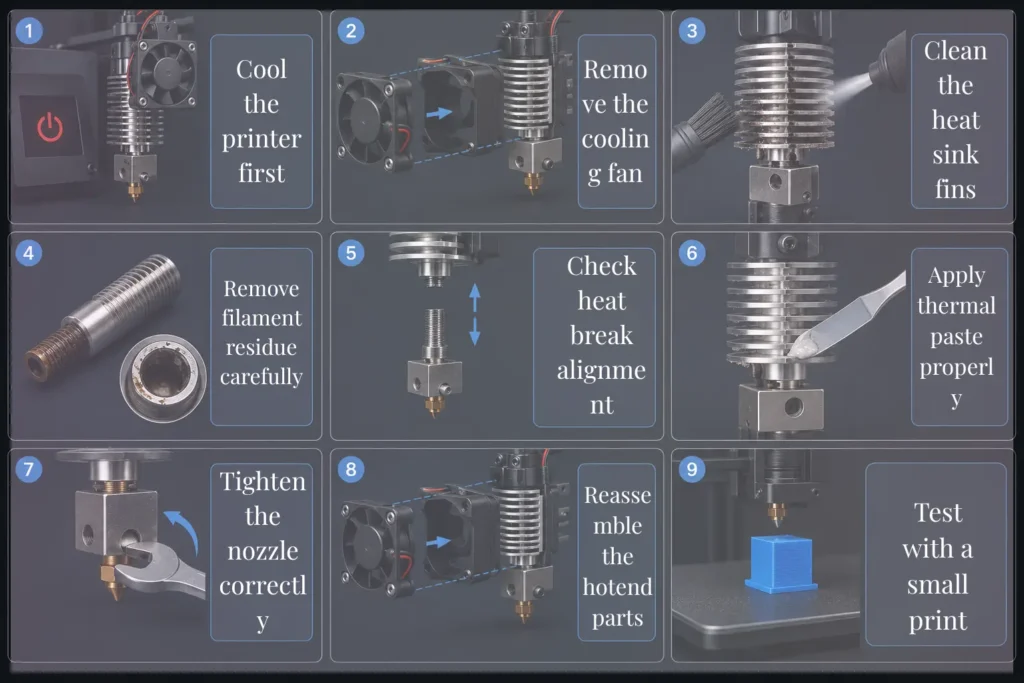
Before touching the hot end, power off the machine and allow all parts to cool fully. Some users try to remove components too quickly after printing, which can damage wiring or cause burns.
Step 2 – Remove the Fan Shroud and Cooling Fan
Carefully remove the fan cover and cooling fan to access the heat sink area. Keep screws organized during disassembly because small mounting parts are easy to lose.
If the fan blades feel stiff or dusty, airflow may already be reduced.
Step 3 – Clean Dust From the Heat Sink Fins
Use compressed air or a soft brush to remove trapped dust between the cooling fins. Restricted airflow is one of the most common reasons for unstable hotend temperatures during long prints.
One workshop operator found enough debris inside a fan housing to block nearly half the airflow. After cleaning, the printer completed an eight-hour print without another jam.
Step 4 – Remove Filament Residue From the Heat Break
Inspect the inside of the heat break for burnt residue or softened material. Even a small amount of buildup can reduce smooth extrusion during printing.
Careful cleaning helps restore normal material flow through the hotend path.
Step 5 – Check the Heat Break Alignment
The heat break should sit evenly between the upper and lower hotend sections. Misalignment may create gaps, leaks, or unstable thermal transfer during printing.
Step 6 – Reapply Thermal Paste Correctly
Apply only a thin layer of thermal paste where the heat break contacts the heat sink. Too much paste can create unnecessary mess during reassembly.
Step 7 – Tighten the Nozzle Properly
The nozzle should fit tightly against the heat break to stop melted filament from leaking inside the hot end. Even a tiny gap can create clogs, burnt residue, and uneven extrusion during long prints.
Why Hot Tightening the Nozzle Matters
Hot tightening helps seal internal gaps after thermal expansion occurs. Several repair shops found that cold tightening often caused leaks during longer prints because the metal expanded once heated.
Common Nozzle Tightening Mistakes
Overtightening can damage threads, while loose installation may create material leakage around the heater block. Both problems affect print quality quickly.
Step 8 – Reassemble the Hotend Correctly
Reinstall all parts carefully and confirm that the cooling fan points toward the heat sink fins properly. Incorrect fan direction quietly causes airflow problems later.
Step 9 – Test the Printer With a Small Print
Run a short test print before starting larger projects. Stable extrusion, quiet operation, and consistent layer lines usually confirm the repair was successful.
How to Fix a Loose Heat Sink on a 3D Printer
A loose heat sink can cause unstable extrusion, nozzle leaks, and failed prints during long jobs. The printer may seem normal at first, but small movement inside the hotend slowly affects print quality over time. Several repair technicians noticed that repeated heating cycles and constant vibration often loosen hotend parts after months of regular use.
One workshop operator found that a customer’s printer kept producing uneven layers even after changing the nozzle twice. After inspection, the actual problem was a slightly unstable heat sink connection that shifted during movement.
Tightening Loose Set Screws
Set screws help hold the heat sink and hotend parts firmly together. If these screws loosen, the hotend may wobble slightly during printing and create inconsistent extrusion.
Each screw should be tightened carefully without forcing too much pressure.
Fixing a Wobbling Hotend Assembly
A wobbling hotend assembly usually means the mounting bracket is no longer stable. Even small movement may create leaks or uneven layer lines during printing.
After tightening the mounting points, the hotend should feel secure during manual inspection.
Realigning the Heat Break and Heater Block
The heat break and heater block must sit evenly together. Poor alignment may create small internal gaps that cause leakage or unstable thermal transfer inside the hotend.
Avoiding Overtightening Damage
Overtightening is a common repair mistake. Too much force can damage threads, crack mounting points, or warp metal surfaces.
Most repair shops recommend tightening parts gradually until they feel secure instead of forcing them excessively.
Should You Use Thermal Paste on a 3D Printer Heat Break?
Yes, thermal paste can help improve heat transfer between the heat break and heat sink when applied correctly. It helps pull unwanted heat away from the upper section of the hotend and reduces the chance of heat creep during long prints. Several repair technicians noticed that printers with properly applied thermal paste often maintain more stable extrusion during extended printing sessions. The important part, though, is using only a small amount in the correct area.
| Section | What to Do |
|---|---|
| Where Thermal Paste Should Be Applied | Apply a thin layer only where the heat break contacts the heat sink. This improves thermal transfer and cooling efficiency. |
| Where You Should Never Apply Thermal Paste | Never apply paste inside the nozzle threads or filament path because it can contaminate the hotend and affect extrusion. |
| Benefits of Proper Heat Transfer | Better heat transfer helps maintain stable hotend temperatures and reduces clog risks during long prints. |
| Risks of Using Too Much Thermal Paste | Excess paste can spread into unwanted areas during assembly and create messy buildup around hotend parts. |
Temporary Fixes Before Replacing the Heat Sink
A weak heat sink does not always need immediate replacement. In several repair cases, small adjustments helped restore stable extrusion long enough to finish important prints or identify the real problem. These temporary fixes are not permanent solutions, but they can reduce heat buildup and prevent repeated clogs during troubleshooting.
Lowering Print Temperature Slightly
Reducing the nozzle temperature by 5–10°C can help control excess heat inside the hotend. This lowers the chance of filament softening too early inside the heat break during long prints.
Improving External Cooling
Better airflow around the printer helps remove trapped heat more efficiently. Some workshop operators place a small external fan near the printer during long jobs, especially in warm rooms where airflow is limited.
Reducing Print Speed and Retraction
High print speeds and aggressive retraction settings increase pressure inside the hotend. Lowering these settings often improves extrusion stability and reduces partial jams.
Performing a Cold Pull to Remove Partial Clogs
A cold pull helps remove softened residue from inside the nozzle and heat break before it turns into a complete blockage. Several repair technicians use this method during maintenance because it often restores smooth material flow without replacing hotend parts.
Maintenance Tips to Prevent Future Heat Sink Problems
Regular maintenance helps prevent most hotend cooling issues before they turn into failed prints. Several repair technicians noticed that printers receiving basic cleaning and inspection usually experience fewer extrusion problems during long printing sessions. Small airflow issues may seem harmless at first, but over time they often lead to unstable thermal performance and repeated clogs.
Cleaning the Hotend Cooling Fan Regularly
The cooling fan should be checked and cleaned regularly because dust buildup slowly reduces airflow strength. Even a thin layer of debris on the fan blades can affect cooling efficiency during longer jobs.
One workshop operator found that reduced airflow from a dirty fan caused repeated extrusion failures during overnight printing. After basic cleaning, the printer returned to stable operation immediately.
Removing Dust From Cooling Fins
Dust trapped between cooling fins prevents proper heat dissipation. A soft brush or compressed air helps remove buildup without damaging delicate metal surfaces.
Routine cleaning becomes especially important in rooms with poor ventilation or high airborne dust levels.
Rechecking Nozzle Tightness After Long Prints
Heating cycles slowly loosen threaded hotend parts over time. Checking nozzle tightness after long printing sessions helps prevent small leaks and unstable extrusion later.
Several repair shops recommend inspecting hotend connections every few weeks during heavy printer use.
Monitoring Fan Noise and Airflow
Changes in fan sound often signal early cooling problems. Rattling, vibration, or weaker airflow usually means the fan is wearing out internally.
A printer may still operate normally for short jobs, but unstable airflow often causes failures during extended prints.
Using High-Quality Filament
Low-quality material sometimes leaves extra residue inside the hotend and increases clog risks. Cleaner filament generally produces more stable extrusion and reduces buildup around internal components.
Inspecting the Hotend Every Few Months
A full hotend inspection every few months helps identify worn threads, unstable mounting points, or airflow restrictions before major problems appear.
Repair technicians who maintain production printers often perform these inspections regularly because small cooling issues become much more expensive once repeated failures begin.
Heat Sink Troubleshooting Table for Quick Diagnosis
| Problem | Possible Cause | Recommended Fix |
| Filament jam near the heat sink | Heat creep | Improve cooling fan airflow |
| Clicking extruder | Partial clog | Clean heat break |
| Nozzle leaking | Loose nozzle | Perform hot tightening |
| Heat sink getting too hot | Fan failure | Replace the cooling fan |
| Under extrusion | Incorrect retraction | Lower retraction distance |
| Burnt filament smell | Poor heat transfer | Reassemble the hotend correctly |
Several workshop operators use troubleshooting charts like this during maintenance because small hotend problems often produce nearly identical symptoms during long prints.
Conclusion
Heat sink problems may seem difficult at first, but most issues usually come from weak airflow, poor hotend alignment, or small assembly mistakes. A printer can show random extrusion problems for hours before the real cause becomes obvious, which is why careful inspection matters during troubleshooting.
Several repair technicians noticed that users often replace nozzles or change slicer settings before checking the cooling system properly. In many situations, simple maintenance like cleaning the fan, improving airflow, or tightening the hotend correctly solves the problem completely.
This guide focused on real repair situations instead of only basic theory. It explained how cooling, heat transfer, nozzle sealing, and hotend alignment work together inside the printer. Practical steps such as hot tightening, thermal paste placement, and regular inspection help prevent repeated clogs and unstable extrusion during long prints.
With proper maintenance and stable cooling, most heat sink problems can be fixed before serious damage happens.
Frequently Asked Questions
How to fix heat creep in 3d printing?
Improve airflow around the hot end and clean the heat sink fins regularly. Lowering the nozzle temperature slightly and checking the cooling fan can help prevent filament jams during long prints.
How to fix thermal runaway?
Inspect the thermistor, heater cartridge, and wiring for loose connections or damage. Replacing faulty temperature components and updating firmware safety settings usually solves the problem.
Is 220 C too hot for PLA?
220°C can be slightly high for standard PLA, especially in enclosed printers or long print jobs. Most PLA filaments print more reliably between 190°C and 210°C with proper cooling.
What is the lifespan of a 3D print nozzle?
A standard brass nozzle may last several months with regular PLA printing. Hardened steel nozzles last much longer, especially when printing abrasive materials like carbon fiber filament.

Willis C. Mathes
About the Author
Willis C. Mathes is a technical writer focused on 3D printing workflows, printer setup, and troubleshooting. His content is based on practical research into FDM and resin printing systems, slicer optimization, filament handling, and common beginner printing problems.
He regularly covers topics related to printer performance, calibration, maintenance, and beginner-friendly 3D printing setups.