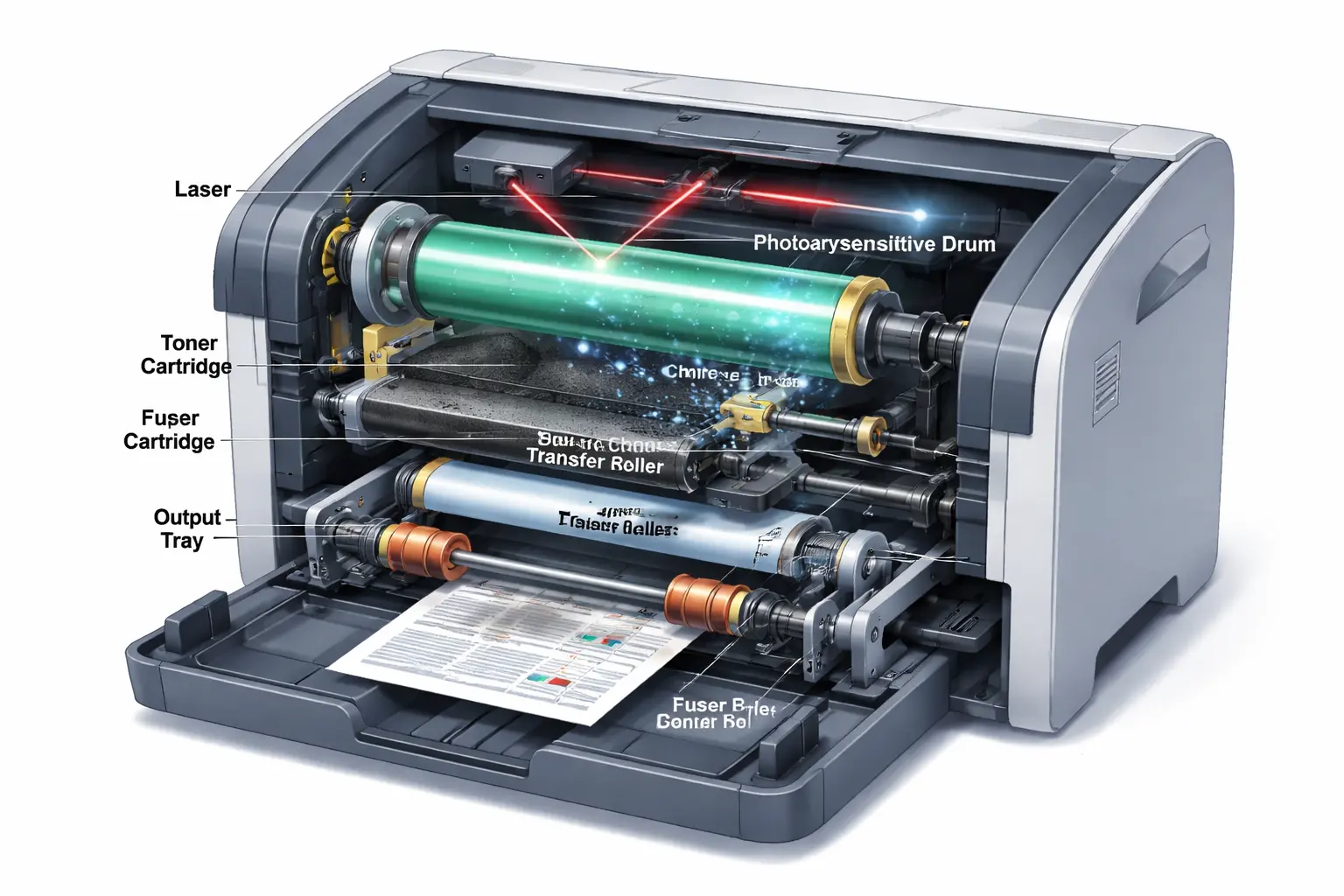
What Is the Correct Order of Steps for Laser Printing? If you use a printer often, you may think it is just a simple “click and print” process. I used to think the same thing, too. But when you look inside a laser printer, things get a little more interesting—and honestly, a bit surprising.
A laser printer does not print everything at once. It follows a fixed laser printing process in which each step must occur in the correct order. First, your file goes into the printer, then a laser beam draws the image on a charged drum. After that, toner sticks to the drum, transfers onto the paper, and finally, a hot fuser melts it so the print becomes permanent.
What I find really impressive (and a bit strict, honestly) is how sensitive the system is. If even one step is out of order, the printer will not give a proper result. That is why the correct sequence is so important in a laser printer.
In this guide, I will explain the steps in a very simple way so you can clearly understand what is happening inside your printer without any confusion or heavy technical words.
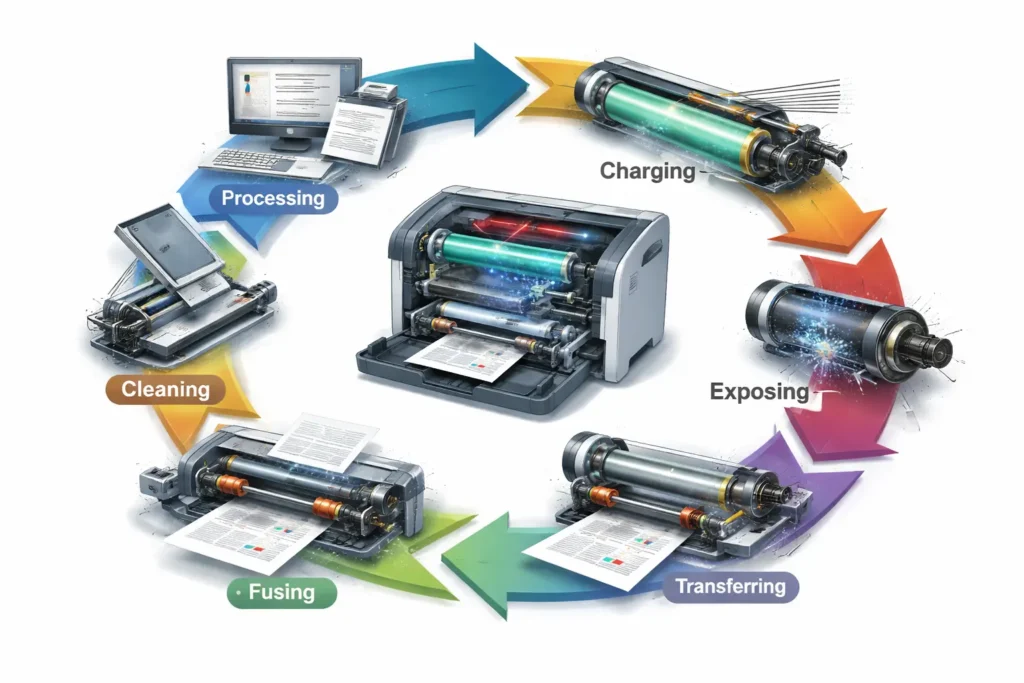
Quick Answer: Correct Order of Steps for Laser Printing
Here is the simple and clear order followed inside a laser printer during every print job. I’ll keep it straight so you can easily understand how the process works without getting confused.
Correct Order of Steps:
- Processing (sending the print job to the printer)
- Charging (creating an electrical charge on the drum using a corona wire or charge roller)
- Exposing (laser beam draws the image on the drum)
- Developing (negatively charged toner particles stick to the image on the drum)
- Transferring (positively charged paper pulls toner from the drum using a transfer roller)
- Fusing (heat and pressure from the fuser unit melt toner onto the paper)
- Cleaning (removing leftover toner and resetting the drum for the next print job)
Inside a laser printer, everything follows this exact sequence. The electrostatic charge on the drum helps the toner powder stick in the right areas and move onto the sheet of paper. Then the fuser uses heat and pressure to lock it in place so you get a permanent printed page.
Even in color laser printers, whether it’s cyan or magenta, the same order is followed to keep the print quality consistent every time.
Laser Printing Process: 7 Steps Explained in the Correct Order
When people try to understand how laser printers work, they often compare them with an inkjet printer, but both are completely different systems. An inkjet printer uses liquid ink, while a laser printer works with light, electricity, and dry powder. I remember when I first learned this—it honestly felt confusing at first, but once you see the flow, it actually makes sense.
The steps of laser printing always follow a fixed order. If even one step goes wrong, the whole print job is affected. Many users quickly blame the toner cartridge, but the issue can actually come from any stage inside the process.
Step 1 – Processing (Sending Data)
This is where everything starts. You send a file from your computer, and the printer converts it into printable data.
The system decides how each part of the page will appear. Even an inkjet printer does this, but in a laser printer, this data directly controls how the image will be built on the drum.
Without this step, nothing else can happen.
Step 2 – Charging (Preparing the Drum)
Now the area of the drum is given a negative charge using a corona wire or charge roller.
This step is very important because it prepares the drum to “receive” the image. If the charge is uneven, the print looks weak or patchy, and users often get frustrated here without knowing the real reason.
At this point, the surface of the drum is fully ready for the laser to draw on it.
Step 3 – Exposing (Laser Draws the Image)
A laser beam now draws the image by removing charge from specific areas of the drum.
It may sound invisible—and it is—but the pattern is already forming. The charged and uncharged parts create a hidden map of your page.
This is where the real structure of the print starts, inside the laser printer’s working process.
Step 4 – Developing (Toner Sticks to Image)
Here, the toner cartridge releases fine toner powder onto the drum.
The toner sticks only to the charged parts. This is where attraction toner action happens because of electrical forces.
Unlike an inkjet printer, there is no liquid ink here at all. Everything is dry and controlled by charge. This step is where the image becomes visible on the drum for the first time.
Step 5 – Transferring (Image Moves to Paper)
Now the image moves from the drum to the paper. The paper gets a positive charge, and it pulls the toner off the drum.
The toner cartridge has already done its job by placing the image correctly, and now it transfers onto the page.
If something goes wrong here, you may get faded prints or missing sections, which can be really annoying during an important print job.
Step 6 – Fusing (Heat Locks the Image)
The paper now goes through the fuser, where heat and pressure melt the toner into the page.
This step makes the print permanent. Without it, the toner would easily rub off.
Compared to an inkjet printer, laser prints feel more durable because of this heating process. This is also why laser printer works are preferred for office documents that need long-lasting quality.
Step 7 – Cleaning (Reset for Next Print)
Finally, the drum is cleaned to remove leftover toner and reset everything.
This step clears the area of the drum so the next print job starts fresh without marks or streaks.
If this part is not done properly, you might see repeated lines or ghost images on the next page, which is something users often complain about.
Why the Order of Laser Printing Steps Matters?
The seven steps of laser printing are not random at all. They follow a very strict flow inside the printer, and honestly, this is where many people get confused when using a printer at home or in the office.
From my experience working with printing technology, I’ve seen users blame printer toner cartridges again and again when something goes wrong. But most of the time, the real issue is not the cartridge—it’s the order of the process. A laser printer uses precise timing, and if that timing breaks, the whole toner image process fails.
Let’s understand why this order actually matters so much.
What Happens If the Order Changes
This is where things get serious.
A step in the laser printing process is like a chain link. If one link breaks or moves out of order, the result becomes messy or incomplete. I’ve personally seen printers waste pages because a simple step went wrong, and it always feels frustrating—especially when you’re in a hurry.
For example:
- If step 1 (processing) fails, the printer cannot understand the file.
- If the OPC drum is not properly charged, the image will not form correctly.
- If the drum unit is not correctly prepared, the latent image will be weak or missing.
- If toner is applied before proper exposure, the toner image becomes random and unclear.
- If fusing happens too early or too late, the print will smear or not stick.
In simple words, everything depends on perfect order. There is no shortcut here, even if people wish there was.
I get a bit frustrated when users think replacing printer toner cartridges will fix every issue. It doesn’t. The real problem is often hidden in the sequence happening inside the printer.
Why Each Step Depends on the Previous One
Every single step in the laser printing process is connected. Nothing works alone.
First, step 1 sends data to the system. Then the drum is charged and gets ready to hold an image. After that, the OPC drum is exposed to a laser beam, which creates a latent image. This is invisible but very important.
Now comes something interesting. The charged areas of the drum help attract toner particles, forming a clear toner image on the surface. Without proper exposure, this attraction does not happen correctly.
Then the image is transferred to the paper, and finally, heat locks everything in place.
Here is a simple breakdown to make it easier:
| Step | What Depends On It | Why It Matters |
| Step 1 | Nothing before it | Starts the process |
| Charging | Step 1 | Prepares the drum unit |
| Exposure | Charging | Creates a latent image |
| Developing | Exposure | Forms a toner image |
| Transfer | Developing | Moves the image to paper |
| Fusing | Transfer | Fixes print permanently |
I’ve worked with many printer toner cartridges, and one thing I strongly believe is this: good hardware alone is not enough. Even the best cartridge cannot fix a broken process.
The truth is, this printing technology is built on precision. If one step is off, the final output suffers. That’s why professionals care so much about the correct order—it saves time, reduces waste, and improves print quality.
And yes, I’ll admit something here… it still surprises me how a simple sheet of paper goes through so many controlled steps just to give us a clean result. But that’s the beauty of how a laser printer uses science in a very organized way.
Laser Printing Steps, What Happens & Purpose
Many people think a printer just prints instantly, but inside a laser printer, everything follows a very controlled system. I’ve seen users worry about paper jams or higher printing costs, but often the real issue is how one step in the process affects the next. Once you understand the flow, it actually becomes easy to see why print quality changes.
A laser printer uses digital data, static electricity, and a negative electrical charge to build a visible toner image step by step. Every printer part plays its role, and even a small issue in the paper feed can affect the final result.
Here is a simple breakdown of the laser printing steps:
| Step | What Happens Inside the Printer | Purpose |
| Processing | Digital data is received by the printer | Prepares the print job |
| Charging | The drum gets a negative electrical charge | Prepares the surface for the image |
| Exposing | Laser draws an image (the next step is exposing) | Creates an invisible pattern |
| Developing | Toner uses static electricity to attract toner particles | Forms a visible toner image |
| Transfer | The image moves through the transfer belt and paper feed | Moves toner onto paper |
| Fusing | Heat and pressure lock the toner onto the paper | Makes print permanent |
| Cleaning | Electrostatic erase removes leftover toner | Resets the printer for next use |
Honestly, I’ve seen many people blame cartridges or ink issues, but in most cases, the real cause is how the internal process flows. When each step works properly, even basic black and white printers can produce sharp results without increasing printing costs.
Easy Trick to Remember the Correct Order
If all the steps feel hard to remember, don’t worry—you are not alone. Many people get confused when learning how a laser printer works, especially when they compare it with color printing or an inkjet printer. I’ve seen this confusion many times, so I like using a very simple trick instead of heavy memorization.
Just remember this flow:
Process → Charge → Expose → Develop → Transfer → Fuse → Clean
Now think of it like a paper moving inside the printer. First, data is pulled from the paper tray, then the drum gets ready, and the image is drawn behind the laser light. After that, the toner sticks, the image is transferred to paper, heat seals it, and finally, everything resets.
Here is an even easier way to see it:
| Stage | Simple Idea |
| Process | File enters the printer |
| Charge | Drum gets ready |
| Expose | The image is drawn |
| Develop | Toner sticks |
| Transfer | Image moves to paper |
| Fuse | Heat locks it |
| Clean | Printer resets |
Just imagine paper moving through the system and passing by the toner, where only the needed areas grab it. The system also neutralizes the electrical charge, so toner from sticking doesn’t happen everywhere. Then the same process is repeated for every new page.
Once you picture it like a flow, it becomes much easier to remember without stress.
Real-Life Example: What Happens When You Print a Document
To really understand laser printing, it helps to see a real example. I always prefer explaining it this way because theory alone feels dry. And honestly, I’ve seen many people get confused until they see the full flow in simple terms.
Let’s say you open a document and press print. What happens next is a smooth but very detailed process inside the printer. Unlike thermal printers, which use heat directly on special paper, a laser printer builds the image step by step using light, charge, and toner.
When You Click Print
The moment you click print, your file becomes digital instructions. The printer receives this data and starts preparing the job.
According to the image data, the printer decides where text and shapes should appear on the page. At this stage, nothing is visible yet—it is all planning inside the system.
I find this part interesting because most users think printing starts instantly, but actually, the printer is “thinking” first. It feels a bit like a quiet preparation phase before action begins.
Inside the Printer (Step-by-Step Flow)
Now the real process begins inside the printer:
- The drum gets charged so it can hold an image.
- A laser draws the pattern on the drum.
- Toner sticks to the correct areas based on charge differences.
- The paper moves forward and collects the toner.
- Heat and pressure lock everything in place.
I’ve seen many cases where people blame toner issues, but in reality, the problem often starts earlier in the process. That’s something I wish more guides explained clearly—it saves users a lot of frustration.
Everything works in a strict order, and even a small delay or fault can affect the final print quality.
Final Output on Paper
At the end, the paper comes out with the final printed content. The image that started as digital data is now physically on the page.
The toner is fixed permanently, so it does not smudge easily. This is one reason many offices still prefer laser printers over other systems.
From my experience, when everything works correctly, the result feels very satisfying. A clean, sharp page comes out exactly as expected. But if any step is off, you immediately notice issues like fading or uneven printing—and that’s usually where people start troubleshooting without understanding the real cause.
In simple terms, printing is not just about ink or toner—it is a carefully controlled process happening behind the scenes every time you press that button.
Common Mistakes About Laser Printing Steps
When people try to understand how a printer works, especially a laser printer, they often make small but important mistakes. I’ve seen this many times in real troubleshooting work, and honestly, it gets a bit frustrating because most issues come from misunderstanding the basics—not from hardware failure. The quality of the printer is usually fine, but the confusion starts with how people think the process works.
Let’s clear up the most common mistakes in a simple way.
Mixing Laser and Inkjet Process
One big mistake is mixing laser printer steps with an inkjet printer. Both look similar from the outside, but inside, they work very differently.
An ink cartridge sprays liquid ink, while a laser system uses powder. In laser printing, the image is formed using static charge, and then toner is transferred onto paper. Some users wrongly assume ink behaves the same way, but it doesn’t.
I’ve even seen people try cleaning a laser unit like an inkjet, which honestly causes more harm than good. That’s where confusion really starts.
Confusing Charging and Cleaning
Another common issue is mixing up the charging stage with the cleaning step. These two are completely different, but beginners often think they do the same job.
Charging prepares the drum so it can form an image. Cleaning happens at the end to remove leftover particles and reset the system. If someone assumes both steps are similar, the whole process becomes unclear.
Sometimes, excess toner builds up because the cleaning stage is ignored, and then users complain about poor prints. But the real issue is simply missing the final step in the cycle.
Wrong Step Order Myths
There is also a common myth that the laser printing steps can happen in any order. That is not true at all.
The process is fixed: each step depends on the previous one. If the order changes, the print fails or looks broken. For example, exposure must happen before transfer; nothing forms correctly on paper.
Some people even think the laser directly prints on paper, but in reality, it works instead of a laser drawing on a drum, then moving the image forward. If you skip that structure, the system simply won’t work.
I’ve seen users blame the printer quickly when issues appear, but most of the time, the problem comes from misunderstanding the sequence, not the machine itself.
And one small detail people miss is how toner behaves on the drum. It sticks properly only when everything is aligned, and even a tiny mismatch can cause toner to move away from the drum incorrectly or leave marks on the page.
Conclusion
Once you understand how laser printing works, it really starts to make sense. The whole process inside the printer follows a fixed order, and every step depends on the one before it. From sending the file to the final cleaning stage, everything works like a connected flow.
In real use, most printing issues don’t come from serious damage. They usually happen when people misunderstand the process or blame the wrong part, like toner or cartridges, without checking how the system actually works.
When all steps happen in the right order, the result is simple—clean, sharp pages that look the way they should. That’s the main strength of laser printing: it stays consistent when the process is followed correctly.
So if you take one thing from this guide, let it be this: printing is not random. It is a step-by-step system, and when the order is right, the result also stays right.
Frequently Asked Questions
Why is the order of laser printing steps important?
The order is important because each step depends on the previous one. If the sequence breaks, the printer cannot form a proper image. This leads to poor or incomplete printing.
How many steps are in the laser printing process?
There are 7 main steps in laser printing. Each step plays a specific role in creating the final print. Together, they produce a complete printed page.
What does the laser do inside a laser printer?
The laser draws the image on the drum by creating an electrical pattern. This pattern decides where the toner will stick. It is the main step that forms the structure of the print.
What is the function of the drum in laser printing?
The drum holds the image created by the laser and attracts toner to it. It then transfers the toner onto the paper. This step is essential for creating a clear final print.
Is laser printing the same as inkjet printing?
No, they are different technologies with different methods. Laser printing uses toner powder and heat to create images. Inkjet printing uses liquid ink sprayed onto paper.

Willis C. Mathes
I’m Willis C. Mathes With hands-on experience and technical knowledge of printers, I dive deep into printer reviews, troubleshooting, and tips, ensuring you get the most out of your printing investment.