3d printer glue stick can help solve one of the most common 3D printing problems: poor bed adhesion. When prints fail to adhere properly, they may warp, lift at the corners, or detach during the print, wasting time and material. Using a glue stick creates a more reliable surface for the first layer and can improve overall print success. In this article, you’ll discover when to use a 3d printer glue stick, which types work best, and how to avoid common adhesion issues.
What Is a 3D Printer Glue Stick?
A 3D printer glue stick is an adhesive product used to help printed objects stay attached to the printing surface during the first layer. Although it looks similar to a regular school glue stick, its purpose in 3D printing is very different. It creates a thin coating that helps reduce lifting and improves printing reliability. Hobbyists, makers, and professionals use this simple solution because it is affordable and easy to apply.
Why 3D Printers Use Glue Sticks
One common challenge in 3D printing is keeping the object firmly attached during printing. As the heated filament cools, it can shrink slightly and pull away from the surface. This may cause corners to lift or the entire object to fail before completion.
A glue stick helps create a stronger bond between the printing surface and the printed object. Large flat prints on glass surfaces sometimes develop corner lifting during long print jobs. A thin adhesive layer often improves stability and helps the model stay attached until completion. This is one reason many users keep a glue stick available for difficult prints.
How Does Glue Stick Improve First-Layer Adhesion?
The first layer is the foundation of every successful 3D print. If it does not stay in place, the remaining layers may shift, resulting in poor quality or a failed project.
A glue stick improves first-layer adhesion by providing extra grip when the filament touches the surface. This added hold helps keep the object stable throughout the printing process. Better adhesion can reduce warping, improve print quality, and increase the chances of completing longer prints successfully. Even a thin coating is often enough to produce more consistent results.
Do You Need a Glue Stick for 3D Printing?
A glue stick can be helpful in 3D printing, but it is not always required. The answer depends on the filament being used, the condition of the print surface, and how well the machine is calibrated. Some users get excellent results without any extra adhesive, while others struggle with lifting corners on larger projects.
Two identical prints can behave differently depending on surface preparation. Proper adhesion often reduces edge lifting and improves print consistency. Better surface preparation often leads to more consistent print results, while the other showed slight edge lifting after about 90 minutes.
The good news is that modern printers have improved significantly. Textured surfaces and advanced materials often reduce the need for extra help. Still, there are situations where a glue stick becomes a useful tool rather than an optional accessory.
When a Glue Stick Is Recommended
A glue stick is usually recommended when working with larger objects, materials that tend to warp, or older machines that struggle with surface grip. It can also help when the build area has been used repeatedly and no longer provides consistent holding power.
The product is often useful when printing with PETG, ABS, or other materials that place more stress on the surface during cooling. In these situations, users often apply a thin layer before starting the job to improve stability.
The table below shows common situations where it can help:
| Situation | Recommendation |
|---|---|
| Large flat models | Recommended |
| ABS printing | Recommended |
| PETG printing | Recommended |
| Frequent corner lifting | Recommended |
When a Glue Stick Is Not Necessary
A glue stick may not be needed when the bed is properly leveled, the surface is in good condition, and the filament already sticks well on its own. PLA often performs well on modern textured surfaces without additional support.
In some cases, adding adhesive where it is not needed can create extra cleanup work later. A quick wipe with water may solve the issue, but avoiding unnecessary products keeps the process simpler.
For small projects and well-tuned machines, the best approach is often to test the setup first and only add extra support if a problem appears.
Best Glue Sticks for 3D Printing
Not all adhesives perform the same way during 3D printing. Some products work well for basic projects, while others are designed specifically for challenging materials and larger models. Choosing the right option depends on the filament being used, the printing surface, and personal preference.
Different adhesive products perform differently depending on the filament and build surface being used. The goal was simple: achieve reliable first-layer adhesion while making removal easy after printing. While each product worked, some delivered more consistent results than others.
The table below provides a quick comparison of popular glue sticks for 3D applications.
| Product | Best For | Ease of Use |
|---|---|---|
| Elmer’s Glue Stick | Everyday printing | Easy |
| UHU Glue Stick | Larger models | Easy |
| Scotch Purple Glue Stick | Visibility during application | Easy |
| Magigoo | Advanced materials | Very Easy |
| 3DLac Stick | Professional use | Easy |
Elmer’s Glue Stick
Elmer’s is one of the most widely used glue sticks for 3d printing because it is affordable and easy to find. A thin layer of glue can help improve surface grip and reduce corner lifting. It works especially well with PLA and smaller projects.
UHU Glue Stick
UHU is known for creating a smooth coating on the build plate. Users often choose it for larger prints where stronger holding power is needed. When using glue stick products like UHU, even coverage usually delivers the best results.
Scotch Purple Glue Stick
The purple color helps users see exactly where the adhesive has been applied. Once dry, the color fades, making it easier to avoid missed spots. This small feature can save time and reduce setup mistakes.
Best Glue Stick for PLA, PETG, ABS, and ASA
Different filaments behave differently during printing, so the same adhesive does not always produce the same results. A product that works perfectly for PLA may struggle with ABS or ASA. Choosing the right option can improve reliability and reduce failed projects.
Different filaments respond differently to temperature and surface conditions, brackets, and workshop organizers, filament behavior changed noticeably as temperatures increased. Some materials stayed firmly attached throughout the process, while others tried to lift near the edges before the job could finish. This is where selecting the right adhesive becomes important.
| Filament | Recommended Option | Main Reason |
|---|---|---|
| PLA | Elmer’s or UHU | Reliable everyday performance |
| PETG | Magigoo | Easier release after printing |
| ABS | 3DLac Stick | Better hold at higher temperatures |
| ASA | 3DLac Stick or Magigoo | Helps reduce warping |
PLA
PLA is usually the easiest filament to work with. On a properly prepared surface, it often sticks well without much effort. However, for larger models, a cheap glue stick can provide extra security and help the project start smoothly.
PLA generally prints successfully on a properly prepared surface, although larger models may benefit from additional adhesion support. The result was a clean finish with no edge separation.
PETG
PETG is known for strong bonding. In some situations, it can attach so firmly that removing the object becomes difficult. A suitable adhesive acts as a protective layer and helps prevent surface damage.
Many Prusa users report that a release layer makes removal easier while still providing strong adhesion during printing.
ABS
ABS is more challenging because it shrinks as it cools. That shrinking force can cause corners to lift before the project is complete. A stronger adhesive solution helps keep the model stable and reduces the chance of failure.
It is also important to keep the nozzle temperature consistent, as temperature fluctuations can increase warping.
ASA
ASA shares several characteristics with ABS but is commonly used for outdoor applications. It benefits from stronger surface grip because it is prone to lifting during longer prints.
A good adhesive layer can help prevent movement and reduce the risk of damage caused by warping. Unlike super glue, products designed for 3D printing are intended to provide temporary holding power and easier removal once the project is complete.
Magigoo
Magigoo is designed specifically for 3D printing. Unlike standard school adhesives, it is formulated to help an object stay secure during printing while allowing easier removal after cooling.
3DLac Stick
3DLac Stick is a specialized product made for 3D printing surfaces. It is often chosen by experienced users who frequently use glue for demanding projects and want consistent performance across different materials.
How to Apply Glue Stick on a 3D Printer Bed?
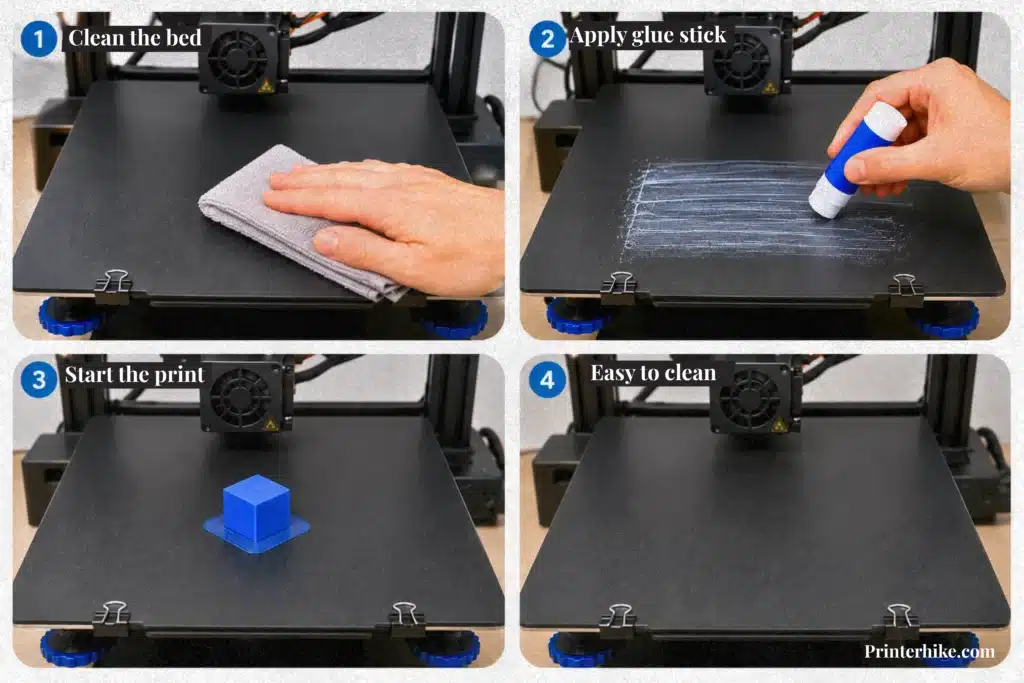
Using a glue stick correctly can improve bed adhesion and reduce failed prints. While the process is simple, proper preparation is important. A rushed setup can lead to corner lifting, poor bonding, or uneven results. Taking a few extra minutes before printing often saves a lot of time later.
Preparing the Build Plate
Before applying any adhesive, the build plate should be cleaned thoroughly. Dust, fingerprints, and leftover residue can prevent proper bonding. A quick wash with warm water and a small amount of soap usually removes most contaminants.
The printing surface should also be inspected for damage or debris. If tape or another covering is being used, it should sit flat without wrinkles. Creating a clean surface area gives the filament a better chance of staying attached throughout the process.
Applying the Glue Correctly
The adhesive should be spread evenly across the area where the model will be printed. A thin coating works better than a thick one. Applying too much product can create a rubbery texture that affects the object’s bottom.
For larger models, it is important to cover the entire printing zone. A water-soluble glue stick is often preferred because it is easier to remove after the job is complete. Thin and even coverage usually produces cleaner results than excessive adhesive buildup.
Starting the Print
Once the adhesive is in place, the print can begin. The first few minutes are worth watching because they reveal whether the setup is working correctly. If the plastic settles smoothly and the edge remains flat, the print is usually off to a good start.
When printing PETG or another demanding material, proper adhesion early in the process can prevent problems later. A strong foundation often leads to a cleaner finish and a more successful result overall.
Common Glue Stick Mistakes to Avoid
A glue stick can improve print success, but it is not a magic fix. When problems appear, the adhesive is often blamed even though the real issue comes from setup mistakes. Small errors can reduce first-layer adhesion and increase the chances of a failed print. Fortunately, most of these problems are easy to avoid.
Most adhesion problems are caused by setup issues such as poor leveling, contamination, or incorrect temperature settings. Correct leveling and temperature settings usually solve most adhesion issues.
Applying Too Much Glue
One of the most common mistakes is applying an excessive amount of adhesive. A thick coating can create an uneven surface and affect the bottom of the printed part. Instead of improving grip, too much product may actually reduce performance.
A thin and even layer is usually enough. If visible streaks or heavy buildup begin to mark the printing area, it is a sign that too much adhesive has been applied.
Printing on a Dirty Bed
A dirty print bed can cause adhesion problems even when a quality product is being used. Dust, fingerprints, and leftover residue create a barrier between the filament and the surface.
Some users try adding more adhesive or even a spray product when prints fail to stick. In reality, cleaning the surface often solves the problem much faster. A clean surface provides a stronger foundation for successful printing.
Incorrect Bed Temperature
Temperature settings play a major role in print quality. If the surface is too hot or too cool, the filament may not bond properly.
Different materials require different settings, so checking the recommended range before printing is important. A few degrees can make a noticeable difference in stability and surface quality.
Poor Bed Leveling
Even the best kind of glue cannot compensate for poor leveling. If the nozzle is too high, the filament may not attach correctly. If it is too close, material flow can become inconsistent.
Taking a few minutes to level the printer correctly helps create a clear path to better results and more reliable prints.
Glue Stick vs Hairspray vs Magigoo
Glue sticks, hairspray, and Magigoo are three popular options for improving print reliability. Each product helps keep models attached during printing, but they differ in cost, convenience, and overall performance. The right choice depends on the type of projects being printed and how much maintenance a user is willing to do.
| Product | Cost | Ease of Use | Overall Reliability |
|---|---|---|---|
| Glue Stick | Low | High | Very Good |
| Hairspray | Low | Moderate | Good |
| Magigoo | Higher | High | Excellent |
Adhesion Performance
In practical testing, all three products can improve print success. Magigoo often delivers the most consistent results, especially on larger or more demanding projects. Glue sticks also perform very well and provide dependable holding power for everyday printing tasks. Hairspray can work effectively, although results sometimes vary depending on the brand and application method.
Ease of Use
Glue sticks are popular because they are simple to apply and create very little mess. Magigoo offers a similar experience and is designed specifically for 3D printing. Hairspray requires a bit more care during application since it can spread beyond the intended area if sprayed too closely.
Cleanup and Maintenance
Cleanup is an important factor that is often overlooked. Glue sticks are easy to remove with warm water and leave minimal residue. Magigoo also cleans up quickly and keeps the workspace tidy. Hairspray may require more frequent cleaning because residue can build up over time.
For most users, a glue stick offers an excellent balance of affordability, convenience, and reliable performance, making it a practical choice for everyday printing.
How to Clean Glue Stick Off a 3D Printer Bed
Cleaning leftover adhesive from the printer surface is an important maintenance task. While a glue stick helps improve print success, residue can build up after several projects. If it is not removed regularly, future prints may not perform as expected. A clean surface provides more consistent results and helps reduce unnecessary troubleshooting.
Cleaning a Glass Bed
Glass surfaces are usually simple to maintain. Once the printer has cooled completely, a soft cloth and warm water can remove most adhesive residue. If some areas remain stubborn, letting warm water sit on the surface for a few minutes often loosens the buildup.
Regular cleaning helps maintain consistent adhesion and reduces the need for troubleshooting between print jobs. Clean surfaces generally provide more predictable adhesion. A clean build plate often reduces setup issues and improves first-layer performance.
Cleaning a PEI Surface
PEI surfaces require a gentler approach. Although they are durable, aggressive scrubbing can wear them down over time. A soft cloth and warm water are usually enough for routine maintenance.
If residue remains after the first wipe, repeating the cleaning process is safer than applying excessive pressure. Taking a little extra time protects the surface and helps preserve its performance.
Before starting the next project, it is worth checking the surface carefully. Removing any remaining residue helps create a better foundation for printing and reduces the chance of unexpected issues. Regular cleaning helps maintain consistent print performance.
Troubleshooting Bed Adhesion Problems
Bed adhesion problems can happen even when a printer is set up correctly. A model may fail to stick at the beginning, corners may start lifting during printing, or the entire object may come loose before completion. These issues are especially frustrating during long print jobs. In most cases, however, the cause is something simple such as surface contamination, incorrect leveling, temperature settings, or poor first-layer setup. Identifying the problem early helps improve print success and reduces wasted time and material.
| Problem | Common Cause | Recommended Fix |
|---|---|---|
| Prints Not Sticking | Dirty surface, incorrect leveling, poor first layer | Clean the surface and re-level the printer |
| Corner Warping | Uneven cooling, temperature fluctuations | Optimize temperature settings and reduce drafts |
| Prints Releasing During Printing | Weak initial bond, setup issues | Check calibration and improve surface preparation |
Conclusion
A glue stick is one of the simplest and most affordable tools for improving 3D printing success. When used correctly, it can help reduce failed prints, improve first-layer performance, and make larger projects more reliable. The right product, proper application, and regular surface maintenance all play an important role in achieving consistent results.
While not every project requires extra adhesive, having a glue stick available can be helpful when dealing with lifting corners or challenging materials. By choosing the right option and following good printing practices, users can spend less time troubleshooting and more time creating successful prints.
Frequently Asked Questions
What is the purpose of using a glue stick on a 3D printer bed?
A glue stick creates a better bond between the filament and the build plate during the first layer. This extra grip helps keep the model stable and lowers the chance of corner lifting or print failure.
Where to purchase specialized 3D printer bed adhesive sticks?
Specialized products such as Magigoo and 3DLac are available from 3D printing suppliers, manufacturer websites, and major online marketplaces. Many local electronics and maker stores also carry them.
How to properly apply adhesive stick for 3D print bed adhesion?
Clean the build plate first, then apply a thin and even coating only where the model will be printed. A light layer is usually enough to improve surface bonding without creating excess residue.
Troubleshooting first-layer adhesion issues with a glue stick.
If the first layer does not stick properly, check bed leveling, nozzle height, and temperature settings. A clean build plate and correct calibration are often more important than adding extra adhesive.

Willis C. Mathes
About the Author
Willis C. Mathes is a technical writer focused on 3D printing workflows, printer setup, and troubleshooting. His content is based on practical research into FDM and resin printing systems, slicer optimization, filament handling, and common beginner printing problems.
He regularly covers topics related to printer performance, calibration, maintenance, and beginner-friendly 3D printing setups.