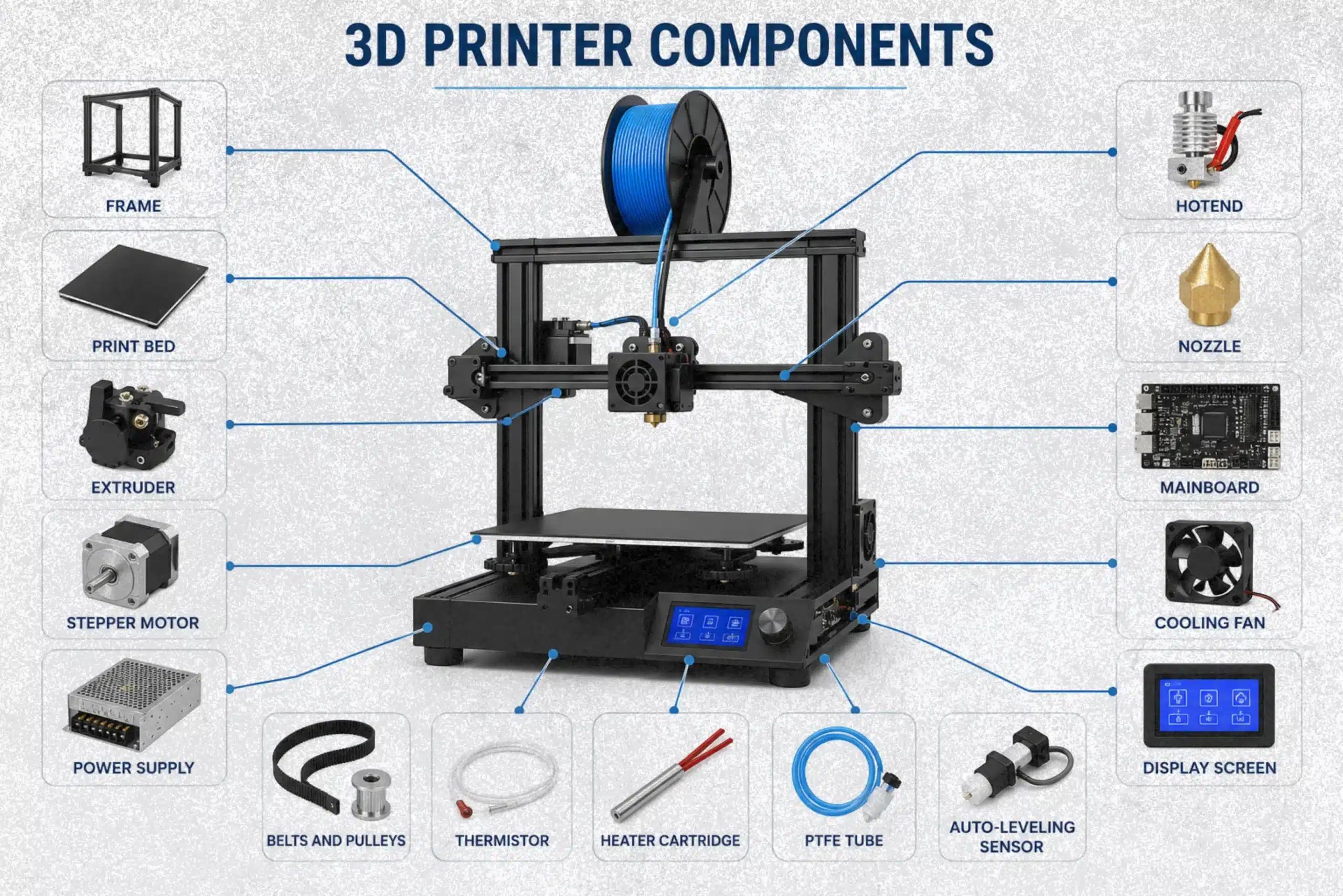
Many 3D printing problems, such as poor print quality, layer shifting, nozzle clogs, and failed prints, can often be traced back to a specific hardware issue. The challenge is that many users do not fully understand how different 3D printer components affect the printing process. Without that knowledge, troubleshooting becomes difficult, and upgrades can feel confusing. This article explores the most important 3D printer components, their functions, and how they work together to support reliable printing and easier maintenance.
What Are 3D Printer Components?
3D printer components are the parts that allow a machine to create objects from a digital design. Each component performs a specific task, such as controlling movement, managing temperature, or coordinating different systems during the printing process.
A 3D printer depends on multiple parts working together smoothly. If one component develops a problem, print quality can suffer, or the job may fail. For example, a movement issue can cause shifted layers, while a temperature-related fault can affect the final result.
As 3D printing becomes more popular across industries, learning how these components work makes it easier to troubleshoot problems, maintain the machine, and achieve more consistent print results. This guide explains the most important components, their functions, and how they work together inside a modern 3D printer.
3D Printer Components List at a Glance
A modern 3D printer contains several systems that work together to create accurate objects. Some parts control movement, others manage temperature, while a few handle power and communication. Understanding these components makes it easier to troubleshoot problems, choose upgrades, and maintain consistent print quality.
The hardware side of the 3D printing industry is especially important. In fact, hardware accounts for more than 65% of total market revenue, showing how critical these physical components are to the printing process.
The table below provides a quick overview of the major components found in most desktop machines.
| Component | Main Function |
| Frame | Supports and stabilizes the entire printer |
| Print Bed | Holds the object during printing |
| Extruder | Feeds material toward the melting system |
| Hotend | Melts material before deposition |
| Nozzle | Controls the flow and precision of output |
| Stepper Motor | Moves the machine accurately along different directions |
| Belts and Pulleys | Transfer movement between motors and axes |
| Mainboard | Processes commands and controls operations |
| Power Supply | Provides electricity to all systems |
| Heater Cartridge | Generates heat for the melting system |
| Thermistor | Monitors and regulates temperature |
| Cooling Fan | Helps maintain proper operating temperatures |
| PTFE Tube | Guides material between components in certain setups |
| Auto-Leveling Sensor | Assists with bed leveling and first-layer accuracy |
| Display Screen | Allows users to control settings and monitor progress |
This table serves as a quick reference before exploring each component in more detail. Knowing the function of each part makes troubleshooting, maintenance, and upgrades much easier.
Mechanical Components of a 3D Printer
Mechanical components are responsible for movement, stability, and positioning inside a 3D printer. These parts work together to ensure every layer is placed accurately. Even a small issue in the mechanical system can affect print quality, so these components play a critical role in the printing process.
Frame
The frame acts as the foundation of the machine. It holds all major assemblies in place and helps reduce vibration during operation. A strong frame improves stability and allows the printer to maintain accuracy, especially during long print jobs.
Print Bed and Build Surface
The print bed is where an object is created layer by layer. It must remain level and stable to support proper adhesion. The build plate surface also affects success rates. Popular options include glass and PEI sheets, which help printed objects stick during printing and release more easily afterward.
Belts, Pulleys, and Lead Screws
These components transfer motion throughout the machine. Belts and pulleys usually handle fast movement across horizontal directions, while lead screws often control movement on the Z axes. If a belt becomes loose, layer shifting and dimensional errors may occur.
Linear Rails, Wheels, and Bearings
Linear rails, wheels, and bearings guide moving parts smoothly. They reduce friction and help maintain precise positioning. Well-maintained motion guides contribute to cleaner prints and more reliable performance.
Stepper Motors
A stepper motor converts electrical commands into controlled movement. Most machines use several units to move different sections of the printer. The motor system allows precise positioning, which is essential for creating accurate models. Reliable movement is one reason why the stepper motor remains the standard choice in modern desktop printers. In one maintenance case, a printer began showing shifted layers halfway through several prints. The issue was eventually traced to a loose pulley connected to a stepper motor. After tightening the pulley, print accuracy returned to normal without replacing any parts.
Extrusion Components of a 3D Printer
The extrusion system is responsible for moving material from the spool to the printing area. It controls how material is fed, guided, and prepared before reaching the melting section. Even a well-built machine can struggle if the extrusion system is not working properly. Small feeding issues often lead to under-extrusion, weak layers, or inconsistent surface quality.
Extruder
The extruder grips the filament and pushes it through the system at a controlled rate. It works closely with a stepper mechanism to ensure the correct amount of material reaches the printing area. Accurate feeding is important because even slight variations can affect the final result.
During practical use, feeding problems are often traced back to worn gears, incorrect tension, or poor-quality material. These issues may seem minor at first, but they can quickly impact print consistency.
Direct Drive vs Bowden Extruders
The two most common designs are Direct Drive and Bowden systems.
| Feature | Direct Drive | Bowden |
| Material Control | Excellent | Good |
| Flexible Materials | Better | More Challenging |
| Moving Weight | Higher | Lower |
| Printing Speed | Moderate | Faster |
A Bowden setup places the drive system away from the print head, reducing weight and allowing quicker movement. Direct Drive designs provide better control, especially when working with flexible materials.
Filament
Filament is the raw material used to create objects in most FDM machines. It is available in different types, including PLA, PETG, ABS, and TPU. The quality of the filament often has a noticeable impact on print success. Moisture, dust, or inconsistent diameter can cause feeding problems and surface defects.
PTFE Tube
The PTFE tube guides filament smoothly between components. It reduces friction and helps maintain a steady flow. In Bowden systems, this tube plays an especially important role because the material travels a longer distance before reaching the hot section. A worn or damaged PTFE tube can restrict movement and reduce printing reliability. A common example occurs when an older PTFE tube develops wear near the hot end. Replacing the tube often restores smooth filament movement and eliminates intermittent under-extrusion on larger prints.
Hotend Components and Their Functions
The hot end is one of the most important parts of a 3D printing system. It is responsible for melting material and delivering it through the nozzle at the correct temperature. A well-designed hot end can improve print quality, while a poorly maintained one can lead to clogs, weak layers, and failed prints. Looking at the anatomy of a 3D printer, the hotend sits at the center of the material delivery process and works closely with several supporting components.
Hotend Assembly
The hotend assembly includes multiple parts that work together to control heat and material flow. These include the heat break, heat sink, heater cartridge, thermistor, and nozzle. In modern machines from brands such as Prusa and Bambu Lab, these systems are designed for quick heating and stable temperature control.
Heat Break
The heat break separates the hot and cool zones. Its job is simple but critical. It prevents excess heat from traveling upward and softening material too early. When this part fails, users often experience heat creep and feeding issues.
Heat Sink
The heat sink removes excess heat from the upper section of the hot end. Keeping temperatures under control, it helps maintain smooth material movement and reduces the risk of jams.
Heater Cartridge
The heater cartridge generates the heat required for printing. It sits inside the heater block and raises temperatures to the level needed for processing different materials. Stable heating helps maintain consistent results throughout a print.
Thermistor
The thermistor is a temperature sensor that constantly monitors heat levels. It sends information to the motherboard, allowing the firmware to make real-time adjustments for safe and accurate operation.
Nozzle
The nozzle controls how material exits the system. Different sizes affect print speed, detail, and layer appearance. A worn nozzle can reduce accuracy and create uneven surfaces. For example, a nozzle used for abrasive materials over an extended period may begin producing rough surfaces and inconsistent dimensions. Installing a new nozzle often improves print quality immediately.
Cooling Fans
Cooling fans support temperature management. One fan cools the upper assembly, while another helps solidify freshly deposited material. Without proper airflow, print quality can quickly decline, which can be surprisingly frustrating during long projects.
Electrical Components of a 3D Printer
Electrical components act as the control center of a 3D printer. While mechanical parts handle movement, the electrical system manages instructions, power distribution, monitoring, and safety. Without these components, the machine would not know where to move, when to heat, or how much material to extrude.
Mainboard
The mainboard is the brain of the printer. It receives instructions from the slicer software and coordinates every major function. It controls movement, temperature, and communication between connected components. If the mainboard develops a fault, the entire machine can become unreliable.
Stepper Drivers
Stepper drivers translate commands from the mainboard into precise motor movements. They help control speed, direction, and positioning accuracy. Quality drivers also reduce vibration and operating noise, creating smoother performance during printing.
Power Supply Unit
The power supply unit converts electricity into usable power for the printer. Most desktop machines use a 12V or 24V system. Stable power delivery is important because sudden voltage fluctuations can affect heating and movement accuracy.
User Interface
The user interface allows operators to start prints, adjust settings, and monitor progress. Modern displays provide access to temperatures, movement controls, and print status in a simple format.
Connectivity Options
Most printers support USB, SD cards, Wi-Fi, or network connections. These options make it easy to transfer files from a computer to the machine without complicated setup steps.
Filament Runout Sensors
A filament runout sensor detects when material is running low or has stopped feeding correctly. This feature can prevent failed jobs that waste time and material. During longer prints, it provides valuable peace of mind.
Auto Bed Leveling Sensors
Auto-leveling systems use a sensor to measure the distance between the print head and the bed surface. The printer automatically compensates for small height differences, helping create a more reliable first layer. This feature is especially useful when printing with PLA or when using a standard 0.4 nozzle, where proper spacing plays a major role in print success.
How 3D Printer Components Work Together During Printing?
Each component plays an important role, but print success depends on how all of them work together during the printing process. A successful print is the result of dozens of coordinated actions happening every second. From receiving a digital file to building a finished object, each system has a specific role. If one component falls behind, the entire process can be affected.
From Digital Model to Printed Object
The process begins with a 3D model that is prepared using slicing software. The slicer converts the design into G-code, which contains detailed instructions for the printer. These instructions tell the machine where to move, how fast to travel, and when to apply heat.
The file is then transferred through a network connection, USB cable, or SD card. Once the print starts, the control system reads each command and sends instructions to the movement and heating systems.
Step-by-Step Component Workflow
The table below shows how major components work together during a typical print.
| Stage | Component Action |
| File Preparation | Slicer generates G-code |
| Command Processing | The mainboard reads instructions |
| Motion Control | Motors move the X and Y axes and Z-axis |
| Material Delivery | The feeding system guides material through the Bowden tube or the direct path |
| Temperature Control | The heating system reaches the target temperature |
| Deposition | Material exits through a 0.4 mm opening and forms layers |
| Layer Building | Z-axis gradually raises the assembly |
| Completion | The finished object cools and is removed |
A good example can be seen during a long print lasting several hours. The printer may process thousands of commands while constantly adjusting movement and temperature. Components such as a 24V power system, internal resistor circuits, and even small 5V electronics all contribute to stable operation. When every part performs its job correctly, the machine produces accurate and reliable results from start to finish.
Which 3D Printer Components Matter Most?
Not all components have the same impact on printing results. Some parts directly affect quality, speed, and reliability, making them more important when troubleshooting or upgrading a machine.
Components That Affect Print Quality
The nozzle, motion system, and heating element have the biggest influence on print quality. A smaller nozzle can create finer details, while a larger nozzle helps complete jobs faster. Material consistency also matters. For example, uneven 1.75mm material can affect surface finish and dimensional accuracy. A direct drive system often provides better control when working with flexible materials.
Components That Affect Print Speed
Printing speed depends largely on the motion system and material flow. Faster movement, efficient feeding, and proper temperature control help reduce production time without sacrificing accuracy.
| Component | Main Impact |
| Nozzle Size | Speed and detail |
| Motion System | Travel speed |
| Feeding System | Material flow |
Components That Affect Reliability
Reliable performance comes from durable parts and proper monitoring. A worn Teflon liner, faulty sensor, or low-quality OEM component can lead to failed prints. Features such as optical monitoring and a responsive LCD screen help users detect issues early. In fused deposition modeling systems, dependable components often mean fewer interruptions and more successful prints.
FDM vs Resin Printer Components
FDM and resin printers use different components to create objects, even though both follow the same goal of building a model layer by layer. An FDM printer relies on parts such as the extruder, hotend, heat bed, cold end, Y-axis system, and end stop switches to control movement and material flow. Resin printers use a resin tank, UV light source, optical system, and build platform instead of a material-feeding setup. The circuitry inside both machines manages operations, but the hardware they control is very different. Comparing these systems side by side makes it easier to see how FDM and resin printers differ.
| Component Category | FDM Printer | Resin Printer |
| Material Type | Solid material | Liquid resin |
| Material Delivery | Extruder and hotend | Resin tank |
| Heating System | Heat bed and heating components | Not required |
| Motion System | X, Y-axis, Z-axis, end stop switches | Primarily Z-axis movement |
| Optical Components | Not required | UV light and optical system |
| Build Surface | Build plate | Build platform |
| Key Electronics | Circuitry, drivers, sensors | Circuitry, UV control system |
| Maintenance Focus | Mechanical and feeding parts | Resin handling and cleaning |
| Best For | Functional parts and prototypes | Highly detailed models |
Common 3D Printer Component Failures and Symptoms
Even well-maintained printers can develop problems as components wear over time. The good news is that most failures show warning signs before they become serious. Recognizing these symptoms early can save time, reduce wasted material, and prevent failed prints. The sections below cover some of the most common issues users encounter and the signs that usually point to a specific component.
Hotend Problems
Hotend issues often cause poor material flow, missing layers, or partial clogs. A printer may start producing thin or inconsistent lines when the hot end is blocked or not maintaining temperature correctly.
Thermistor Failures
A damaged thermistor can send incorrect temperature readings. Common signs include heating errors, unexpected print pauses, or temperatures that suddenly rise or fall during operation.
Worn Belts
Belts can stretch after long-term use. This usually appears as shifted layers, uneven dimensions, or movement that no longer feels precise.
Faulty Cooling Fans
Cooling fans help regulate temperatures throughout the printer. When airflow becomes weak, prints may show poor overhangs, soft corners, or overheating-related defects.
Power Supply Issues
Power supply problems can cause random shutdowns, heating failures, or difficulty starting the machine. Since every major system relies on stable power, these issues should be addressed quickly.
3D Printer Component Lifespan Chart
Like any machine, a 3D printer contains components that wear out over time. Heat, movement, and daily use gradually affect performance, even when the printer is maintained properly. Knowing the average lifespan of key components helps users plan replacements before print quality starts to decline. A simple inspection every few months can often prevent unexpected failures and reduce downtime.
| Component | Average Lifespan | Common Wear Signs |
| Nozzle | 3–12 Months | Poor detail, uneven extrusion |
| PTFE Tube | 6–12 Months | Feeding issues, discoloration |
| Belts | 1–3 Years | Layer shifting, loose tension |
| Cooling Fans | 2–5 Years | Noise, reduced airflow |
| Thermistor | 2–5 Years | Unstable temperature readings |
| Heater Cartridge | 2–5 Years | Slow or inconsistent heating |
| Build Surface | 6 Months–2 Years | Poor adhesion, visible wear |
Replacing worn components at the right time helps maintain print quality, improve reliability, and reduce the chances of failed prints.
Conclusion
Understanding 3D printer components is one of the best ways to improve print quality, troubleshoot problems, and keep a machine running smoothly. Every component, from the frame and motion system to the hotend and electronics, plays a specific role in the printing process. When these parts work together correctly, the printer can produce accurate and reliable results.
Familiarity with the major systems makes maintenance and upgrades much easier. A user who understands the purpose of each component can identify issues faster and make better decisions when replacing worn parts. Whether the goal is creating simple models or complex projects, a solid understanding of 3D printer components helps unlock the full potential of the machine and leads to more successful prints over time.
Frequently Asked Questions
How to choose the right extruder for flexible filaments?
A direct drive extruder is usually the best choice for flexible filaments because it provides better control and a shorter material path. It helps reduce bending and feeding issues that can occur with softer materials.
Where can I buy replacement nozzles for my 3D printer?
Replacement nozzles are available from manufacturer stores, 3D printing retailers, and online marketplaces. Always check the nozzle size, thread type, and material compatibility before purchasing.
How to choose the right build plate for my 3d printer?
Choose a build plate based on the materials being used and the level of adhesion required. PEI surfaces work well for a wide range of filaments, while glass plates are valued for their smooth finish and durability.
What are the best hotends available for 3d printers?
Popular hotends include options from E3D, Micro Swiss, and other trusted manufacturers known for reliable temperature control and material compatibility. The best choice depends on the printer model, printing speed, and the types of materials being used.

Willis C. Mathes
About the Author
Willis C. Mathes is a technical writer focused on 3D printing workflows, printer setup, and troubleshooting. His content is based on practical research into FDM and resin printing systems, slicer optimization, filament handling, and common beginner printing problems.
He regularly covers topics related to printer performance, calibration, maintenance, and beginner-friendly 3D printing setups.