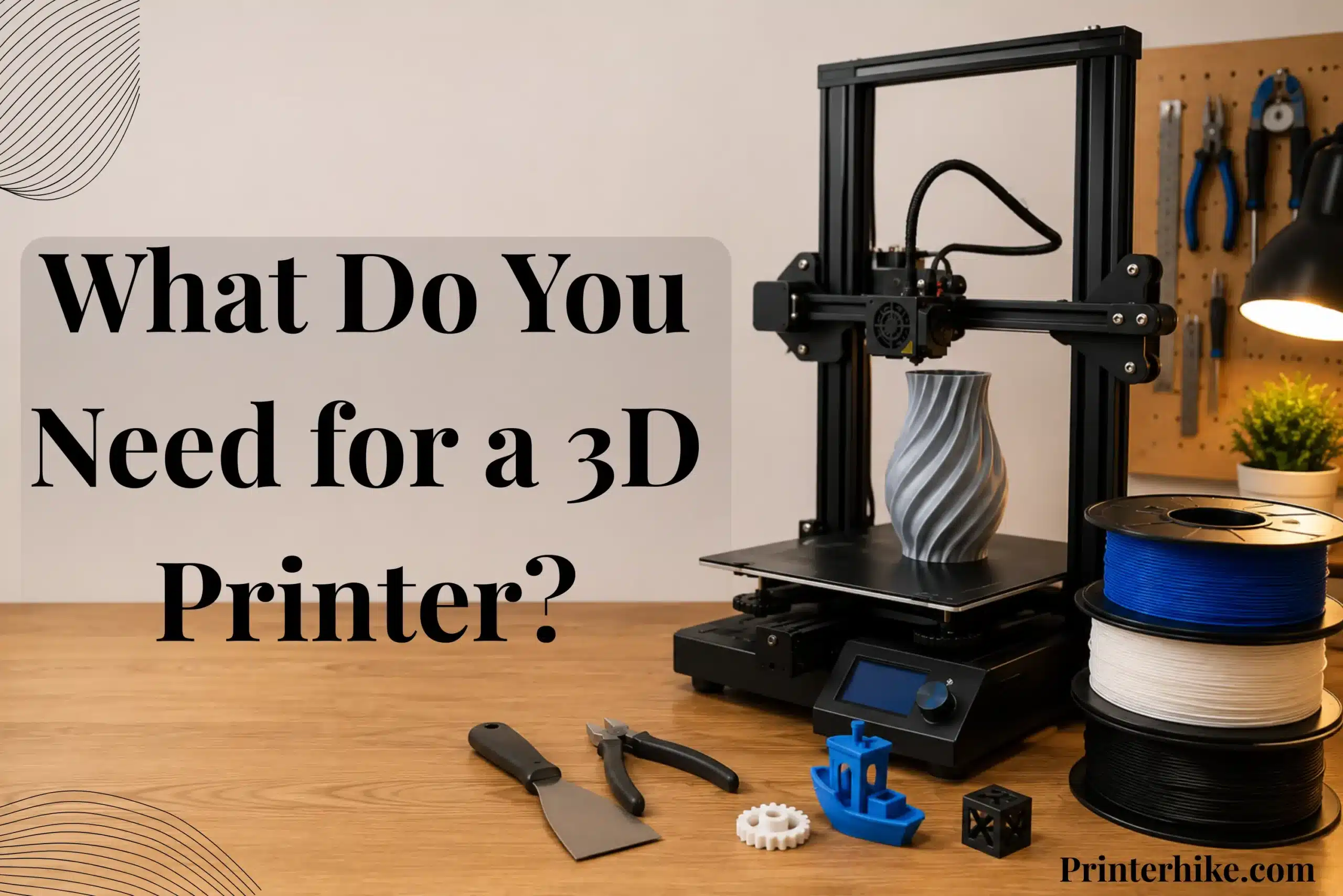
What Do You Need for a 3D Printer? Starting with a 3d printer feels exciting at first, but many new users quickly learn that the machine alone cannot handle everything. A successful 3d print also depends on the right filament or resin, slicer software, simple maintenance tools, and a clean workspace. Even small setup details like proper bed leveling, airflow, and print settings can affect the final result more than expected.
Many online guides push expensive upgrades right away, which often makes the process confusing for first-time users. Some people spend heavily on accessories while overlooking simple essentials such as filament storage containers or nozzle cleaning needles. That usually leads to failed prints, wasted material, and unnecessary stress during the early learning stage.
Thankfully, today’s desktop 3D printers are much easier to operate than older machines. Entry-level FDM printers are easier to operate, budget-friendly, and work well with materials like PLA. Most users also begin with free slicer software to prepare a 3d model before printing. As skills improve, some move toward CAD design programs or advanced resin and SLA printing systems.
This guide explains what you actually need for a 3d printer, including important tools, software, printing materials, safety equipment, and setup basics. It will help you avoid common setup mistakes, manage costs more wisely, and start printing with better results from the beginning.
Essential Things You Need to Start 3D Printing
Getting started with a 3D printer is much simpler now compared to a few years ago, but the machine alone cannot handle everything. Good print results also depend on proper materials, software, and a stable setup. Many new hobbyists focus only on the printer itself, then later realize that small missing tools can affect print quality and maintenance.
Most people begin with an FDM printer because it is cost-effective, easy to operate, and compatible with common materials such as PLA and PETG. Resin SLA printers are another option for highly detailed models, although they require extra cleaning supplies and additional post-processing steps.
A slicer program is also necessary. Software like Cura converts an STL or OBJ 3d model into printable layers that the printer can understand. Some users later move into CAD programs such as Fusion 360 for custom designs, while others prefer downloading ready-made files from online libraries.
Essential Items Every Beginner Needs
A starter setup does not require expensive upgrades or complicated equipment. In most cases, a dependable printer, printing material, slicer software, and a few maintenance tools are enough to begin learning.
PLA filament is widely used because it prints reliably and works well for starter models and everyday printing. Keeping simple cleanup tools nearby also helps with nozzle care, support removal, and small adjustments during printing.
| Essential Item | Purpose |
|---|---|
| 3D Printer | Creates the final print |
| PLA or PETG Filament | Printing material |
| Cura or Other Slicer | Prepares files for printing |
| STL Files | Digital print designs |
| Basic Tools | Cleanup and maintenance |
| Computer | Runs slicer and CAD software |
What Is Necessary vs Optional
Many brands advertise advanced accessories very heavily, even though most new users do not need them during the early setup stage. This often makes the hobby seem more expensive and difficult than it really is.
The most important items are the printer, filament, slicer software, STL files, and a few basic tools. These provide everything needed to begin practicing and improving print results.
Extra accessories such as webcams, enclosures, automatic dryers, and smart sensors can be useful later. However, they are optional additions rather than core requirements for starting 3d printing.
| Necessary Items | Optional Upgrades |
|---|---|
| 3D Printer | Enclosure |
| PLA Filament | Filament Dryer |
| Slicer Software | Webcam |
| Basic Tools | Smart Sensors |
| STL Files | Advanced Storage |
Choosing the Right 3D Printer for Your Needs
Selecting a 3d printer is an important step for anyone starting in 3d printing. Many beginners believe expensive accessories improve print quality immediately. In reality, Reliable results usually come from correct calibration and setup rather than expensive accessories.
The most important factors are:
– Correct bed leveling
– Proper slicer settings
– Stable printing surface
– Dry filament storage
A well-tuned entry-level printer can often produce more reliable results than an expensive machine with incorrect calibration.
Many companies promote their machines as the perfect option, but the best choice depends on the type of projects you want to create. Some people print simple household items, while others prefer detailed miniatures, prototypes, or design models.
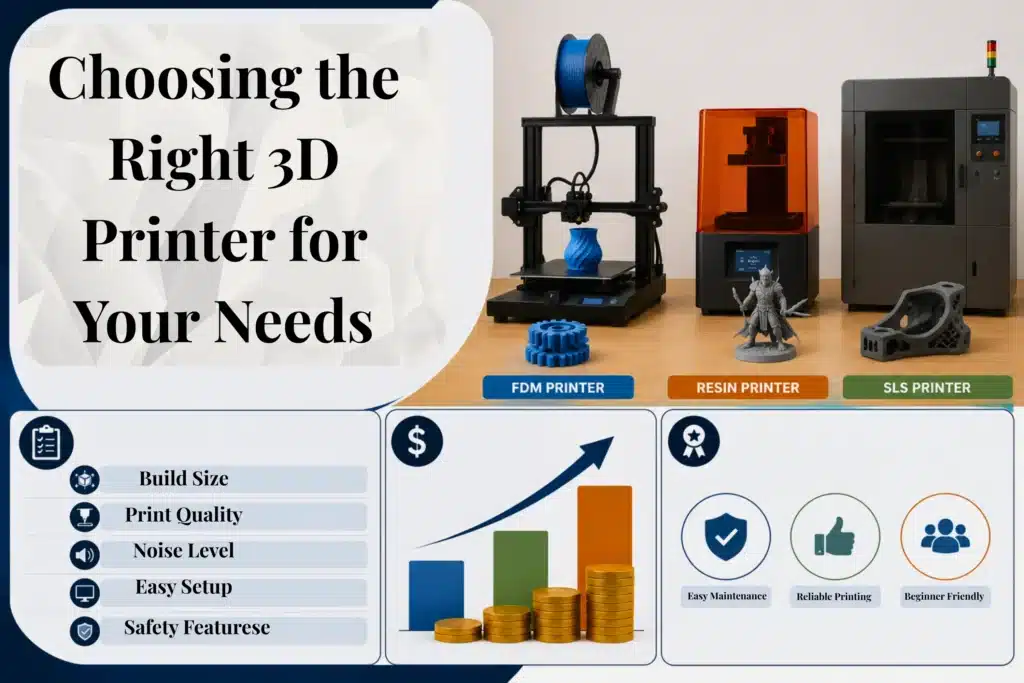
Different printing technologies are built for different tasks. Before purchasing a machine, consider your budget, expected print quality, available workspace, and the amount of maintenance you are willing to manage. A good starter printer should feel reliable and easy to operate during daily use.
FDM vs Resin Printers for Beginners
FDM printers are a common choice for newcomers because they are budget-friendly and easier to maintain. These machines use filament to build objects layer by layer. Materials such as PLA work well for learning the basics of 3d printing and usually require less setup effort.
Resin printers use liquid resin and UV light to produce highly detailed prints with cleaner surface quality. SLA systems are often used for miniatures, jewelry models, and detailed parts. However, they also require washing, curing, and careful resin handling after printing.
SLS printers are another type of additive manufacturing technology, but they are mainly designed for industrial production because of their higher cost and advanced setup requirements.
| Printer Type | Best For | Difficulty |
|---|---|---|
| FDM Printer | Home projects and learning | Easy |
| Resin Printer | Detailed models and miniatures | Medium |
| SLS Printers | Industrial production | Advanced |
Important Features to Look for in a Starter Printer
Some printer features are far more useful than flashy advertisements. High print speed may sound impressive, but pushing extreme speed settings can reduce detail quality and create unstable layers.
Auto bed leveling is one of the most helpful features for new users because it reduces setup errors and improves consistency. A heated bed is also useful since it improves adhesion and helps prints stay stable during longer jobs.
You should also check:
- Build size
- Nozzle quality
- Noise level
- Software support
- Safety features
A dependable machine with stable performance usually provides a better long-term experience than a printer focused only on marketing features.
How Much Should You Spend on Your First 3D Printer?
An expensive machine is not necessary for learning 3d printing. In many cases, a quality FDM printer between $200 and $500 is enough for practice projects, home use, and skill development. Modern desktop printers now deliver much better performance than older entry-level machines.
Extremely cheap models can sometimes lead to inconsistent print results, weak components, and extra maintenance work. Spending slightly more on a reliable printer often reduces future repair costs and failed prints.
Instead of focusing only on speed or advanced specifications, prioritize reliability, ease of use, and strong community support when choosing your first machine.
What All Do You Need for a 3D Printer Besides the Printer?
Many people assume a 3d printer is the only thing required to start printing, but a complete setup also includes materials, software, design files, and a few maintenance tools. These extra items help produce cleaner and more stable prints, reduce setup problems, and make the printing process easier to manage at home.
Most first-time users can start successfully with a simple and affordable setup. In most cases, a clean workspace, proper materials, and a few stable tools are enough to getting familiar with successfully.
Filament or Resin Materials
Every 3d printer requires printing material to create objects. FDM machines use filament, while resin printers use liquid resin during the printing process. PLA filament is one of the most common choices because it is easy to work with and performs well for practice projects and daily printing.
Some users later explore stronger materials, flexible filaments, or composite blends for advanced projects. Resin systems can produce highly detailed models with DLP technology, although they also require extra washing, curing, and safety precautions.
During long PLA prints, I noticed moisture-exposed filament created popping sounds and rough surface layers
| Material Type | Best For |
|---|---|
| PLA Filament | Beginner projects |
| PETG Filament | Stronger functional parts |
| Resin | Detailed miniatures and models |
| Composite Materials | Advanced printing projects |
Slicer Software
Slicing software converts a 3d model into printable instructions for the machine. Programs like Cura help control settings such as layer height, print speed, wall thickness, and support placement.
Incorrect slicer settings often lead to poor surface quality, weak layers, or failed prints. Even high-quality machines can struggle when print settings are not adjusted properly for the material or model type.
STL Design Files
A printer also needs digital files before production can begin. STL files are commonly used because they contain the shape information required for layer-by-layer printing.
Many users start by downloading free STL models from online libraries instead of creating custom designs immediately. This approach makes the learning process faster and allows more time to understand printer settings and material behavior.
Basic Print Removal Tools
Once a print is complete, simple tools help remove support material and clean the object safely. Small cutters, pliers, scrapers, and tweezers are useful for handling delicate sections without damaging the finished print.
Using proper tools also improves safety and creates cleaner final results compared to using household items that are not designed for print removal work.
Cleaning and Maintenance Supplies
Regular maintenance helps keep print quality consistent and reduces long-term hardware problems. Basic supplies such as nozzle needles, soft brushes, microfiber cloths, and alcohol wipes help remove dust, residue, and leftover filament.
Small cleaning habits often prevent larger repair issues later. Keeping the printer clean also improves reliability during long printing sessions.
What Do You Need for a 3D Printer for Beginners?
Getting started with a first 3d printer is much easier today than many people expect. Some new users assume they need costly equipment and advanced technical skills from the beginning, but a basic setup is often enough for learning the fundamentals. Home 3D printing equipment has become more affordable and easier to manage in recent years.
One major advantage of this hobby is that skills improve naturally over time. Starting with simple materials, user-friendly software, and smaller projects usually creates a better learning experience than jumping into complex setups too early.
Best Beginner-Friendly Filaments
PLA is one of the most recommended materials for first-time printing because it is easy to handle and adheres well to the build plate. It also produces fewer setup issues than many advanced filament types. For practice prints and daily projects, PLA remains a trustworthy starting option.
PETG is commonly used for stronger functional parts, while resin systems use liquid resin instead of standard filament. Stereolithography printers can create highly detailed surfaces, although they also require washing, curing, and extra safety precautions during post-processing.
| Material | Best For |
|---|---|
| PLA | Beginner projects |
| PETG | Stronger functional parts |
| Resin | Detailed models and miniatures |
Easy Software for New Users
Software plays a major role in the printing process because it prepares the digital model before production begins. Programs like Cura allow users to adjust layer height, support placement, print speed, and other important settings.
Incorrect slicer settings can affect print quality quickly, especially during early practice sessions. Spending time learning the software usually improves results more than upgrading hardware immediately. Many users begin with free slicer programs before exploring advanced CAD design software later.
Simple First Prints to Start With
Testing smaller prints first usually makes troubleshooting easier and reduces wasted material. Items such as calibration cubes, cable organizers, phone stands, and storage boxes print faster and use less material, which makes troubleshooting easier.
Large, detailed models often require more supports, longer print times, and advanced settings. Simple projects help users learn bed leveling, support removal, filament handling, and printer calibration step by step.
Different technologies, such as stereolithography and selective laser sintering, are designed for different applications, but FDM printing is often the easiest starting point for learning core 3d printing skills.
What Software Is Needed for 3D Printing?
Software controls how the model is prepared before the machine begins building the object. Even a high-quality machine can struggle to produce accurate results if the files are not prepared correctly. Many new users focus mainly on hardware, but software controls how each layer is created during the printing process.
Most modern slicer tools are much easier to use than older versions and many are available for free. These tools help organize settings, improve print accuracy, and simplify model preparation for home printing projects.
What Slicer Software Does
Slicing software converts a 3d model into instructions the printer can understand. It controls important settings such as print speed, layer height, nozzle temperature, wall thickness, and support placement.
Programs like Cura and PrusaSlicer are widely used because they support many printer models and provide user-friendly interfaces. Most machines also accept common file formats such as STL and 3MF after slicing is complete.
Incorrect slicer settings can reduce surface quality, weaken prints, or create adhesion problems. In many cases, print failures are caused by setup errors inside the software rather than hardware problems.
| Slicer Feature | Purpose |
|---|---|
| Layer Height | Controls detail quality |
| Print Speed | Adjusts printing time |
| Support Structures | Helps print difficult shapes |
| Temperature Settings | Improves adhesion and strength |
Best Free Slicer Software
Several free slicer programs work well for home printing. Cura is a popular choice because it is simple to navigate and compatible with many FDM printers. PrusaSlicer is another smoother operation option that includes beginner presets along with advanced settings for later learning.
Resin printers often use different software because DLP and vat-based systems follow different printing methods than standard filament machines.
| Software | Best For |
|---|---|
| Cura | Beginner FDM printing |
| PrusaSlicer | Easy workflow and presets |
| Lychee | Resin printing |
| ChiTuBox | Resin 3d printer setups |
Do You Need CAD Software?
CAD software is not required immediately for learning 3d printing. Many people begin by downloading ready-made models and practicing with existing files before creating custom designs.
Later, some users move into additive manufacturing design with programs like Fusion 360 to create tools, replacement parts, and personal projects. Learning printer setup and slicer settings first usually makes advanced design software easier to understand later.
Where to Download Free STL Files
Many websites provide free STL models for practice printing. Common beginner projects include phone stands, storage containers, cable organizers, and calibration models.
These files help users test printer settings, improve build plate adhesion, and understand how different materials behave during printing. Some libraries also include models designed for resin systems, stereolithography, and selective laser sintering workflows.
Computer and Internet Requirements for 3D Printing
Some beginners assume they need powerful computer hardware, but most home setups work well on standard laptops and desktop systems. In typical printing workflows, the computer mainly handles slicing, file preparation, and printer management rather than heavy graphics processing.
Modern slicing software has also become more optimized over time, which means basic projects can run smoothly on average computers without expensive hardware upgrades.
Minimum Computer Requirements
For standard printing tasks, a regular computer is usually enough to run slicer software and prepare models. Programs like Cura and PrusaSlicer work well on most modern systems unless the project involves extremely large or highly detailed models.
A setup with the following specifications is suitable for most home users:
- 8GB RAM
- Dual-core processor
- SSD storage
- Stable operating system
Some marketing campaigns make 3d printing hardware seem far more demanding than it actually is. In reality, consistent software performance matters more than owning an expensive computer for beginner-level projects.
| Component | Recommended Setup |
|---|---|
| RAM | 8GB or more |
| Storage | SSD preferred |
| Processor | Dual-core or higher |
| Internet | Helpful but optional |
Do You Need Internet for a 3D Printer?
An internet connection is not always required for 3d printing. Many machines can print directly from saved files using an SD card or USB connection without needing online access.
Internet access does make certain tasks easier, though. Users often download STL models, update firmware, access cloud-based tools, or watch setup tutorials while learning different printing methods.
Remote monitoring and cloud printing are also becoming more common in modern 3d printing systems. Still, offline printing remains fully functional for everyday projects.
SD Card vs Wi-Fi Printing
SD card printing is common because it is simple and dependable. The process usually involves slicing the file, saving it to the card, and starting the print directly from the printer interface.
Wi-Fi printing allows files to be transferred wirelessly from a computer or mobile device, which can be more convenient for managing multiple prints or monitoring projects remotely.
Wireless connections can occasionally disconnect during longer jobs, so many users still prefer SD cards for important prints because they are easier to troubleshoot and generally more stable.
| Printing Method | Main Benefit |
|---|---|
| SD Card Printing | Reliable and simple |
| Wi-Fi Printing | Wireless convenience |
Setting Up a 3D Printing Workspace at Home
A well-planned workspace helps make 3d printing safer, cleaner, and easier to manage during daily use. Many first-time users focus solely on the machine and overlook the surrounding setup, even though poor workspace conditions can affect print reliability and material performance. Stable furniture, proper airflow, and organized storage all contribute to more consistent printing results. For most home setups, a simple and tidy area is enough to support reliable printing projects.
Choosing a Safe and Stable Surface
A 3d printer should always be placed on a strong and steady surface. Vibration or movement during long print sessions can lead to layer shifts, uneven surfaces, or failed prints.
Sturdy wooden desks and heavy tables usually provide better stability than lightweight furniture. Industrial technologies such as electron beam melting and powder-based manufacturing systems require specialized environments, but home filament printers generally only need a secure and uncluttered workspace.
Ventilation and Room Conditions
Good airflow helps maintain a safer and more comfortable printing environment, especially during extended print sessions. Some materials and printer types release heat, odor, or fine particles while operating, which makes ventilation important for indoor setups.
Room temperature also affects printing performance. Stable indoor conditions often improve bed adhesion and help materials behave more consistently throughout the printing process.
Filament Storage Tips
Filament should be stored in a dry environment because moisture exposure can weaken materials and reduce print quality. Even properly prepared print files may fail when filament absorbs humidity before printing begins.
Many users store filament in sealed containers with silica gel packs to help control moisture levels. Simple storage habits like these often improve print consistency and reduce material waste during everyday projects.
Important Safety Items Every 3D Printer Owner Should Have
Safety becomes more important as 3d printing becomes part of regular daily use. Printers generate heat, operate for long periods, and may release fumes depending on the material and printing method. A proper safety setup helps protect both the equipment and the surrounding workspace while reducing avoidable risks during long print sessions.
Ventilation and Airflow
Good airflow helps reduce heat buildup, odors, and airborne particles during printing. Certain materials, especially resin-based systems, can produce stronger fumes than standard filament printing.
Rooms with open ventilation, windows, or steady airflow are usually more comfortable for long printing sessions. Many experienced users also avoid placing printers in sleeping areas because continuous printing may affect indoor air quality over time.
Fire and Electrical Safety
3d printers use heated components for extended periods, which makes electrical safety an important part of the setup. The printer should stay on a stable surface away from paper, curtains, and other flammable materials.
Using reliable power strips and undamaged cables also helps reduce electrical risks. During the early learning stage, it is safer to avoid leaving the printer running unattended for long overnight prints until the machine’s behavior becomes more familiar.
Resin Safety Equipment
Resin printing requires extra protection because liquid resin may irritate the skin and create strong odors during printing and cleanup. Gloves, safety glasses, and proper cleaning materials help create a safer working environment.
Uncured resin can also become messy during post-processing, especially when removing supports or washing printed parts. A consistent safety routine helps keep the workspace cleaner and makes resin printing easier to manage over time.
Hidden Costs Most First-Time 3D Printer Owners Don’t Expect
Many people assume the printer is the biggest expense in 3d printing, but additional costs often appear soon after regular use begins. Failed prints, replacement components, maintenance supplies, and extra materials can gradually increase the total cost over time. Planning for these smaller expenses early helps create a more realistic budget and avoids surprises later.
A reliable setup does not need to be extremely expensive, though. In many cases, careful maintenance and smart material choices help reduce long-term costs significantly.
Failed Print Material Waste
Failed prints are a normal part of learning 3d printing. Incorrect leveling, poor adhesion, or inaccurate slicer settings can waste filament during the early setup stage.
Testing smaller models and calibration prints first usually helps reduce material waste. Most users gradually achieve more consistent results by adjusting temperatures, leveling the build plate correctly, and slowing down print speeds when needed.
Replacement Parts and Maintenance
Most 3d printers require occasional maintenance to continue operating properly. Components such as nozzles, belts, cooling fans, and build surfaces naturally wear down with regular use.
Lower-quality machines may need repairs more frequently because cheaper parts often fail faster or become unreliable during longer print sessions.
| Common Replacement Part | Why It May Need Replacing |
|---|---|
| Nozzle | Clogs or wear |
| Build Surface | Poor adhesion |
| Belts | Loose movement |
| Fans | Cooling problems |
Electricity and Upgrade Costs
Home printers usually do not consume extreme amounts of electricity, but long printing sessions can still increase power usage over time.
Some users also purchase optional upgrades such as improved cooling systems, enclosures, lighting, or filament dryers. While these additions can improve the printing experience, most are not necessary during the early learning stage. A dependable setup with basic equipment is often more useful than adding expensive upgrades too quickly.
Common Beginner Mistakes When Starting 3D Printing
One thing many new owners notice after a few weeks is that small environmental changes can affect results more than expected. For example, filament stored near an open window may absorb moisture faster, especially during humid weather. Even moving the printer onto a less stable desk can sometimes create visible layer inconsistencies during taller prints.
During long print sessions, regular nozzle cleaning and checking belt tension also help avoid random failures that often confuse new users. These small habits usually improve consistency more than expensive upgrades.
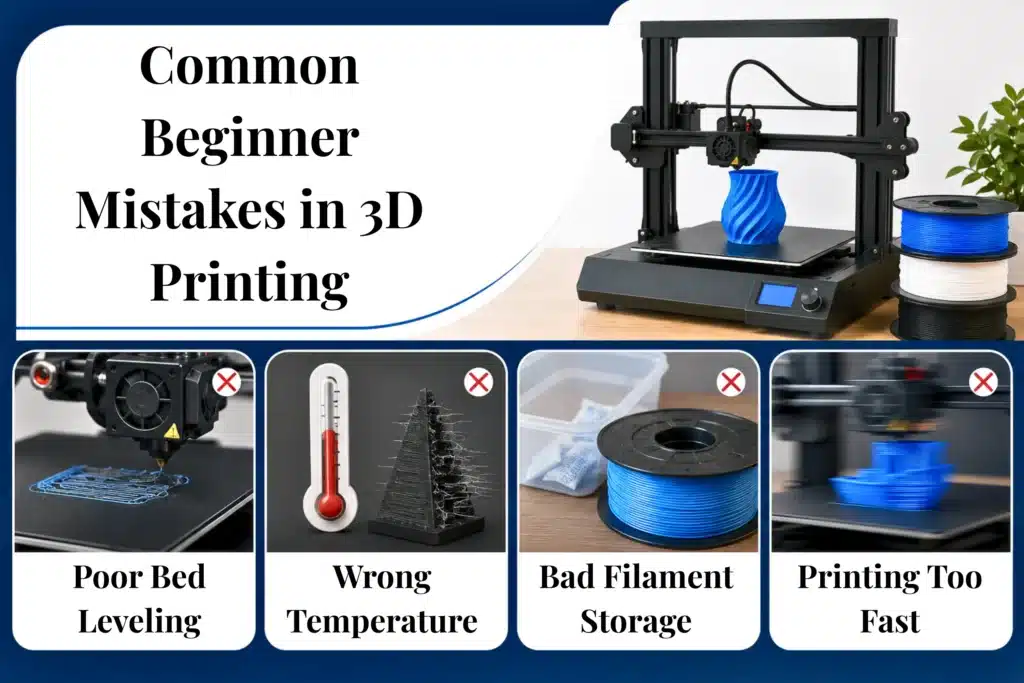
Poor Bed Leveling
Incorrect bed leveling is one of the most common causes of failed prints. If the nozzle is positioned too close or too far from the build plate, the first layer may not adhere properly.
In many cases, print failures happen because of leveling issues rather than hardware defects. Proper first-layer calibration usually improves print stability and adhesion immediately.
Wrong Temperature Settings
Different printing materials require different temperature ranges for reliable results. Temperatures that are too high or too low may cause weak layers, stringing, warping, or rough surfaces.
PLA generally prints well at lower temperatures, while materials such as PETG often require additional heat for proper layer bonding and adhesion.
Bad Filament Storage
Filament can absorb moisture from the surrounding air, especially in humid environments. Damp material may lead to bubbling, weak layers, and uneven print surfaces during long printing sessions.
Dry boxes, sealed containers, and silica gel packs help protect filament and maintain more consistent printing performance.
Printing Too Fast
High print speeds may reduce detail quality and increase the risk of failed prints. Slower and more controlled settings usually produce cleaner surfaces and stronger layer bonding, especially while learning printer calibration and slicer adjustments.
What You Must Set Up Before Your First 3D Print
Starting a first 3d print can feel exciting, but proper preparation is important before beginning the printing process. Skipping setup steps often leads to failed prints, wasted filament, or poor surface quality. A well-prepared setup improves print consistency and helps the printer operate more reliably from the start.
Downloading an STL File
Before printing begins, a digital model file is required. Many users start with free STL files from online libraries because they are easy to access and simple to print.
Small projects such as cable clips, phone stands, calibration cubes, or keychains are good starting options. These models print quickly and help users understand basic printer behavior without using large amounts of material.
Preparing the Model in a Slicer
After downloading the model, the file must be prepared in slicing software. The slicer converts the design into printable instructions for the machine.
This step controls settings such as layer height, print speed, support placement, and nozzle temperature. Incorrect slicer settings can reduce print quality even when the hardware is working properly.
Calibrating the Printer
Basic calibration helps the printer operate correctly before starting longer projects. Bed leveling, nozzle inspection, and proper filament loading are some of the most important preparation steps.
Spending a few extra minutes on calibration usually prevents larger printing issues later and improves first-layer adhesion significantly.
Running a Test Print
A small test print helps confirm that the setup is working correctly before printing larger models. Calibration cubes and simple practice objects are commonly used because they print quickly and reveal setup problems early.
Starting with smaller prints also helps build confidence while reducing wasted time and material during the learning process.
FDM vs Resin Printing Requirements
FDM and resin printers both produce quality results, but each system requires a different setup and workflow. FDM printing is often easier for home use because it uses filament materials and usually needs less post-processing after printing. Resin systems are known for producing finer details and smoother surfaces, although they also require additional safety equipment, washing supplies, and stronger ventilation during operation.
Many first-time users choose FDM printers because they are simpler to maintain and generally easier to manage in everyday home environments.
| Feature | FDM Printing | Resin Printing |
|---|---|---|
| Best For | Beginner projects | Detailed models |
| Material | Filament | Liquid resin |
| Cleanup | Simple | More complex |
| Safety Needs | Basic | Extra protection |
| Beginner Difficulty | Easier | Moderate |
What First-Time 3D Printer Owners Should Realistically Expect
Using a printer for the first time can feel exciting, but it also comes with a learning period during the early stages. Failed prints, setup adjustments, and troubleshooting are common while learning how different materials and settings affect print quality. Many online demonstrations make the process appear instant, although real-world printing usually requires testing, calibration, and gradual improvement.
With regular practice, most users become more comfortable with printer settings, slicer adjustments, and material handling over time.
Failed Prints Are Normal
Failed prints are a common part of learning 3d printing. Problems such as poor bed adhesion, incorrect temperatures, or support issues can affect the final result even when the printer is functioning correctly.
Many printing mistakes become useful learning experiences because they help users understand calibration, material behavior, and slicer settings more clearly.
Learning Takes Time
3d printing includes a learning curve, especially when adjusting print settings and solving technical problems. Skills usually improve step by step through practice, testing, and small setup changes.
Reliable calibration and consistent settings are often more valuable during the early stages than spending money on advanced upgrades.
Printing Can Be Slow and Noisy
Large models may take several hours or even overnight to complete. During long printing sessions, some machines also produce noticeable fan and motor noise, especially in smaller rooms.
A comfortable workspace and realistic expectations usually make the overall printing experience easier to manage during extended projects.
The recommendations in this guide are based on commonly used home printing workflows, slicer software practices, manufacturer documentation, and practical troubleshooting methods used by hobbyists and desktop printer owners.
Conclusion
Starting with a 3d printer may seem complicated at first, but most people only need a basic setup, a few essential tools, and some practice to begin printing successfully. The printer itself is only one part of the overall process. Materials, slicer software, workspace organization, maintenance, and safety habits all contribute to consistent print quality.
Affordable desktop machines and free slicer software now allow hobbyists to start printing without investing in expensive equipment. Affordable desktop printers, free slicing programs, and online learning resources now make it easier to learn gradually without spending large amounts of money on advanced equipment.
Print failures and setup mistakes are a normal part of learning. With steady practice, proper calibration, and realistic expectations, users usually improve their printing skills quickly and gain more confidence handling different projects and materials.
Frequently Asked Questions
Where can I find reputable retailers selling entry-level 3D printers?
Reliable entry-level 3d printers are available from trusted retailers such as Amazon, Micro Center, and official brand stores like Creality or Prusa Research. Buying from well-known sellers usually provides better warranty support, replacement parts, and setup guides.
What type of filament is best for first-time 3D printer users?
PLA filament is usually the best choice for first-time users because it is easy to print, produces fewer warping issues, and works well with most beginner printers. It also requires lower printing temperatures and is widely available in different colors.
How do I choose the right 3D printer for home use?
Choose a printer based on ease of use, print quality, safety features, and maintenance requirements. FDM printers are often the best option for home use because they are affordable, easy to use, and suitable for everyday projects.
Which types of filament are best for beginner 3D printers?
PLA is the best filament for beginner 3D printers because it is easy to print, affordable, and works well with most entry-level printers. PETG is another good option for stronger and more durable prints once beginners gain more experience.

Willis C. Mathes
About the Author
Willis C. Mathes is a technical writer focused on 3D printing workflows, printer setup, and troubleshooting. His content is based on practical research into FDM and resin printing systems, slicer optimization, filament handling, and common beginner printing problems.
He regularly covers topics related to printer performance, calibration, maintenance, and beginner-friendly 3D printing setups.