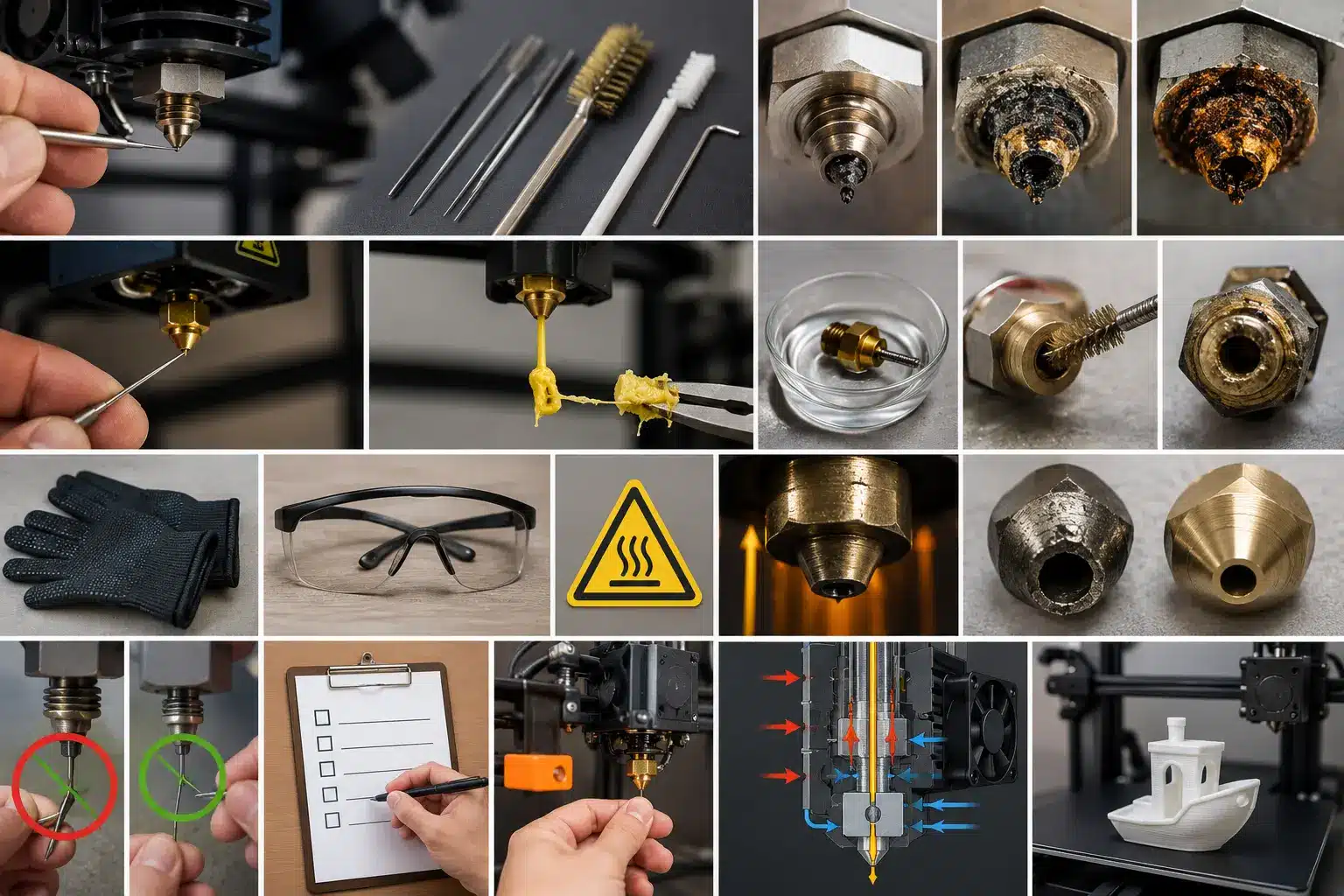
A clogged nozzle is one of the most common problems in 3D printing. Your printer may stop pushing filament smoothly, prints may develop gaps, or the extruder may start making clicking sounds. Honestly, it can feel frustrating, especially when a print fails after hours of waiting. The good news is that most nozzle problems are easy to fix if you use the right cleaning method.
Many beginners think the entire printer is damaged, but in most cases, the issue is only inside the 3D printer nozzle. Small pieces of burnt filament, dust, incorrect temperature settings, or low-quality PLA and PETG can slowly block the nozzle tip and reduce material flow. Over time, this buildup can turn into a serious clog.
This problem is becoming more common because millions of people now use FDM printers at home and in small businesses. Research in additive manufacturing also shows that a clogged nozzle can affect print quality, reduce material flow, and waste filament. That is why regular nozzle cleaning and maintenance are so important.
One thing I dislike about many online guides is that they treat all printer nozzles the same. In reality, ABS, PLA, PETG, and flexible filaments behave differently inside the hot end. A cleaning method that works for PLA may not work well for PETG or a severely clogged nozzle.
In this guide, you will learn how to clean 3D printer nozzle clogs safely using simple methods like the cold pull technique, needle cleaning, and deep cleaning for severe blockages. You will also learn when to heat the nozzle, when to replace worn brass nozzles, and how to prevent future clogs for smoother prints and better overall printer performance.
How to Identify a Clogged 3D Printer Nozzle (Beginner Guide)
A clogged nozzle usually shows small warning signs before it completely stops working. Many beginners think the printer or slicer is broken, but most of the time, the real problem is inside the hotend. Small pieces of melted filament, dust, or incorrect printing temperature settings slowly create buildup inside the nozzle and restrict the flow.
If you notice the problem early, you can clean the nozzle before the blockage becomes serious.
Common Symptoms of a Clogged Nozzle
One common sign is under-extrusion. The printer moves normally, but very little filament comes out. Prints may also show missing layers or weak lines because the nozzle cannot extrude material evenly.
Another warning sign is a clicking sound from the extruder. This happens when the extruder tries to push filament through a partial clog but fails due to the pressure inside the nozzle.
Sometimes the print surface looks rough or uneven, or it may leave small blobs of plastic behind. Honestly, this frustrates many beginners because they often blame the printer settings when the clogged nozzle is the real issue.
| Symptom | Possible Cause |
|---|---|
| Thin print lines | Partial blockage |
| Missing layers | Poor filament flow |
| Clicking sound | Pressure inside the nozzle |
| Plastic blobs | Melted filament buildup |
What Is Happening Inside the Nozzle
Inside the nozzle, the filament must melt smoothly and pass through a very small opening. If residue, burnt plastic, or dust gets stuck inside, it can cause clogs.
A partial clog still allows some material to flow, while a full blockage stops extrusion almost completely. PLA, PETG, and other filament types also behave differently inside printer nozzles. PETG often leaves sticky residue, while PLA can harden if the temperature changes too much.
Brass nozzles heat up quickly, but hardened steel nozzle options usually last longer when using abrasive filaments.
Quick Self-Check Before Cleaning
Before starting any cleaning method, heat the nozzle to its normal printing temperature and test the filament flow.
- Smooth, straight flow = nozzle is likely fine
- Weak or curled flow = partial clog
- No flow = serious blockage
You can also pull the filament out and inspect the tip. Burn marks or unusual shapes usually mean there is a buildup inside the hotend.
For light clogs, a cleaning needle or brass brush may help. More serious clogs may require a cold pull or a deeper cleaning process.
Nozzle Cleaning Methods Based on Filament Type (PLA, PETG, ABS, TPU)
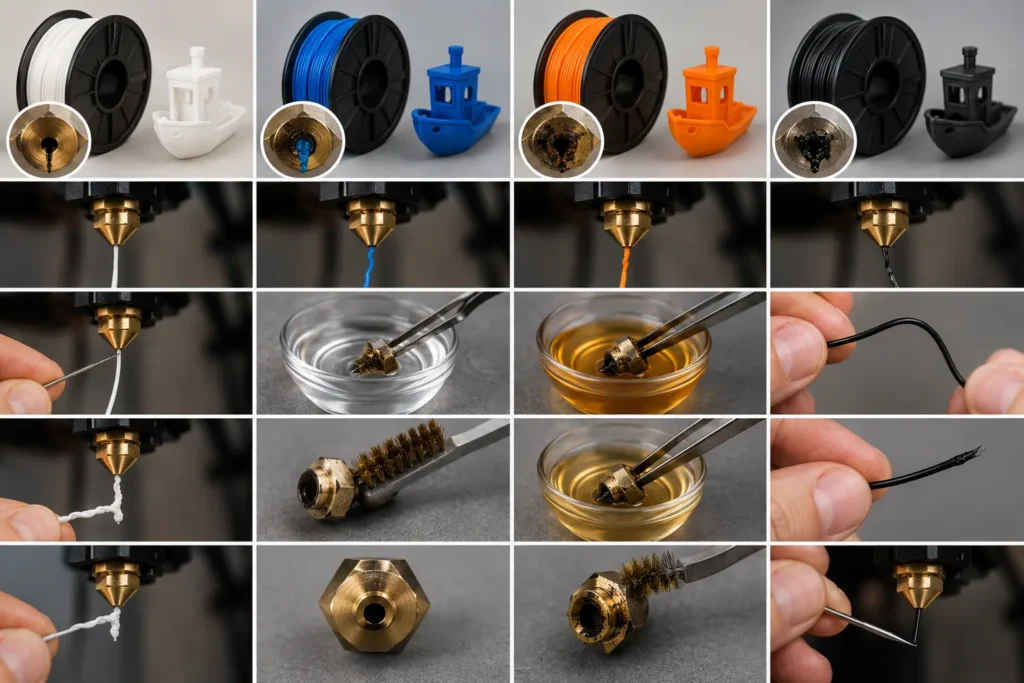
Different filament types behave differently inside the nozzle. That is why one simple method does not always work. If you want to clean your 3D printer nozzle properly, you must match the method with the filament type. Otherwise, the clog can get worse.
Also, always check the printing temperature before cleaning. In many cases, adjusting the temperature a couple of times helps soften stuck material and makes cleaning easier.
How to Clean PLA Clogs?
PLA is the easiest to clean because it softens quickly. First, heat the nozzle to the PLA printing temperature. Once the material inside starts to melt, push fresh filament through the extruder to clear the blockage.
If the nozzle is still clogged, use a cleaning needle from a cleaning kit to gently remove residue. Do not force it, as this can damage the nozzle tip.
In stubborn cases, let the nozzle cool slightly and then pull the filament out slowly. This helps remove leftover melted filament stuck inside.
How to Clean PETG Clogs?
PETG is sticky and often causes partial clogs. Heat the nozzle slightly above the normal PETG temperature so the material softens.
Try extruding fresh filament first. If it is not clear, you may need to soak the nozzle in acetone after removing it. Acetone helps break down PETG residue.
After soaking, clean the outside using a wire brush. If the blockage remains, it is often better to replace the nozzle instead of forcing it.
How to Clean ABS Clogs?
ABS hardens when it cools, so it can create strong blockages. Heat the nozzle to ABS printing temperature so the material inside melts again.
Then try slow extrusion to push the melted filament out. If needed, soak the nozzle in acetone to dissolve the buildup.
Let the nozzle sit in acetone long enough to soften the blockage, then clean it gently.
How to Clean TPU Clogs?
TPU is flexible, so it bends instead of breaking. First, check the extruder path for any jammed filament.
Heat the nozzle and slowly try to extrude. If it flows, continue until it is clear. If not, remove the filament and check for bending or soft blockage inside the hotend.
Use only light cleaning tools, like a needle if needed, because TPU residue is usually soft and does not require aggressive cleaning.
Step-by-Step Guide on How to Clean the Nozzle of a 3D Printer (Light, Medium, Severe Clogs)
When a nozzle is clogged, many beginners panic. I understand that feeling. I’ve seen people stop printing completely just because of a small blockage. But the truth is simple: most problems are just maintenance issues in printer maintenance, not machine failure.
If you want to keep your 3D printer working smoothly, you must learn different methods of cleaning based on the clog level. Light, medium, and severe clogs all need different approaches. Let’s go step by step.
Light clog (quick needle cleaning method)
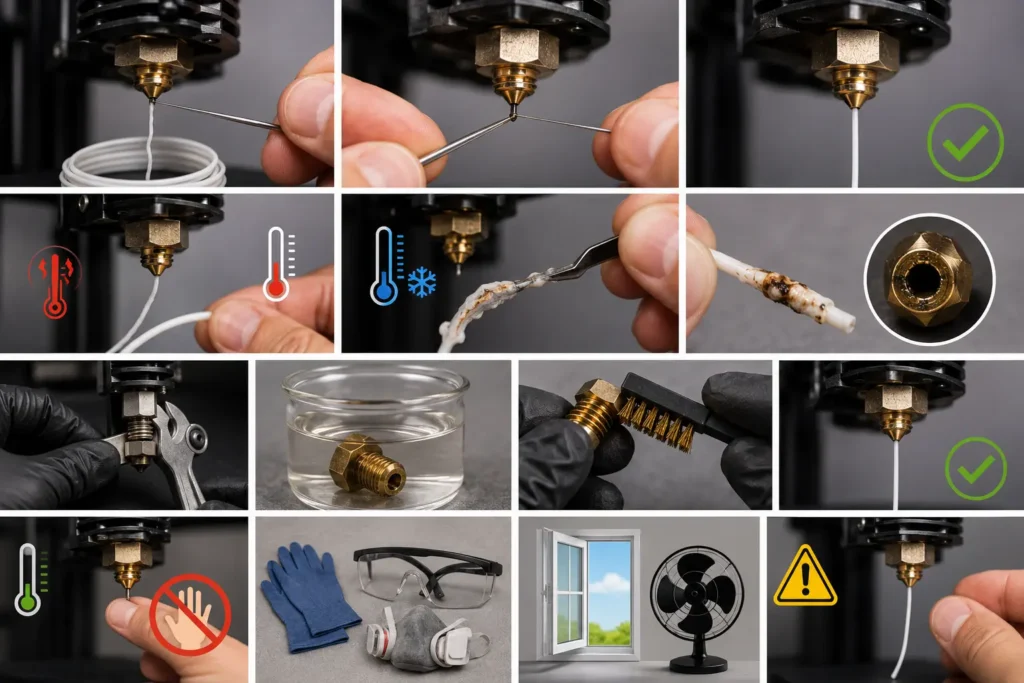
A light clog is the easiest to fix. In this case, filament still flows but weakly. This usually happens when small residue builds up inside the nozzle.
First, heat the nozzle properly so any stuck filament becomes soft. This helps reduce resistance inside the hotend.
Next, carefully use a fine cleaning needle to clear the opening. Do not force it. I’ve honestly seen beginners damage the nozzle just because they rushed this step, and that always frustrates me a little.
After cleaning, test extrusion. If filament flows smoothly again, the issue is solved. This simple method often helps you keep the nozzle clean without deep work.
Medium clog (cold pull method)
A medium clog means filament flow is blocked inside the nozzle, but not completely stopped. This is where the cold pull method works best.
First, heat the filament to normal printing temperature. Then push filament through the extruder so it softens inside the hotend.
Now, slowly cool it down until it reaches a semi-solid state. This step is important because it helps the material grip inside the nozzle walls.
After that, gently pull the filament out. You will often see trapped dirt or burnt residue attached to it. This clearly shows what caused the clog.
This method is very useful for regular troubleshooting and helps prevent bigger blockage problems later.
Severe clog (deep cleaning method)
A severe clog is serious. In this case, the filament does not flow at all. This usually happens when the buildup inside the nozzle becomes hard or burnt.
First, carefully remove the nozzle from the hotend. This step requires patience because it is easy to damage threads if rushed.
Next, use solvent soak depending on filament type. PLA or ABS residue can often soften when you soak the nozzle in acetone. This helps break down hard buildup inside.
After soaking, gently clean the exterior of the nozzle using a brass brush. This helps remove leftover residue from the surface.
For metal nozzles like hardened steel, controlled heat cleaning can also be used, but only when needed. This step should be done carefully because overheating can damage parts.
Sometimes, if the damage is too severe, it is better to replace the nozzle instead of forcing a repair. I always say this honestly—saving time is better than damaging your printer.
Safety precautions (based on research guidelines)
Safety is very important during cleaning. Many people ignore it, and that can lead to burns or exposure to harmful fumes.
Always let the nozzle cool below a safe temperature before touching it. A hot nozzle can easily burn skin, so never rush this step.
Use gloves and proper ventilation when working with solvents like acetone. These chemicals can release strong fumes, so fresh air is important.
Avoid touching hot metal parts directly. Even small mistakes can cause injury, especially when you put the nozzle back into the hotend after cleaning.
When You Should NOT Clean the Nozzle (Replace Instead)
Sometimes people keep trying to clean the nozzle again and again, but the real issue is damage, not dirt. I’ve seen many users waste hours on cleaning while the real fix was just replacing the nozzle. It’s frustrating, I know, but this is part of normal 3D printing maintenance.
When a severe clog keeps coming back, or print quality stays bad, cleaning is no longer enough. Signs your nozzle is permanently damaged
If the nozzle hole becomes worn or slightly enlarged, filament flow becomes unstable. You may see inconsistent extrusion even after cleaning. Another clear sign is repeated clogging after cleaning. You fix it, it works for a short time, then it blocks again. That usually means more serious damage inside the heater block or nozzle system.
Poor extrusion, even after deep cleaning, is also a warning. If you are still struggling to extrude filament or need to push filament with extra force, the nozzle is likely no longer usable.
Sometimes the issue can also come from a damaged PTFE tube or poor filament quality, especially cheap filament that leaves heavy residue inside. Nozzle lifespan (based on usage and material)
Nozzles don’t last forever. Their lifespan depends on the material and usage.
| Type | Lifespan | Notes |
|---|---|---|
| Brass | 3–6 months | Normal home use |
| Steel / Ruby | Longer life | Better for abrasive filament |
| Heavy use | Faster wear | Needs frequent checks |
Brass wears out faster, especially with abrasive materials or frequent printing. Steel and ruby nozzles last longer and handle tough filament better. Cleaning vs replacement decision guide
If the problem is a light clog or simple blockage, cleaning works well and helps keep your printer running smoothly.
But if you notice repeated issues, poor flow after cleaning, or constant blockage, it is better to replace the nozzle instead of wasting time.
Simple rule:
If cleaning fixes it → continue using it
If the problem returns → replace the nozzle
This saves time, reduces failed prints, and protects your extruder system from extra stress.
Common Mistakes Beginners Make While Cleaning a 3D Printer Nozzle
Many beginners try to clean the nozzle quickly when printing goes wrong. I understand the feeling, honestly—it is frustrating when a print fails. But in real printer maintenance, small mistakes during cleaning often make the problem worse instead of fixing it.
Let’s keep it simple and clear.
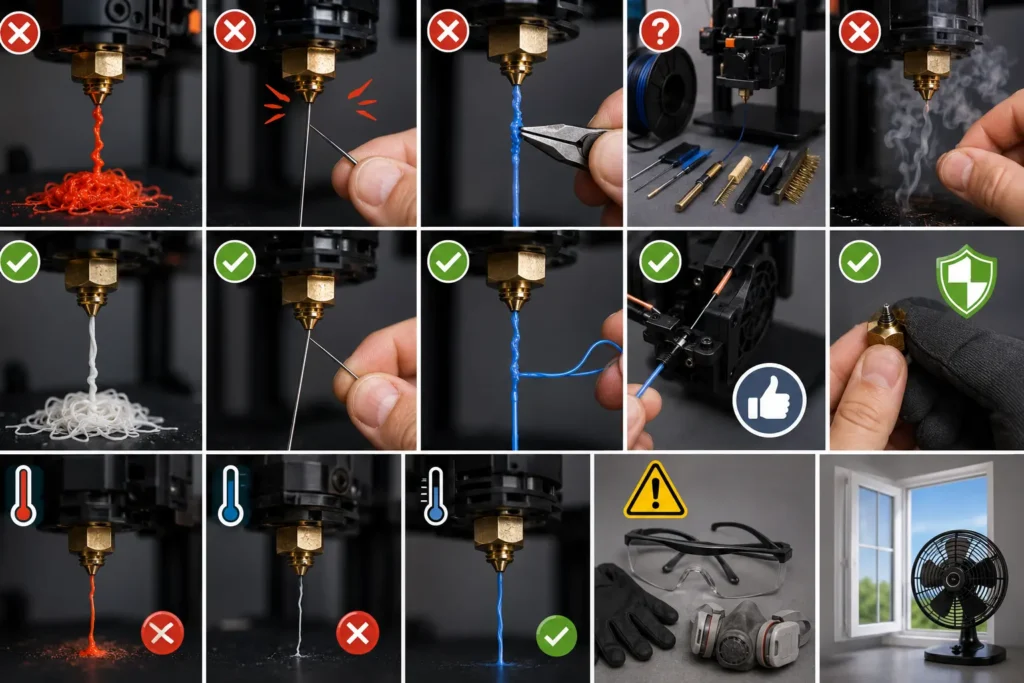
Using the wrong temperature
One common mistake is cleaning at the wrong temperature. If it is too low, the filament stays hard and blocks the nozzle. If it is too high, it can burn and stick inside the hotend.
This often causes more damage than the original clog. I’ve seen users rush this step and later regret it.
Pushing the needle too hard
Yes, you can use a needle, but gently. Many beginners force it inside, thinking it will fix the blockage faster. That is not true.
If you push too hard, you can damage the nozzle opening and cause inconsistent extrusion later. Slow and light pressure always works better.
Doing a cold pull incorrectly
Cold pull is useful, but only if done properly. If the filament is not at the right soft stage, it will break instead of cleaning inside the nozzle.
Timing matters here. If you rush it, it does nothing useful and wastes time.
Cleaning without checking the clog level first
This is a big mistake. Not every extrusion issue is a clog. Sometimes it is just a dry filament or a feeding issue in the extruder.
Before cleaning, always check the flow first. A quick test saves time and avoids unnecessary work.
Ignoring safety precautions
Safety is often ignored, but it is very important. The nozzle gets very hot and can easily burn skin. Always let it cool slightly before touching it.
| Mistake | Risk |
|---|---|
| Wrong temperature | Burnt filament or damage |
| Hard needle pressure | Nozzle damage |
| Skipping checks | Unnecessary cleaning |
| Ignoring safety | Burns or injury |
If you avoid these simple mistakes, cleaning becomes easier and safer, and your printer will give more stable results with fewer clogs.
Maintenance Schedule for 3D Printer Nozzle (Prevent Future Clogs)
A 3D printer works best when you don’t wait for problems. Many users only clean the nozzle when it is fully blocked, and that is when printing becomes stressful. A simple maintenance routine helps you avoid frequent clogs and keeps high-quality prints consistent.
Weekly maintenance
Every week, do a quick check. This is not deep cleaning, just basic care.
Heat the nozzle and test extrusion. If filament flows unevenly or you notice extrusion issues, fix them early before they become serious. This small step helps you keep your printer stable.
Check if the extruder motor is feeding filament smoothly. Sometimes dust or small residue can affect the flow. You can also lightly inspect the nozzle tip and use a needle if needed for minor buildup.
Monthly deep cleaning
Once a month, do a proper deep clean. This removes hidden residue inside the hotend that weekly checks cannot reach.
A cold pull method works well here, or you can use a solvent cleaning method for stronger buildup. Some users also apply a heat soak before cleaning to soften stuck material at around 200°C, depending on the filament type.
Be careful around sensitive parts like the thermistor. Do not force anything during cleaning.
Usage-based cleaning
Cleaning also depends on how much you print. Heavy users need more frequent care, while light users can extend intervals.
| Usage Level | Cleaning Routine |
|---|---|
| Heavy use | Weekly check + monthly deep clean |
| Medium use | Weekly check + monthly clean |
| Light use | Bi-weekly check |
If the filament is not stored properly or kept dry, it can affect flow and cause uneven extrusion. Some materials, like TPU, also need more attention because they behave differently under heat.
A simple schedule like this helps you avoid major blockages, keeps your printer stable, and ensures smoother printing over time without unnecessary breakdowns.
Advanced Insight – Why Nozzle Clogging Happens (Simple Scientific Explanation)
A clogged nozzle is not random. It happens because heat, material, and airflow inside the hotend are not balanced. I’ve seen many users think their printer is broken, but in most cases, it is just simple physics inside the system. If you understand this, you can easily avoid frequent clogs and keep your printer stable.
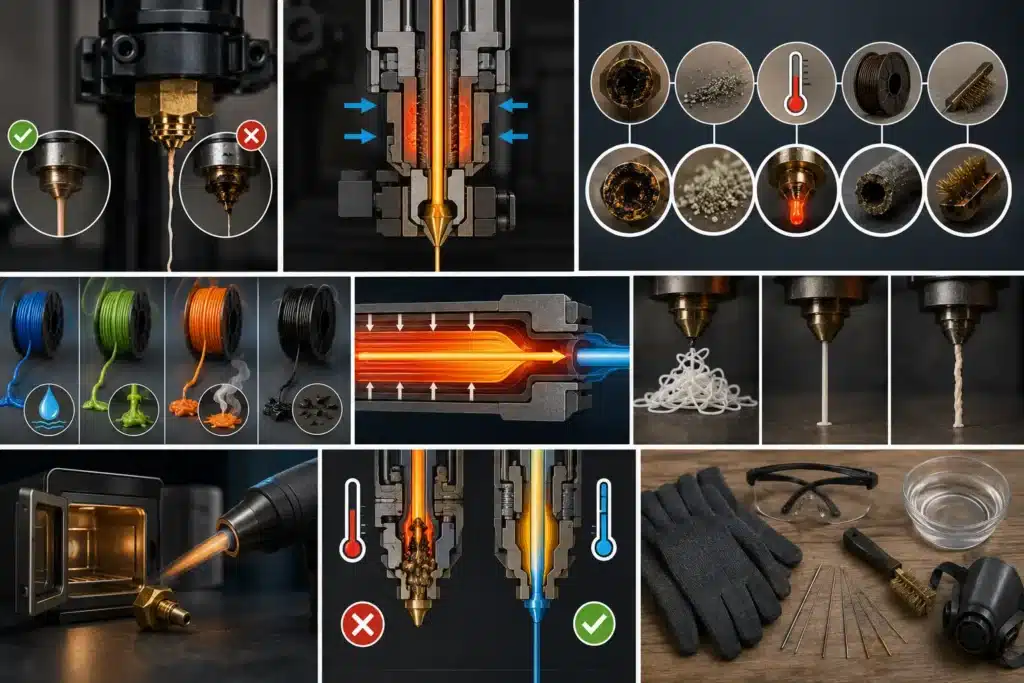
When you try to clean your nozzle, it helps, but knowing why the problem happens is even better. Let’s break it down in a simple way.
Main causes of nozzle clogging
There are a few common reasons behind blockage, and most of them are easy to prevent.
Burnt filament buildup is one of the biggest problems. When the temperature is too high or the filament stays inside too long, it starts to burn and stick inside the nozzle. This slowly blocks the flow.
Dust and contamination also play a role. If you do not store filament properly or keep it open, dust enters the line and causes resistance inside the nozzle.
Wrong temperature settings are another major issue. If the temperature is too low, the filament does not melt fully. If it is too high, it burns. I’ve honestly seen users struggle for hours just because of a small temperature mistake.
Filament quality issues also matter a lot. Poor-quality material like black PLA often leaves uneven residue inside the system. This is why I always recommend using good filament from trusted brands.
Sometimes people try different methods of cleaning, but if the root cause is not fixed, the problem comes back again.
Why do different filaments behave differently?
Not all filaments act the same inside the nozzle. Each material reacts differently to heat and pressure.
PLA, PETG, and ABS all have different flow behaviors. PLA melts easily but can harden quickly if cooling is uneven. PETG becomes sticky and can build up inside the nozzle. ABS needs stable heat, or it may form blockages.
This is why temperature control is so important. Even a small change in temp can affect flow. I’ve seen cases where adjusting the temperature two times fixed a problem that looked like a full clog.
Some users even try using an oven to soften stuck filament or a small torch for metal parts during deep cleaning, but these methods must be controlled carefully.
If the filament is not melting evenly, the nozzle is hot but still not working properly, meaning heat is not reaching the material correctly inside the hotend.
Understanding this simple science helps you fix problems faster, reduce damage, and make better decisions when you try to unclog or maintain your printer. It also makes regular care easier when you follow a proper routine and keep your printer clean and stable using safe practices.
Conclusion
Cleaning a 3D printer nozzle is not just a quick fix. It is a skill that helps you protect your printer and improve print quality over time. Most problems, like poor flow, weak layers, or even a full blockage, come from simple issues such as wrong temperature, low-quality filament, or lack of regular care.
If you follow the right method, you can easily clean your nozzle without damage. Light clogs need simple needle cleaning, medium clogs respond well to the cold pull method, and severe clogs may need deep cleaning or even replacement. The important part is to act early instead of waiting until the nozzle completely stops working.
I’ve seen many beginners struggle just because they ignore small warning signs. That is why understanding the problem is as important as cleaning it. When you take care of your printer regularly, it rewards you with smooth performance and consistent prints.
In the end, a clean nozzle means less frustration, fewer failed prints, and more confidence in your 3D printing journey.
Frequently Asked Questions
Are there specialized cleaning filaments for 3D printers?
Yes, there are special cleaning filaments made to remove leftover material and small clogs from the nozzle. They work well when switching between different filament types or colors and help keep the nozzle clean without taking it apart.
What are the best products for cleaning 3D printer nozzles?
Some useful tools include nozzle cleaning needles, brass wire brushes, cleaning filament, and small nozzle drill bits. A soft cloth and tweezers can also help remove melted plastic safely during maintenance.
Recommended temperature for a 3D printer cold pull.
The best temperature depends on the filament you use, but for PLA, a cold pull usually works well around 80°C to 100°C after heating the nozzle fully first. The goal is to let the filament grab the dirt inside before pulling it out slowly.
What is the safest way to clean a metal 3D printer nozzle?
The safest method is to heat the nozzle slightly and clean it gently with a nozzle needle or soft brass brush. Avoid using too much force or sharp steel tools because they can damage the nozzle opening.

Willis C. Mathes
I’m Willis C. Mathes With hands-on experience and technical knowledge of printers, I dive deep into printer reviews, troubleshooting, and tips, ensuring you get the most out of your printing investment.