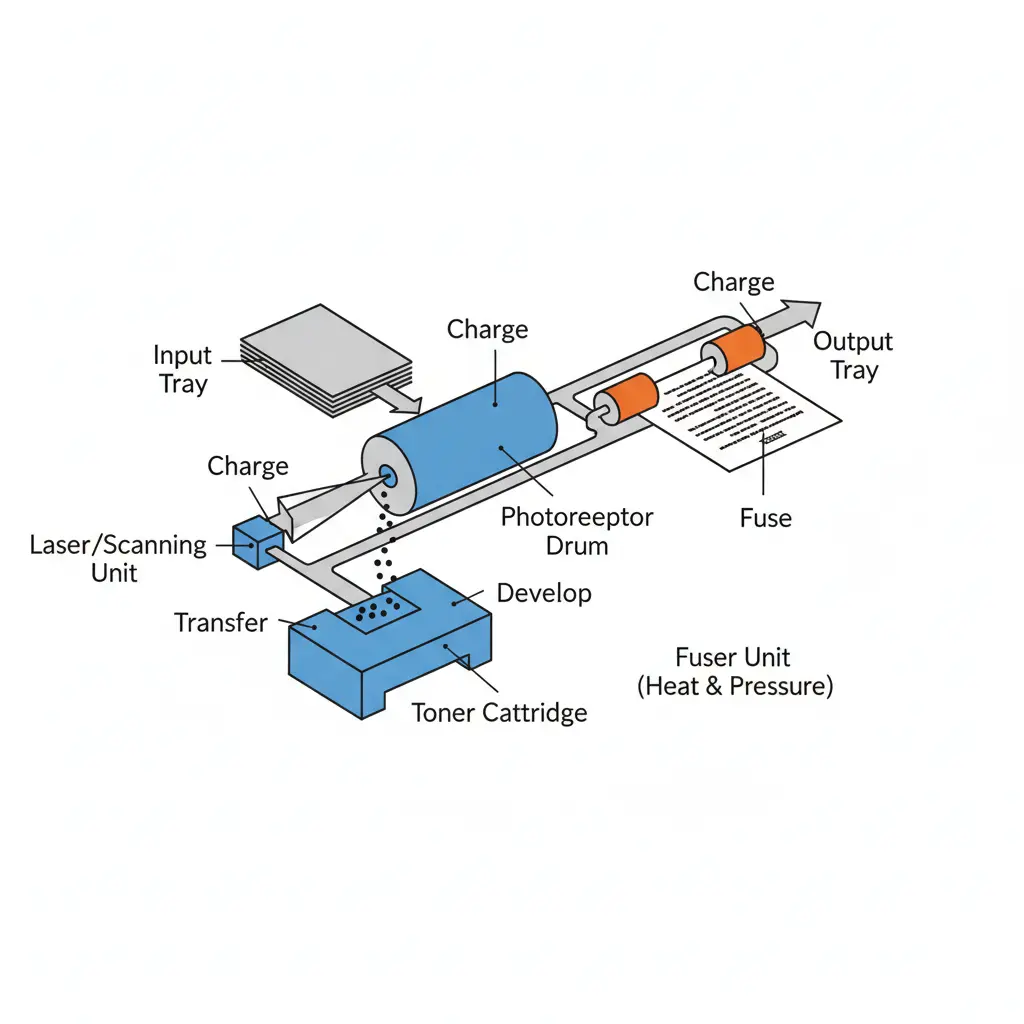
A laser printer is used in homes, schools, and offices because it prints fast and gives sharp results. But most people don’t really understand the laser printer components, so when something goes wrong, they feel confused and frustrated.
A laser printer works differently from an inkjet printer. Instead of liquid ink, it uses powder called toner. Inside the machine, a laser beam draws the image, and parts like the drum, roller, and fuser work together to print it on paper.
The truth is, many printing problems happen just because one small part is not working properly. I’ve seen people replace a toner cartridge when the real issue was something else. That kind of mistake wastes money and time.
Learning how a laser printer works helps you fix small issues, avoid confusion, and make better decisions. In this guide, we will keep everything simple so anyone can understand it easily.
What Are Laser Printer Components? (Simple Explanation)
A laser printer is not a single-part machine. It is made of many small laser printer components that work together like a team. If one part stops working, the whole print can be affected. I’ve seen users get confused and blame the whole printer, while the real issue is just one small part.
In a color laser printer, the process is more advanced than in an inkjet. Instead of liquid ink, it uses fine toner particles. These particles move using positive charge and negative charge, helping create sharp color images and clear text.
Main parts include the transfer roller, transfer belt, and fuser assembly. The transfer roller moves negatively charged toner onto paper. The transfer belt helps arrange colors properly. Then the fuser unit uses heat and pressure to melt the toner so it sticks permanently. Honestly, when the fuser fails, prints become messy fast—it’s one of the most common issues I’ve seen in real use.
There is also a corona wire, which helps create a positive charge so toner can stick to the drum correctly. Think of it as preparing the paper before printing starts.
Compared to an inkjet, a laser printer gives more stable print quality, especially for office use, where speed and volume matter. Many laser printer users depend on efficiency and cost control, not just appearance.
Why Understanding These Components Matters
Knowing laser printer components is not just for technicians. It actually saves you money, time, and stress.
Let’s be honest—I get a bit frustrated when people replace a full printer just because of a small issue like a worn fuser or weak toner system. Most problems are fixable if you understand the basics.
Here’s why it matters:
- Better print quality control: If prints look faded or uneven, you can quickly identify if the issue is toner, drum, or fuser related.
- Lower cost: You don’t waste money replacing the wrong parts. A simple inkjet vs laser printer comparison shows that lasers save cost long-term when maintained properly.
- Easy maintenance: When you know how parts like the fuser assembly or transfer belt work, cleaning and care become simple.
To be honest, I’ve seen people ignore small issues until the whole printing process breaks down. That usually leads to bigger repair costs, and that’s something no one wants.
In short, understanding these components gives you control. You don’t need to be an expert—you just need basic awareness. And that small knowledge makes a big difference in how your laser printer performs every day.
Main Laser Printer Components and Functions (With Simple Examples)
A laser printer depends on different internal parts working together. These components of a laser printer control how fast, clean, and accurate printing will be. When one part fails, the whole system feels slow or messy. I’ve seen this happen in offices where people blame the whole machine, but the real issue is just one small part inside a laser printer.
Modern printer manufacturers design different printer models to handle high print speed, often measured in pages per minute. A monochrome laser is mostly used for fast text printing, while color models handle images. Whether it is a laser printer or an inkjet printer, the internal structure is very different, especially because laser printers use toner instead of liquid ink.
Drum Unit (Photoreceptor) – The Image Holder
The drum is one of the most important laser printer components. It works like a surface that prepares the image before printing. Inside a laser printer, the drum uses laser light to create an invisible image pattern. After that, toner sticks to it and moves to the paper. This step is very important for clear output in a laser printer.
What It Does (Simple Example)
The drum holds the image using an electric charge and sends it forward for printing. Think of it like a “pre-print board” that shapes everything before final printing.
Common Issue (Faded or ghost prints)
If the drum gets old, the prints may look light or show shadows of previous pages. This usually affects print quality and needs replacement after some time.
Toner Cartridge – The Powder That Prints
The toner cartridge holds the fine powder used in a laser printer. This powder creates text and images by moving onto the paper through the printing process. It plays a direct role in laser printer use and print output.
What It Does
The toner cartridge holds fine powder that sticks to the drum and then moves to the paper. This is the main printing material in a laser printer.
Why It’s the Most Costly Part
It affects overall output and cost. Poor-quality toner can damage results, which is why reliable parts from trusted printer manufacturers are always better.
Laser Assembly (Laser Diode) – The Image Creator
The laser assembly is the part that creates the image inside a laser printer. It sends a focused laser beam that draws the text and images on the drum. This step is very important because it decides what will appear on the page.
How It Works in Simple Words
This part sends a controlled laser beam that draws the image on the drum. It acts like a guide that tells the printer what to print and where.
Transfer Roller / Belt – Moves Toner to Paper
The transfer roller or belt moves toner from the drum onto the paper inside a laser printer. It helps keep the image aligned so printing stays clean and accurate.
What It Does
It transfers toner from the drum to the paper in a smooth and controlled way. This step ensures the image stays clear and properly placed during printing.
Common Issue (uneven prints)
If this part gets dirty or worn out, prints may look uneven, faded, or patchy. It often happens in heavy use when maintenance is ignored.
Fuser Unit – Heat That Locks the Print
The fuser unit is a very important part of a laser printer. It uses heat and pressure to permanently stick toner onto paper. Without it, the print would easily smudge or wipe off.
What It Does
The fuser uses heat and pressure to permanently stick toner to paper. This step makes printing permanent and smudge-free.
Signs of Failure
If the fuser is weak, prints may smear or rub off easily. It is one of the most important parts inside a laser printer.
Paper Feed System – Controls Paper Movement
The paper feed system controls how paper moves inside a laser printer. It makes sure each sheet goes in the right direction at the right time, so printing stays smooth and steady.
What It Does
It feeds paper into the printer in a controlled way so printing can happen without delay or misalignment.
Common Issue (paper jams)
If the rollers get dirty or weak, paper can get stuck inside the printer. This slows down work and interrupts normal printing.
Internal vs External Laser Printer Components
A laser printer has two main groups of printer components: internal parts and external parts. Both work together to handle smooth printing, especially in high-volume printing offices. Many users compare inkjet and laser printers, but the real difference is inside the machine, where laser systems use more advanced key components for fast and stable output.
Internal Components (Inside the Printer)
Inside a laser printer, all the main printing work happens. These parts control how images are created and placed on paper. The system uses printer memory to process data, and then the laser draws the image on the drum. The drum collects negatively charged toner particles, and the transfer system moves them to paper. Finally, the fuser uses heat to lock the print.
Honestly, I’ve seen many users ignore these parts until something breaks, which leads to frustration during urgent work.
| Internal Part | Simple Role |
| Drum | Holds image for printing |
| Laser unit | Creates an image using light |
| Transfer system | Moves toner to paper |
| Fuser | Fixes toner using heat |
These parts make monochrome printers fast and reliable, especially for printing text in offices. It’s one reason laser printers are faster than inkjet printers, even when handling heavy tasks.
External Components (User-Facing Parts)
External parts are the ones users see and use daily. The paper tray holds sheets, the output tray collects printed pages, and the control panel manages settings. These parts look simple, but they play a big role in smooth operation.
If these are not handled properly, users often face paper jams or delays, which they sometimes wrongly blame on printer ink or internal damage.
| External Part | Simple Role |
| Paper tray | Holds paper |
| Output tray | Collects prints |
| Control panel | Controls settings |
In real use, especially in HP LaserJet or similar models, these parts help keep printing fast and stable. Compared to inkjet vs laser, laser machines feel more organized and efficient for daily office work, including light color printing tasks.
How Laser Printer Components Work Together (Step-by-Step)
A laser printer looks simple from the outside, but inside the printer, many small parts work in a fixed order. These printers are designed to handle fast jobs like text and images, and they are often used for high-volume printing in offices. I’ve personally seen situations where people think printing is instant, but in reality, every page follows a clear internal flow.
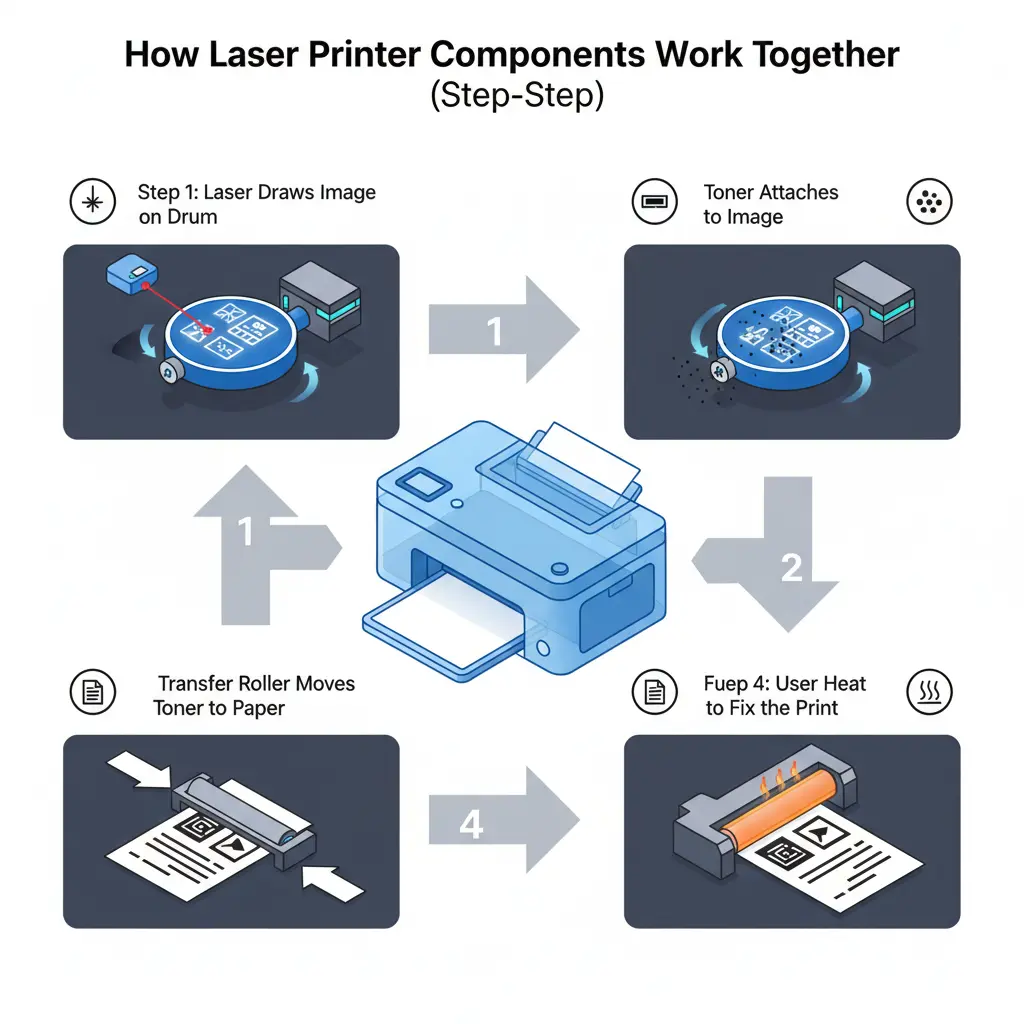
This is the exact laser printing process explained in a simple way.
Step 1: Laser Draws Image on Drum
First, the printer receives data and starts preparing the image. Inside the printer, a laser beam creates the pattern on the drum.
This step happens very fast and quietly. The system works by using a laser beam to draw text and images on a special surface.
It feels almost magical, but it’s actually just controlled light doing the job.
Step 2: Toner Attaches to Image
Next, toner particles move toward the drum. The drum surface becomes positively charged, while the toner is negatively charged.
Because of this, the toner sticks only where the image was drawn. This is where laser printing becomes visible for the first time.
I always find this step interesting because it shows how simple physics creates clean printing results.
Step 3: Transfer Roller Moves Toner to Paper
Now the paper enters the system. The transfer roller moves the toner from the drum onto the paper.
The paper is charged in a way that it attracts the negatively charged toner, so the image shifts perfectly.
This step is very important in laser printing, especially when machines are used for high-volume printing, because even a small error here can ruin many pages.
Step 4: Fuser Uses Heat to Fix the Print
Finally, the paper goes through the fuser. This part applies heat and pressure to lock the toner onto the page permanently.
This is where the final result of laser printing becomes stable and ready to use.
To be honest, I sometimes get frustrated when people ignore fuser maintenance and then complain about smudged prints. The fuser is doing a tough job, and it deserves care.
Common Problems in Laser Printer Components (And Easy Fixes)
A laser printer works smoothly only when all its laser printer components are healthy. But in real life, problems still happen. I’ve seen many users panic during office work, especially in high-volume printing situations, when the machine stops or prints look bad. Honestly, most issues are simple, but people often ignore early signs, and then things get worse.
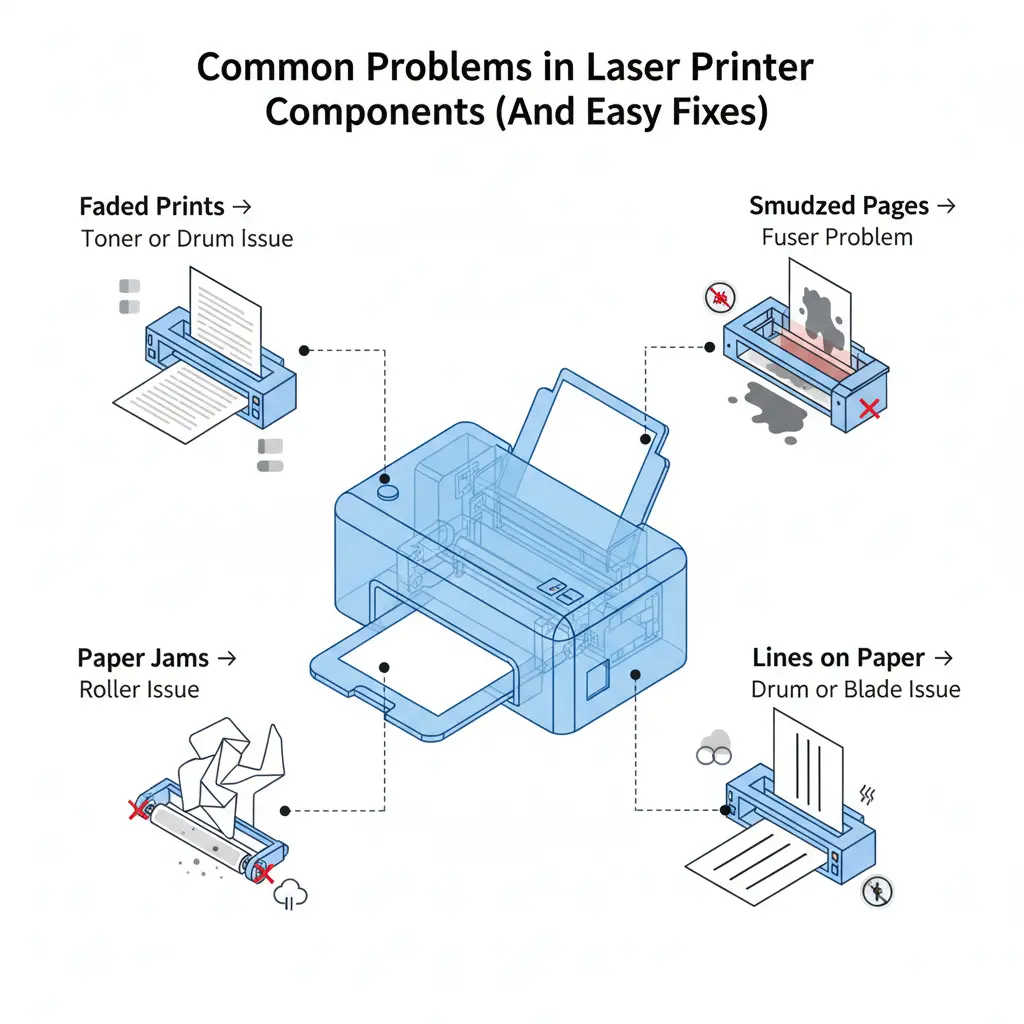
Here are the most common problems and how they are usually solved in real situations.
Faded Prints → Toner or Drum Issue
Faded prints usually mean the toner is running low or the drum is not working properly. These two parts control how dark and clear your pages look.
In real office use, I’ve noticed people often think the whole printer is weak, but it is just one small issue inside the system.
This problem affects overall print quality and should not be ignored for long.
Smudged Pages → Fuser Problem
Smudged prints happen when the fuser does not heat the toner properly. The toner should stick firmly to the paper, but if the fuser is weak, the print stays loose.
I’ve seen users continue printing like this, which only wastes paper and time. It’s one of those avoidable mistakes that frustrates me.
Paper Jams → Roller Issue
Paper jams are very common in daily use. They usually happen when rollers inside the printer get dirty or lose grip.
Even a small dust buildup can stop the whole printing process, especially in a busy office.
Lines on Paper → Drum or Blade Issue
If vertical lines appear on pages, the problem often comes from the drum or cleaning blade. These parts help control how toner spreads on paper.
I always feel a bit concerned when users ignore this issue because it slowly gets worse and affects every print.
In simple words, most laser printer problems come from a few key internal parts. If you understand these signs early, you can avoid bigger damage and keep your printer working smoothly.
Which Laser Printer Components Need Replacement Most Often?
In a laser printer, not all parts have the same lifespan. Some laser printer components wear out quickly because they handle daily printing work, while others last for years. I’ve seen many users replace the wrong part first, and honestly, that leads to unnecessary cost and frustration. Once you understand this properly, maintenance becomes much easier, and you avoid wasting money on guesswork.
Below is a simple breakdown of which parts usually need replacement most often and how their cost and lifespan compare in real use.
| Component | Replacement Frequency | Lifespan | Cost Impact | Simple Note |
| Toner Cartridge | High | Short | Highest | Used up quickly in daily printing |
| Drum Unit | Medium | Medium | Moderate | Affects print quality over time |
| Fuser Unit | Low | Long | High (when replaced) | Works under heat and pressure for long use |
Beginner Mistakes to Avoid When Using Laser Printer Components
Many people use a laser printer daily, but still make small mistakes with its components. These mistakes may look simple, but they slowly reduce performance and increase cost. I’ve seen this many times in real office setups, and honestly, it’s a bit frustrating when problems could be avoided with basic care. The good thing is—once you know these mistakes, you can easily avoid them and keep your printer running smoothly.
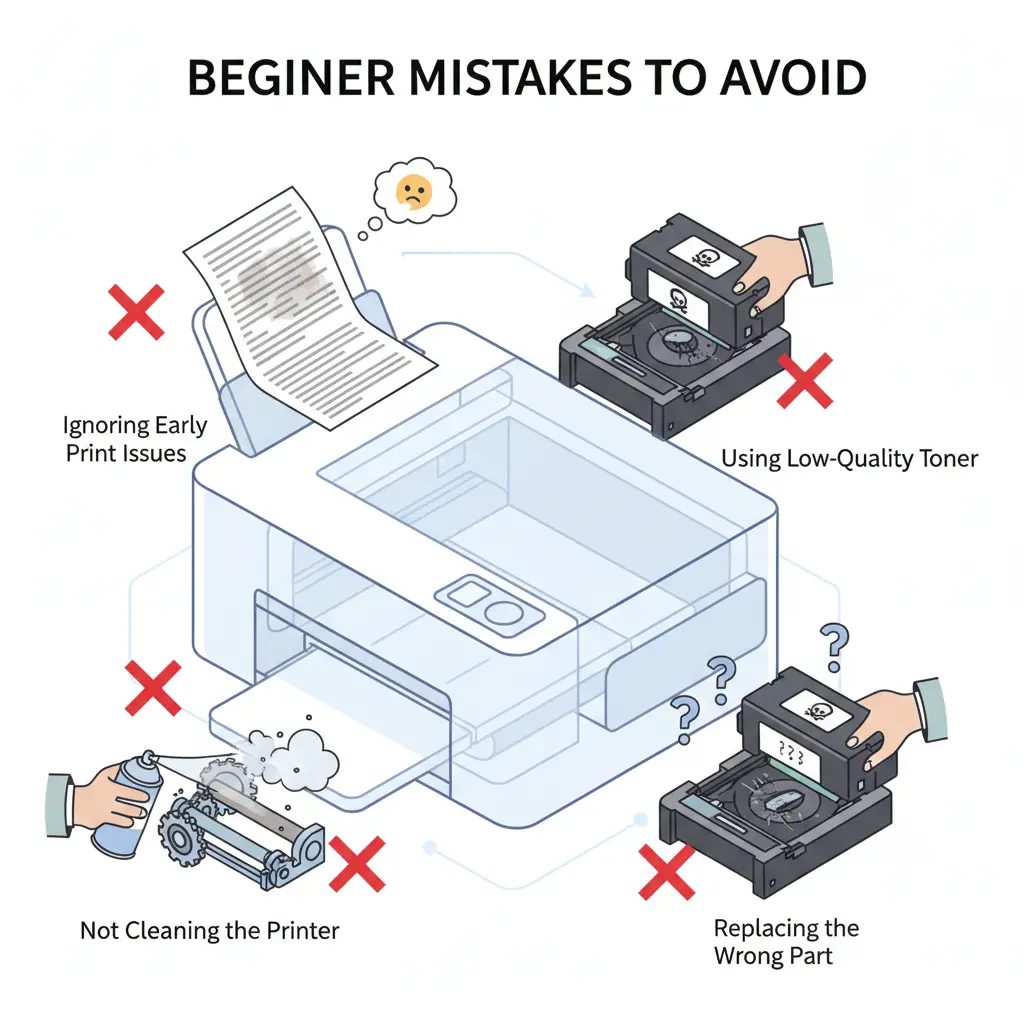
Ignoring Early Print Issues
One common mistake is ignoring early signs like faded text, lines, or slow printing. People think it will “fix itself,” but it never does.
I’ve seen users wait too long and then face bigger damage. Early signs are actually warnings from the printer.
Using Low-Quality Toner
Another big mistake is using cheap or low-quality toner. It may look like a money-saving idea, but it often leads to poor output and even damage inside the printer.
To be honest, this is one of my biggest pet peeves because I’ve seen printers fail early due to poor toner choices.
Not Cleaning the Printer
Dust and small particles collect inside the printer over time. If you don’t clean it, parts like rollers and drums stop working properly.
I always suggest simple cleaning because it makes a big difference in long-term performance. It also helps maintain stable print quality.
Replacing the Wrong Part
Many users replace parts without checking the real problem. For example, they change the toner when the drum is actually the issue.
This mistake wastes money and creates confusion. I’ve seen this happen often, and it honestly feels avoidable with just a little understanding of the system.
In simple words, most printer problems come from small user mistakes, not machine failure. If you take care of these basics, your laser printer will last longer and perform much better.
Tips to Make Your Laser Printer Components Last Longer
A laser printer can run smoothly for years if you take care of its laser printer components in the right way. In real office use, I’ve noticed most breakdowns don’t happen because the machine is weak, but because of small daily mistakes. Honestly, it can be a bit frustrating when users ignore simple care steps and then face big repair costs later. The good news is, you only need a few basic habits to keep everything working fine.
Key Factors
- Use High-Quality Toner
Always choose a good toner instead of cheap options. Low-quality toner can affect print quality and slowly damage internal parts. - Keep Printer Clean
Dust builds up inside the printer over time. Regular cleaning helps protect rollers, the drum, and other sensitive parts. - Avoid Overloading the Paper Tray
Do not push too much paper into the tray. It increases the risk of jams and puts pressure on internal rollers. - Turn Off Properly
Always use the power button to shut down the printer. Improper shutdown can affect system stability over time.
Latest Trends in Laser Printer Components (2025 Update)
The world of laser printer components is changing fast in 2025. Modern laser printer systems are now designed to save energy, improve safety, and reduce maintenance problems. From my experience working with printer users, I’ve noticed one thing clearly—people want faster printing but with less cost and fewer issues. And honestly, manufacturers are finally listening.
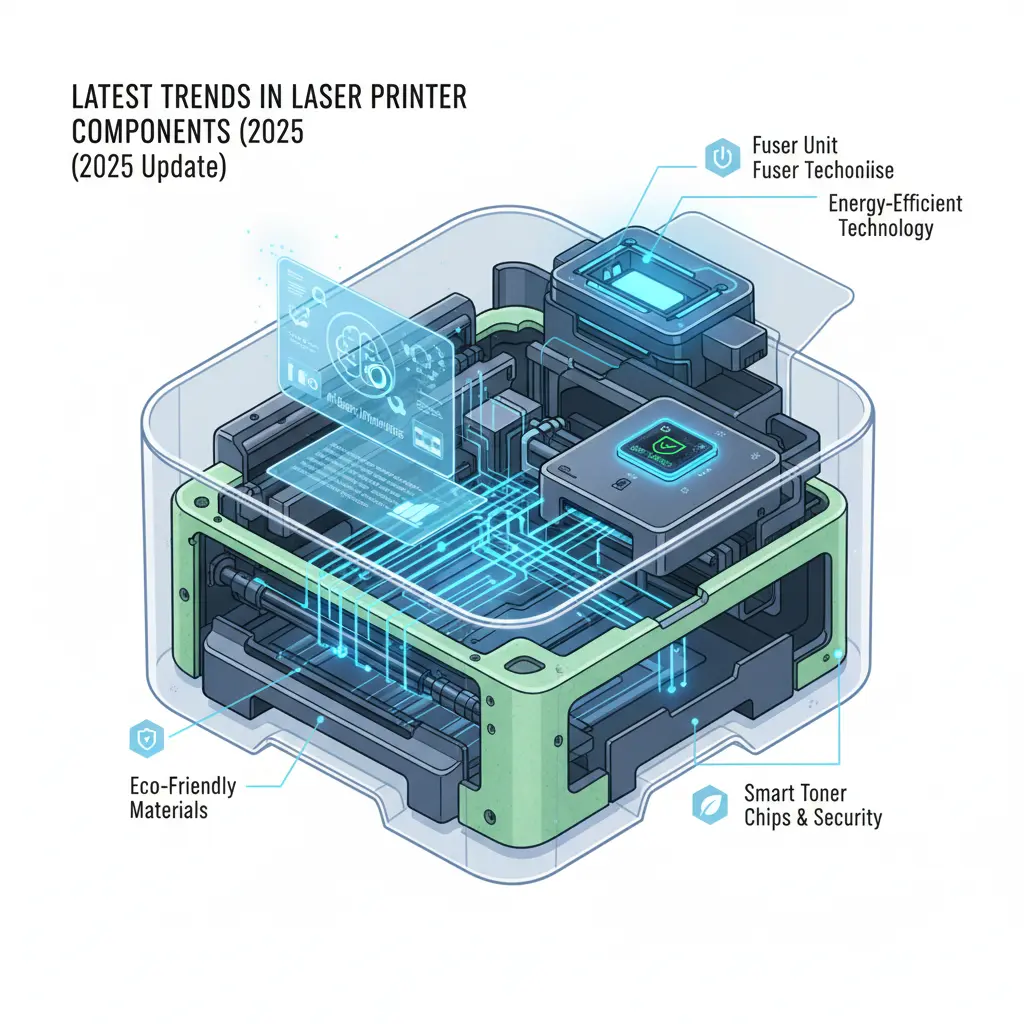
Energy-Efficient Fuser Technology
New laser printer models now use improved fuser systems that need less energy to heat up. This helps reduce power use and keeps printing stable during long work hours.
It’s a small change, but in offices where printing runs all day, it really makes a difference in performance and electricity cost.
Smart Toner Chips & Security
Modern toner cartridges now come with smart chips. These chips help track usage and prevent fake cartridges.
I like this improvement, but I’ll be honest—it sometimes annoys users when the third-party toner stops working. Still, it helps improve safety and print reliability in professional environments.
Eco-Friendly Materials
Printer companies are now using more recycled and safe materials in cartridges and internal parts. This reduces waste and supports cleaner production.
It feels good to see this change because older systems created a lot of plastic waste, which was not good for the environment.
AI-Based Printer Diagnostics
New laser printer systems can now detect problems automatically using smart diagnostics. They alert users before a small issue becomes a big failure.
This is very helpful, especially for busy offices where downtime is not acceptable. It saves time and reduces frustration during work.
In simple words, 2025 trends focus on smarter, cleaner, and more efficient printing systems. These updates are improving how laser printer components perform in real life, making printing more stable and user-friendly.
Conclusion
A laser printer works only when all its components work together in the right way. Once you understand these parts, printing problems start making sense, and you don’t feel confused every time something goes wrong.
From real experience, I’ve seen many users waste money just because they didn’t know whether the issue was in the toner, drum, or fuser. Honestly, it’s frustrating because most of these problems are simple and avoidable.
The good thing is, basic knowledge gives you control. You can easily understand when it’s a small fix or when you need help. This saves time, reduces cost, and keeps your laser printer running smoothly for a long time.
In the end, a little understanding of how the system works makes you more confident and less dependent on guesswork.
Frequently Asked Questions
What are the core components of a typical office laser printer?
A typical office laser printer has a few main parts that work together. These include the drum unit, toner cartridge, laser assembly, transfer roller or belt, fuser unit, and paper feed system. Each part has a simple job, and together they handle the full printing process. When one part stops working, the whole output can be affected.
How do the drum unit and toner cartridge work in a laser printer?
The drum unit first creates an image using a laser beam. Then the toner cartridge sends fine powder that sticks to that image. After that, the toner moves onto the paper. In simple words, the drum builds the print shape, and the toner fills it with text or images. If either part has an issue, print quality becomes weak or uneven.
How much does an original manufacturer drum cartridge usually cost?
The cost of an original drum cartridge depends on the printer model and brand. On average, it can range from moderate to high price because it lasts for thousands of pages. In most office printers, the drum is more expensive than toner but does not need frequent replacement. It is a long-term investment for stable printing performance.
How to troubleshoot common laser printer component failures?
First, check simple issues like toner level, paper jams, or dirty rollers. If prints are faded, the toner or drum may be the problem. If pages smudge, the fuser might be failing. For lines on paper, the drum or cleaning blade often causes the issue. The key is to check step by step instead of replacing the whole printer. This saves money and avoids unnecessary repairs.

Willis C. Mathes
I’m Willis C. Mathes With hands-on experience and technical knowledge of printers, I dive deep into printer reviews, troubleshooting, and tips, ensuring you get the most out of your printing investment.