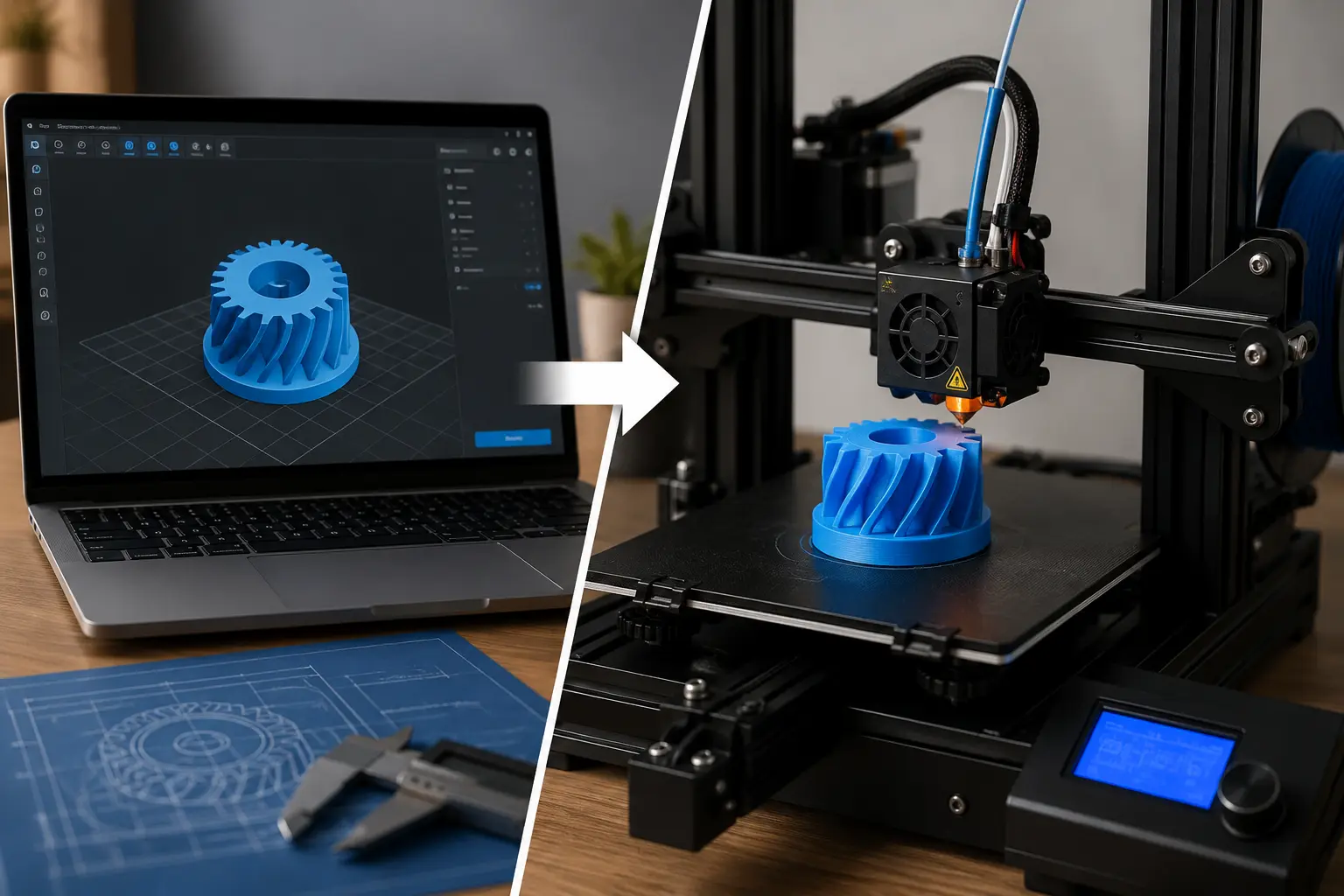
How does a 3d printer work step by step? A 3D printer is a machine that builds real objects from a digital file. It works by adding material layer by layer rather than cutting or shaping it as older machines do. This process is called additive manufacturing, and honestly, when I first saw it in action, I felt a bit amazed and confused at the same time—it looks simple, but there is a smart system behind it.
More beginners are now learning how a 3D printer works, step by step, because this technology is no longer just for big factories. Students, hobbyists, and even small business owners use a 3D printer to create useful items at home. The demand for 3D print projects is growing fast, and many people want to understand the real 3D printing process instead of just using ready-made files.
In this guide, you will learn how a 3D printer works step by step, from a simple 3D model to a finished object. I will also explain how filament melts inside the machine, how the nozzle moves, and how the full printing process turns ideas into real objects. I’ll keep everything simple, so even a beginner or student can understand how a 3D printer works without feeling lost.
What Is a 3D Printer and How Does It Work?
A 3D printer is a machine that turns a digital design into a real object. It follows instructions from a computer and builds the object step by step using material like filament. This process is called additive manufacturing, which simply means the object is created by adding material instead of cutting it.
In simple words, a 3D printer works by taking a 3D model made in computer-aided design (CAD) software. Then, slicing software breaks that model into thin layers. After that, the printer follows those instructions and prints the object layer by layer. A beginner often finds this confusing at first, but once you see it in action, it becomes much clearer.
Different types of 3D printers follow the same basic idea. The printer heats the filament, pushes it through a hot nozzle, and places it exactly where needed. This forms the object slowly through a controlled printing process. I’ll be honest, many people expect instant results, but a 3D print takes time and patience.
Think of a 3D Printer Like a Robotic Hot Glue Gun
A simple way to understand a 3D printer is to imagine a hot glue gun that moves on its own.
It melts plastic and places it in lines based on instructions. Over time, these lines build a full object layer by layer. That is exactly how a 3D printer works step by step, just more precise and controlled.
The machine follows a digital design and uses motors to move in different directions. These movements are very accurate because the printer uses programmed instructions from slicing software. If the settings are wrong, the 3D print can fail, which honestly can be a bit frustrating for beginners.
What Can a 3D Printer Make?
A 3D printer can create many useful and creative objects. I have seen beginners feel surprised after their first successful 3D print because it feels like bringing imagination into real life.
Everyday Items
A 3D printer can make simple things used at home:
- Phone stands
- Hooks
- Small boxes
- Kitchen tools
These are easy 3D print projects for any beginner.
Prototypes
Designers use a 3D printer to test ideas before making final products. They first create a 3D model using CAD or computer-aided design tools. Then they print it to check shape, size, and function. This improves the manufacturing process and reduces waste.
Decorative Objects
People also use a 3D printer for creative items like:
- Figurines
- Art pieces
- Vases
These prints often use colorful filament, and the final result looks very detailed.
Replacement Parts
One of the most practical uses is printing replacement parts. A broken handle or small plastic part can be recreated using a 3D print. Sometimes the design needs support structures to hold complex shapes while printing.
This is where I feel a bit proud of the technology—it really helps solve real-life problems instead of wasting money or materials.
A 3D printer works in a simple but smart way. Once you understand how it builds objects layer by layer, the whole printing process becomes easy to follow, even for a beginner.
Simple 3D Printing Workflow for Beginners
When we talk about 3D printing work, it follows a clear step-by-step flow. At first, it may look technical, but once you break it down, it becomes easy even for a beginner.
Most 3D printing technologies follow the same process, whether you are using desktop 3D printers, an FFF 3D machine, or even a resin 3D printer. Only the material changes, not the main idea.
Here is the simple workflow:
Idea → 3D Model → Slicing → G-Code → Printer Setup → Printing → Finished Object
Each step is important. If one step is wrong, the final 3D object may fail. That is something I’ve seen many times, and honestly, it can be frustrating when a small mistake ruins a perfect 3D design.
How Does a 3D Printer Know What to Print?
A 3D printer does not understand images or ideas on its own. It only follows instructions from the software.
Explain Coordinates
The machine moves using coordinates:
- X-axis (left/right)
- Y-axis (forward/backward)
- Z-axis (up/down)
These movements control how the 3D printing works. Every small movement shapes the final object.
Explain Slicing Instructions
Before printing, slicing software converts the 3D design into layers. This is one of the most important steps in modern 3D printing technologies.
It:
- Breaks the model into thin layers
- Creates tool paths for the nozzle
- Sets speed and temperature
This step produces G-code, which the printer follows.
Explain Layer-by-Layer Movement
Now the real 3D printing work begins.
The printer builds the object layer by layer:
- Material is pushed through the nozzle
- Each layer is placed carefully
- It cools or hardens
- The next layer is added on top
In FFF 3D printers, melted filament is used. In a resin 3D printer, UV light hardens liquid resin. Some industrial systems even use metal 3D printing, but the idea stays the same.
I personally find this process impressive because a simple instruction turns into a real 3D object step by step. Still, I feel a bit annoyed when beginners skip settings and expect perfect results—it doesn’t work like that.
Step-by-Step Process of How a 3D Printer Works
The 3D printing process looks complex at first, but once you break it into steps, it becomes very easy to understand. In real 3D printing use, every object follows the same flow from idea to final result. A 3D printer simply follows instructions and builds an object slowly and carefully. Different 3D printers come in many styles, like FDM 3D printers, FFF 3D printers, and SLA printers, but the working idea stays similar.
I’ve seen many beginners rush this part and then feel confused when the print job fails. Honestly, it’s usually because they skipped one small step in the process.
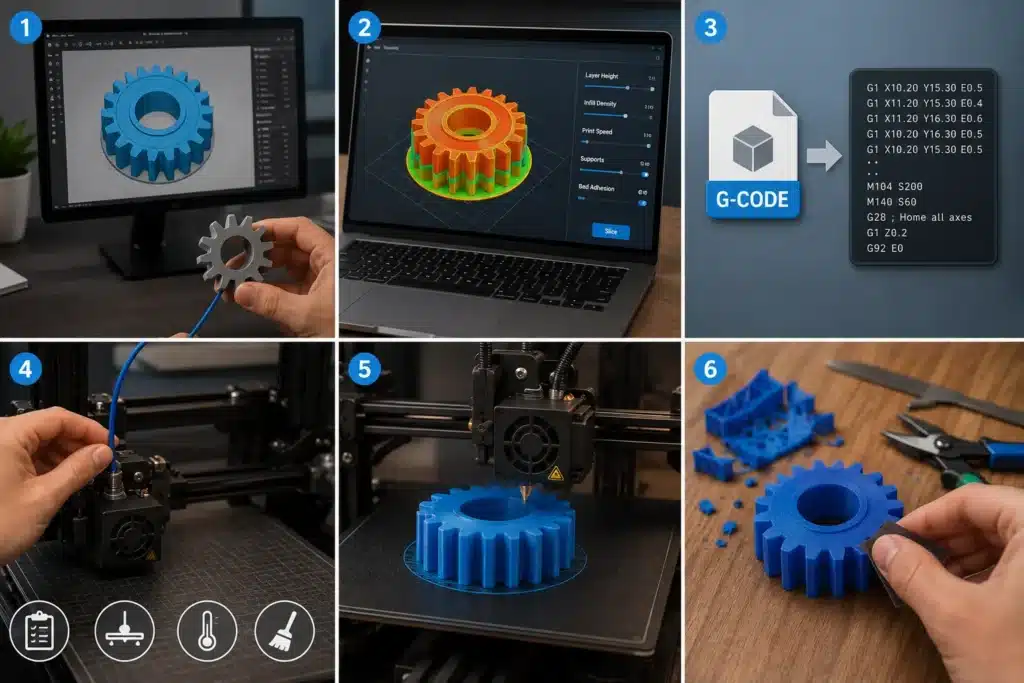
Step 1 – Create or Download a 3D Model
Everything starts with a 3D model, which is a digital 3D file made using 3D modeling software. This is where your idea becomes a real design.
Most people either:
- Design their own model
- Or download ready files from websites like Thingiverse or Printables
These files are usually in STL format, which is a standard file used in 3D printing.
Common beginner mistakes:
- Choosing complex designs too early
- Ignoring size scaling
- Downloading broken or unsupported files
I’ve seen beginners get excited and jump straight into hard models, and then they get frustrated when the print fails. I totally understand that feeling.
Step 2 – Slice the 3D Model Into Layers
This step is called slicing the 3D model. It is very important because the printer cannot understand a full model directly.
We use slicing software to break the model into thin layers and generate instructions.
Important slicer settings:
Layer Height
Layer height controls how smooth or detailed the final print will look. Smaller layers give better quality but take more time.
Infill Density
Infill density decides how solid or hollow the object will be inside. Higher infill makes the print stronger but uses more material.
Print Speed
Print speed controls how fast the 3D printer moves while printing. A slower speed usually gives better accuracy and cleaner results.
Supports
Supports are temporary structures that hold overhanging parts during printing. They are removed after the print is finished.
Bed Adhesion
Bed adhesion helps the first layer stick properly to the printing surface. Good adhesion prevents warping and print failure.
Step 3 – Convert the File Into G-Code
Now the sliced file becomes G-code. This is the language the printer understands.
G-code tells the printer:
- Where to move
- How fast to move
- When to heat
- How much material to push
A 3D printer reads these instructions like a step-by-step map. Without G-code, the machine would not know what to do.
Step 4 – Prepare the 3D Printer
Before starting any print job, the machine must be ready. This step is very important in 3D printing.
You need to:
- Load filament into the extruder
- Level the print bed properly
- Set the correct temperature
- Clean the nozzle and print surface
A properly prepared machine gives better results. I get a bit frustrated when people ignore bed leveling—it is the most common reason for failed prints.
Step 5 – The Printer Starts Printing Layer by Layer
Now the real 3D printing process begins.
- The extruder melts filament
- The nozzle pushes material out
- Motors move the print head carefully
- The object is built layer by layer
Each layer sticks to the previous one. This is how the printing method works in all types of machines, like FFF 3D printers or FDM 3D printer systems.
Cooling fans also help the material harden quickly, so the shape stays strong. Watching this stage always feels satisfying—it slowly turns a flat idea into a real object.
Step 6 – Cooling and Post-Processing
After printing finishes, the object is not fully ready yet.
- The print needs a cooling time
- Supports are removed carefully
- The surface is sanded for smoothness
Sometimes small marks remain, and finishing makes the object look clean and professional.
In real 3D printing, this step matters a lot. A poorly finished print can ruin even a perfect model. That’s why I always tell beginners: don’t rush the last step, it matters as much as printing itself.
What Happens Inside a 3D Printer While Printing?
When you start printing, many small actions happen inside a 3D printer at the same time. Most beginners only see the outside movement, but inside, a very controlled system is working. In real FDM printing, every step must be correct, or the final result will fail. This is true for most FDM printers, no matter what type of 3D printing technology you use.
Honestly, I feel a bit frustrated when people think printing is random. It is not. Everything is planned from a 3D model before the printer starts.
The Full Internal Printing Process Explained
When the machine is ready to print, the system follows a strict order. This process is used in most 3D printing materials, whether it is plastic, resin, or even metal 3D printing in industries.
A simple breakdown:
| Inside Step | What Happens |
| Feeding | Material enters the system |
| Heating | Material becomes soft |
| Movement | Printer follows instructions |
| Layering | The object is built slowly |
| Cooling | Shape becomes solid |
This is how a 3D printer starts building a real object from nothing.
Filament Feeds Into the Extruder
In most FDM printers, the process begins when the filament enters the extruder. This material is pushed slowly into the machine.
The system ensures the material flows smoothly and steadily. If the feeding is uneven, the print can fail. I’ve seen this happen many times, and trust me, it wastes both time and material.
The Nozzle Heats the Material
Next, the nozzle heats the filament until it melts. This step is important because melted material is needed to form shapes.
In simple terms, solid plastic turns into a soft liquid so it can be shaped. This is a key part of FDM printing, and it must stay at the correct temperature.
Stepper Motors Follow G-Code Instructions
Now the real movement begins. The motors follow G-code instructions created from the 3D model.
They control:
- Left and right movement
- Forward and backward movement
- Up and down movement
The printer follows every command carefully. This is why 3D printing is used in industries where precision matters.
Layers Are Deposited Precisely
After the movement starts, the melted material is placed layer by layer on the print bed. Each layer sticks to the previous one.
This is the heart of the process. Whether it is plastic, resin printing, or even advanced metal 3D printing, everything depends on accurate layering.
A small mistake here can ruin the whole object, which, honestly, can be very annoying for beginners.
Cooling Fans Harden the Material
Finally, cooling fans help the material harden quickly. This keeps the shape strong and stable.
Without cooling, the object would lose its shape. Once this step is complete, the object becomes fully solid and is ready to use as a final product.
How the Printer Builds an Object One Layer at a Time
A 3D printer builds an object slowly by placing material one layer at a time. Each thin layer sticks to the previous one until the full shape is completed.
This layer-by-layer method is the core idea of additive manufacturing, and it is what makes 3D printing so unique compared to traditional manufacturing.
Real Example: How a Beginner Prints a Phone Stand Step by Step
A phone stand is one of the easiest beginner projects in 3D printing or additive manufacturing. It shows the full process of 3D printing simply, from a digital 3D model to a real object. In real life, 3D printing enables people to turn ideas into useful items without complex tools, and this is one of the most popular applications of 3D printing.
Downloading the STL File
First, you download an STL file of a phone stand. This file works as a 3D blueprint that defines the shape of the object. Many websites offer free models, so beginners can easily create 3D prints without designing from scratch. This step shows how 3D printing requires only a basic file to begin.
Opening the File in Cura
Next, you open the STL file in slicing software like Cura. This software converts your digital 3D model into print instructions. Here, 3D printing or additive manufacturing becomes more technical because settings like size and orientation are adjusted before printing.
Slicing and Exporting G-Code
Now the model is sliced into layers, and G-code is created. The printer follows the G-code to understand movement, temperature, and speed. This file is very important because it controls the entire print job and ensures proper execution of the process of 3D printing.
Starting the Print
After loading the file into the printer, you start printing. The machine begins melting material and building the object. Some 3D prints can take minutes, while others take hours, depending on size and settings. At this stage, printers use UV light in resin machines, while FDM machines use heated nozzles.
Watching the First Layers Carefully
The first layers decide the success of the print. The printer slowly lays down material to make sure it sticks properly. This step reflects the basic principles of 3D printing, where accuracy at the start ensures a strong final result.
Removing the Finished Print
Finally, the print is removed from the bed. You clean small supports and check the surface. This is the moment when 3D printing enables an idea to become a real object you can hold and use. It’s simple, but honestly, it feels satisfying every time.
Common Problems During 3D Printing and Why They Happen
Even when a 3d printer looks simple, problems can still happen during printing. This is normal, especially for beginners. In real use, 3d printers use precise movement, heat, and material flow, so even a small mistake in setup or environment can affect the result.
Honestly, I’ve seen many users blame the machine, but most issues come from wrong printer setup or settings. And yes, that can be a bit frustrating when you just want a clean print.
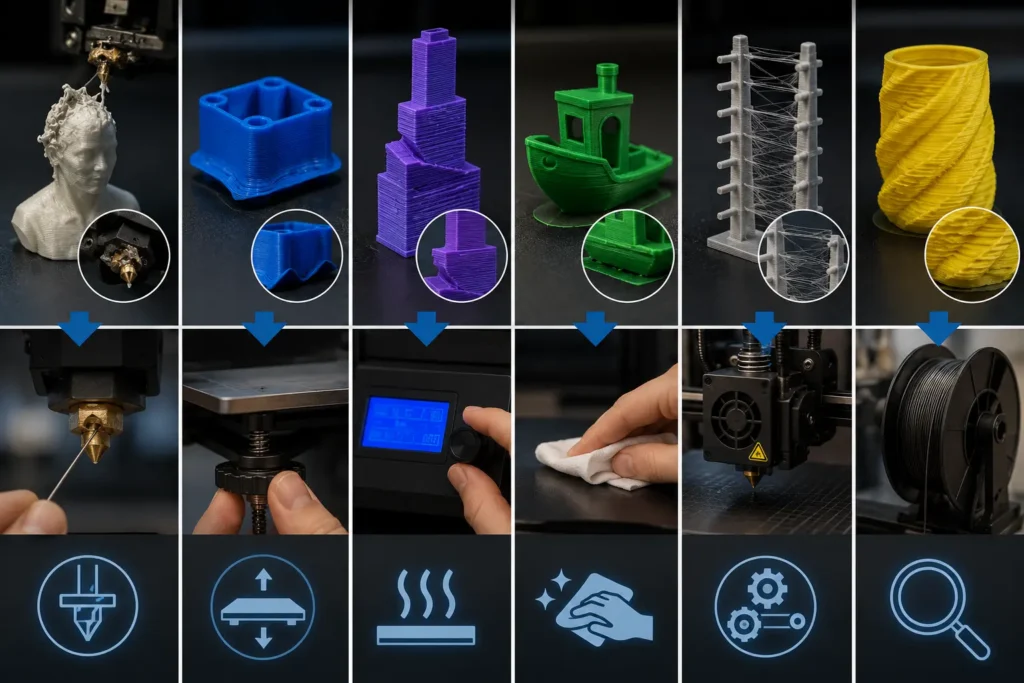
Nozzle Clogging
Nozzle clogging happens when melted material blocks the opening. This stops the smooth flow and ruins the print.
It usually happens because of:
- Low-quality filament
- Dust inside the material
- Wrong temperature
This issue is common in entry-level 3d machines, especially when maintenance is ignored.
Warping
Warping means the corners of a print lift from the bed while cooling.
It happens when:
- The bed temperature is wrong
- Cooling is too fast
- Surface grip is weak
This is a common issue in low-cost 3d setups, and I personally find it annoying because it ruins the shape even after hours of waiting.
Layer Shifting
Layer shifting happens when layers move out of place.
This breaks alignment because:
- Belts are loose
- The printer moves too fast
- Object hits the nozzle during printing
Even in advanced systems where 3d printers use strong motors, bad calibration can still cause this issue.
Poor Bed Adhesion
This means the first layer does not stick properly.
Main reasons:
- Dirty print bed
- Wrong leveling
- Incorrect temperature
A weak first layer can fail the whole print, which is why choosing a 3d printer with stable build quality really matters.
Stringing
Stringing creates thin plastic threads between parts of the print.
It happens when:
- The temperature is too high
- Retraction settings are wrong
I always tell beginners this is normal at first, but it can be reduced with small adjustments.
Uneven Layers
Uneven layers make the surface look rough or bumpy.
This happens due to:
- Incorrect speed settings
- Mechanical vibration
- Poor filament flow
Different machines, like resin printers, use light curing, while DLP printers use projectors, but layer quality still depends on setup.
Quick Fixes Beginners Should Try First
When problems happen, don’t panic. In real experience, most issues are easy to fix.
| Fix | What It Does |
| Re-leveling the bed | Improves first-layer grip |
| Adjusting temperature | Fixes flow and adhesion issues |
| Cleaning the nozzle | Removes blockages and improves extrusion |
These small steps solve most issues in printer setup and improve results quickly.
A 3d printer works best when everything is balanced—temperature, speed, and material. Even though 3d printing offers amazing results and can even process hundreds or thousands of parts in industries, small home machines still need careful handling.
Sometimes I feel a bit frustrated when beginners expect perfect results without setup. But once you understand these problems, 3d printing might feel much easier and more controlled than it first looks.
Beginner Mistakes to Avoid During 3D Printing
When you use 3D printing, beginners often make simple mistakes that ruin the final result. Most of these problems do not come from the machine but from ignoring basic settings before starting. I’ve seen many cases where people get excited, send the file to the printer, and expect perfect output without checking the setup. Honestly, that’s where things usually go wrong, and it can feel frustrating after waiting for hours.
Good 3D printing work depends on patience and correct preparation. If you rush or skip steps, even a good design will fail. Let’s understand the most common mistakes only.
Common Beginner Mistakes in 3D Printing
| Mistake | What Happens | Simple Fix |
| Printing Too Fast | Weak layers and poor-quality print | Reduce speed for stable results |
| Wrong Temperature | Filament does not melt or stick properly | Match the temperature with the material |
| Ignoring Bed Leveling | First layer fails or warps | Level the bed before every print |
| Choosing Hard Models Early | Print fails due to complexity | Start with simple designs |
| Poor Filament Storage | Moisture ruins print quality | Store filament in a dry place |
When you use 3D printing, beginners often rush and skip basic settings, which leads to failed prints. Printing too fast, using the wrong temperature, or ignoring bed leveling can quickly ruin the result. Many people also choose complex models too early or store filament carelessly, which affects print quality.
I honestly feel a bit frustrated here because these small steps decide everything in 3D printing work. Once you fix them, the whole process becomes much smoother and easier, even for a beginner.
How Long Does the 3D Printing Process Take?
The time needed for 3D printing work depends on the size of the object and the settings you choose. Some prints finish in under an hour, while others can take many hours or even a full day. In real practice, a 3D printer works slowly but carefully because it builds objects layer by layer. I’ve seen beginners get surprised here—they expect fast results, but good quality always takes time.
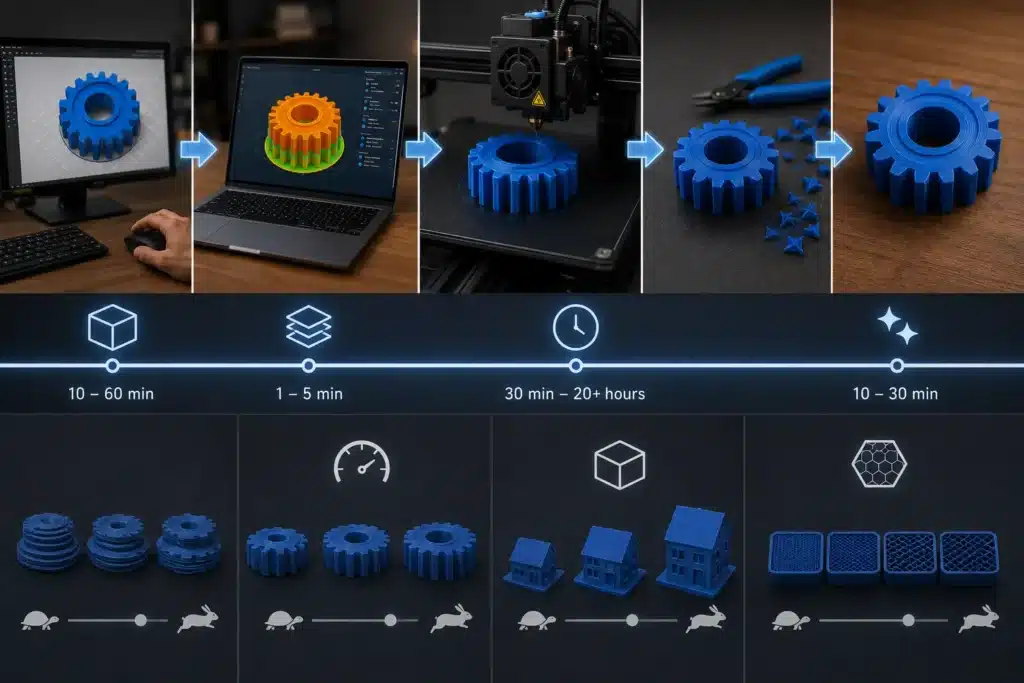
Let’s break it down simply so you can understand where the time goes.
Time Needed for Each Step
| Step | Time Needed | Simple Explanation |
| Modeling | 10–60 minutes | Creating or downloading a design |
| Slicing | 1–5 minutes | Preparing file for printer |
| Printing | 30 minutes–20+ hours | Main printing process |
| Cooling & Cleanup | 10–30 minutes | Finishing the object |
Modeling
This is where you create or choose a 3D model. It can be quick if you download a ready file, or longer if you design it yourself. Honestly, beginners sometimes spend too much time here choosing the “perfect” design instead of starting simple.
Slicing
Slicing is fast. The software prepares the model and converts it into printer instructions. This step usually takes just a few minutes, but it is very important for smooth printing.
Printing
This is the longest step. The printer slowly builds the object layer by layer. Small items may take 30–60 minutes, but larger or detailed prints can take many hours. This is where patience really matters.
Cooling and Cleanup
After printing, the object needs time to cool. Then you remove the supports and clean the surface. This step is short but important for the final quality.
What Affects Printing Time?
Several factors change how long the 3D printing process takes. I’ve noticed many beginners ignore these, then wonder why their print is slow.
| Factor | Effect on Time |
| Layer height | Smaller layers take longer but look smoother |
| Print speed | Faster speed reduces time but may lower the quality |
| Model size | Bigger models take much longer |
| Infill settings | More infill increases strength but adds time |
In real 3D printing, there is always a balance between speed and quality. If you rush, results may suffer. If you slow down, you get better prints. I personally prefer quality because a failed print wastes more time than a slow but successful one.
Conclusion
Understanding how a 3D printer works step by step makes the whole process much easier and less confusing. At first, it may feel technical, but once you see the flow—from the 3D model, slicing, and G-code to layer-by-layer printing—it starts to make sense. A 3D printer is not magic; it simply follows instructions and builds objects slowly and carefully.
I’ve noticed many beginners rush and expect perfect results on the first try, and honestly, that’s where frustration starts. But when you take time to learn each step, the results become much better and more satisfying. Small things like bed leveling, correct temperature, and proper slicing settings make a huge difference.
In real 3D printing work, patience is everything. Whether you are using a basic home printer or an advanced machine, success depends on understanding the process, not just pressing “print.” Once you get this right, you can confidently turn your ideas into real objects without stress.
Frequently Asked Questions
What materials are commonly used in home 3D printing, and how are they processed by the machine?
The most common material in home 3D printing is plastic filament, like PLA or ABS. The machine heats the filament, melts it through a nozzle, and places it layer by layer to form the object.
What are the essential components of a typical desktop 3D printer and their functions?
A desktop 3D printer includes a nozzle (which melts material), an extruder (which feeds filament), a heated bed (which helps the print stick), and stepper motors (which move the printer). These parts work together to build objects step by step.
Describe the role of slicing software in preparing a 3D model for printing.
Slicing software converts a 3D model into thin layers and creates G-code instructions for the printer. It tells the machine how to move, print, and control temperature during the process.
Which companies offer detailed guides on how their 3D printers operate?
Companies like Ultimaker, Prusa Research, and Creality provide detailed guides and tutorials. These help users understand setup, printing steps, and troubleshooting.

Willis C. Mathes
I’m Willis C. Mathes With hands-on experience and technical knowledge of printers, I dive deep into printer reviews, troubleshooting, and tips, ensuring you get the most out of your printing investment.